
Cross Site Scripting XSS Vulnerabilities Explained
Learn how cross site scripting XSS vulnerabilities work, how to detect them, real-world examples, and proven prevention strategies
You're reviewing an agent-generated dashboard before release. It summarizes support tickets, turns tool results into Markdown, and lets an operator open linked records. The output looks right, but someone added a raw HTML rendering option to preserve formatting. Now a customer-controlled ticket field can reach a browser capability nobody intended to expose.
That's the review moment that matters for cross site scripting XSS vulnerabilities. The useful question isn't whether the input looks suspicious. It's whether the application keeps that input as data at every place the browser interprets it.
What Cross Site Scripting Actually Does in a Browser
Suppose an agent retrieves a support ticket and builds a summary panel. A developer inserts the returned summary as HTML rather than displaying it as text. An attacker who controls part of the ticket can then influence more than the words on the screen.
When a logged-in operator opens the panel, their browser receives both legitimate application content and attacker-controlled content. If the application hasn't kept those categories separate, the browser can execute the attacker's instructions within the operator's session.
The trust boundary looks like this:
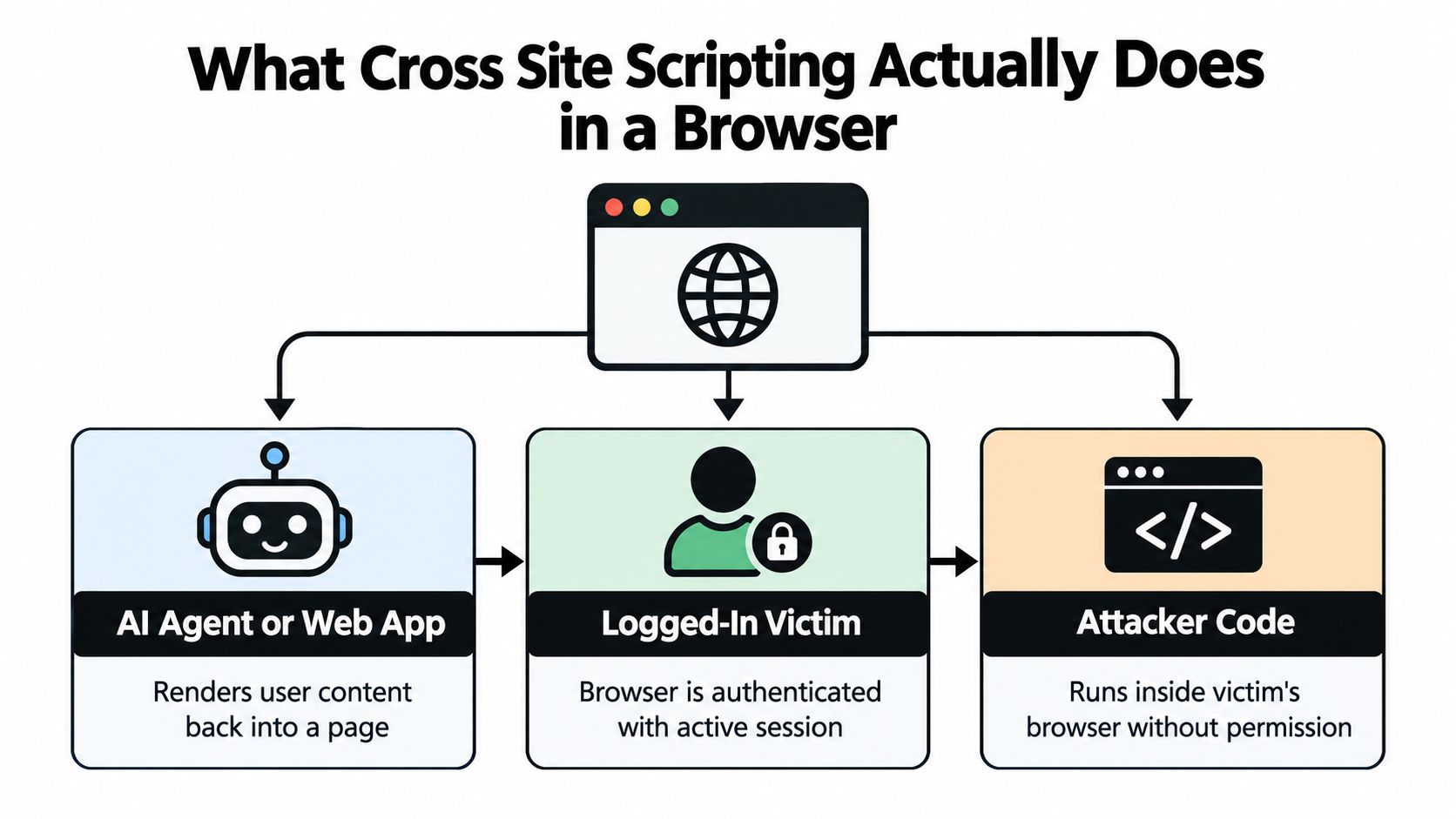
The browser doesn't know who wrote the content
Cross-site scripting, usually shortened to XSS, happens when untrusted content receives executable meaning. The application intended to display information, but it delivered something the browser could interpret as markup or script.
CISA identifies inadequate validation, sanitization, or escaping as the underlying design failure and recommends modern frameworks with safe output-encoding functions in its secure-by-design guidance for eliminating XSS. This isn't an exotic browser trick. It's a failure to preserve the distinction between content and instructions.
Practical rule: A tool response can be valid application data without being safe browser content.
Why internal interfaces still need protection
An internal dashboard doesn't make externally sourced text trustworthy. Customer messages, imported documents, repository descriptions, and tool-returned records can all contain content an operator didn't author.
The potential impact depends on what the victim's session can access. An injected script might manipulate visible content, expose page-accessible information, or initiate unauthorized actions. An administrative interface deserves particular scrutiny because its users may have capabilities unavailable to ordinary customers.
For agent interfaces, review both ends of the workflow: who can influence the content, and what the renderer lets that content become. A model-generated summary doesn't remove the need for that boundary.
How Untrusted Input Becomes Executable Script
Follow a value through the application rather than searching only for suspicious strings. A request parameter might enter a server template directly. Alternatively, a tool result might pass through an agent, a Markdown renderer, and a client-side component before reaching the browser.
These are alternative entry paths, not mandatory sequential stages. The decisive transition occurs when the application submits the value to an interpreter that treats it as instructions.
The diagram highlights that transition:
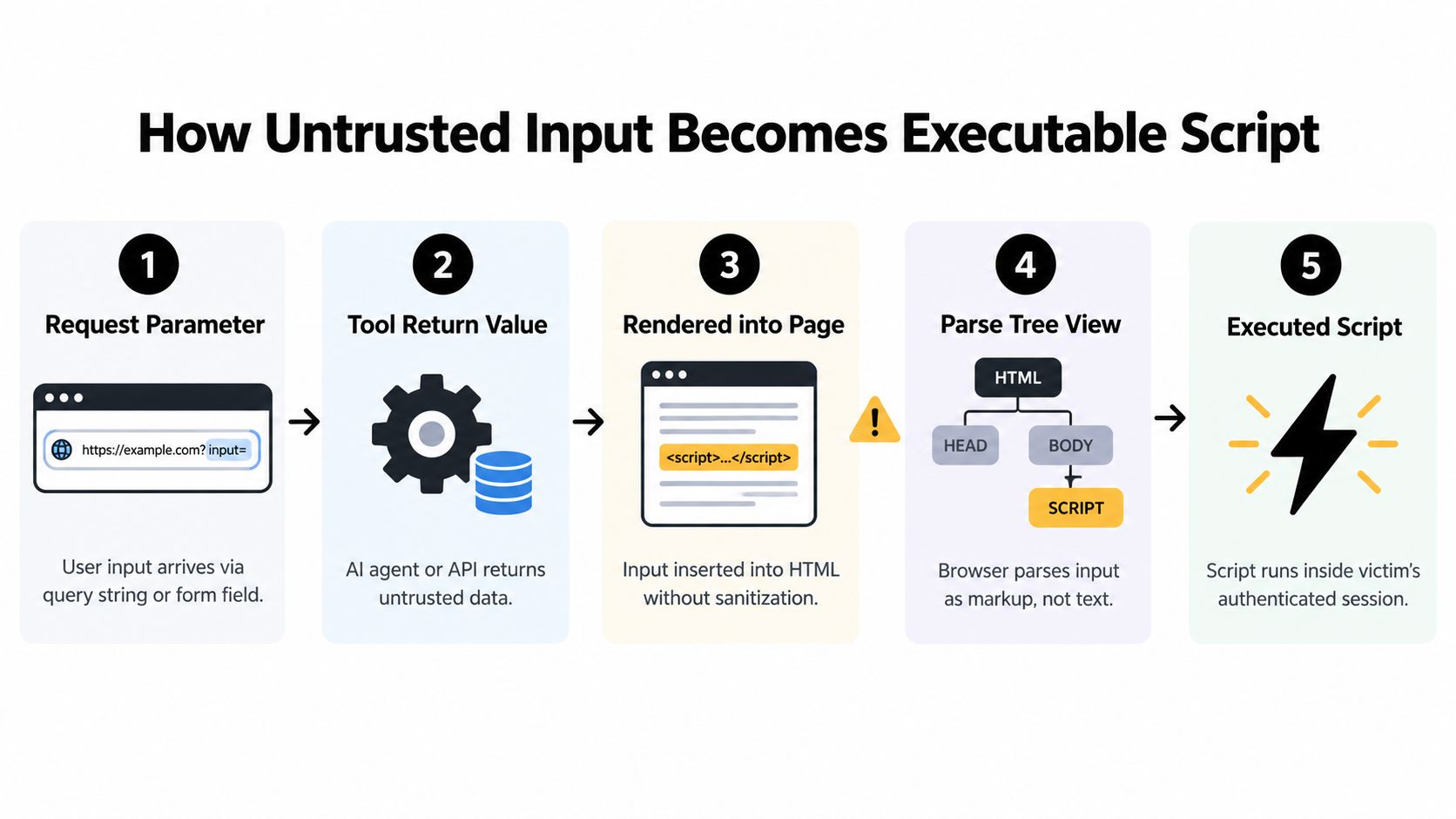
Read the browser's parse tree
Consider the illustrative string <strong>Review required</strong>. Assigned through textContent, it appears as literal text. Inserted through innerHTML, it becomes an element containing text.
That example changes formatting rather than executing JavaScript, but it exposes the underlying mistake: the destination determines the meaning. Other markup can introduce executable behavior when interpreted in an unsafe context.
Server templates and client-side rendering create different opportunities for that interpretation. A server can construct unsafe HTML before sending a response, while JavaScript can take previously inert data and create unsafe DOM content after the page loads. Checking the original response alone therefore doesn't establish that the final interface is safe.
A browser-level demonstration helps connect the incoming value to its eventual interpretation:
Name the final sink precisely
A sink is the destination where the application uses a value. Reviewers should record more than “rendered on the page”:
- HTML text: Content between elements, intended to appear as words.
- Attribute values: Data inside attributes such as
titleorvalue, including their surrounding quotes. - JavaScript: Values embedded in script strings or other executable syntax.
- URLs and CSS: Destinations and styling values interpreted under their own rules.
- DOM insertion: APIs that can parse strings as markup, including
innerHTMLanddocument.write.
Validation that accepts a field as ordinary text doesn't authorize placing it in an event handler. Likewise, a tool's structured response contract doesn't establish that one of its strings is safe for an href. Record every transformation and final context, especially where an encoder is followed by decoding or reparsing.
Reflected Stored and DOM-Based XSS Compared
Security reports use reflected, stored, and DOM-based to describe important differences in an XSS data flow. They don't describe interchangeable severity levels. A reflected issue in a privileged workflow can matter more than a stored issue in a tightly constrained interface.
Start with where the attacker supplies the value, whether the application retains it, and where unsafe interpretation occurs.
Comparing the three main XSS classes
| Class | Data flow | Persistence | Victim trigger | Primary control |
|---|---|---|---|---|
| Reflected | Request value enters an unsafe response sink | Usually not retained by the vulnerable feature | Victim follows a crafted request or submits attacker-influenced data | Context-specific encoding at response construction |
| Stored | Submitted content is saved, retrieved, and rendered unsafely | Retained in application data | Victim views affected content | Safe rendering at every consumer, with sanitization where rich text is required |
| DOM-based | Client-side code reads a source and passes it to an unsafe DOM sink | Depends on the source | Page code processes attacker-influenced data | Safe DOM APIs and controls appropriate to the final sink |
Reflected XSS commonly appears around search terms, status messages, or request-driven previews. The attacker needs the victim to load a request containing the malicious value. During triage, reproduce the complete request and identify the response context, not merely whether the value appears somewhere in the HTML.
Stored XSS changes the delivery problem. A malicious value saved in a comment, profile field, or ticket can reach later viewers through ordinary navigation. The developer who fixes the customer-facing page must also check administrative views, notifications, and other consumers of that stored field.
DOM-based describes the execution path
In DOM-based XSS, client-side code creates the unsafe interpretation. Relevant sources can include location data, document-derived values, or messages received through postMessage. A reviewer needs to inspect the receiving code and trace the value into its destination.
These classifications can overlap. Stored data fetched by client-side JavaScript can become a DOM-based issue when the component inserts it unsafely. Don't force a report into a single category if that hides the relevant source-to-sink path.
Classify the delivery mechanism to understand exposure. Inspect the sink to choose the fix.
For agent applications, a useful comparison is a one-off preview versus a retained conversation. A preview may expose only the operator who opens it, while saved output can reach later reviewers. That distinction should change your investigation scope, not your rendering contract.
Famous XSS Incidents and What They Actually Teach
The 2005 Samy worm on MySpace demonstrated what happens when stored content becomes both an execution surface and a distribution mechanism. Attacker-controlled profile content was retained by the platform, then rendered when other users viewed affected profiles.
Contemporary accounts report that it affected more than one million users within approximately 20 hours, as described in Detectify's account of the Samy worm and later XSS incidents. The incident was not merely a malicious string displayed once. Browsers executed the stored payload, enabling propagation through user-to-user interactions.
The illustration compares the platforms associated with these landmark worms:
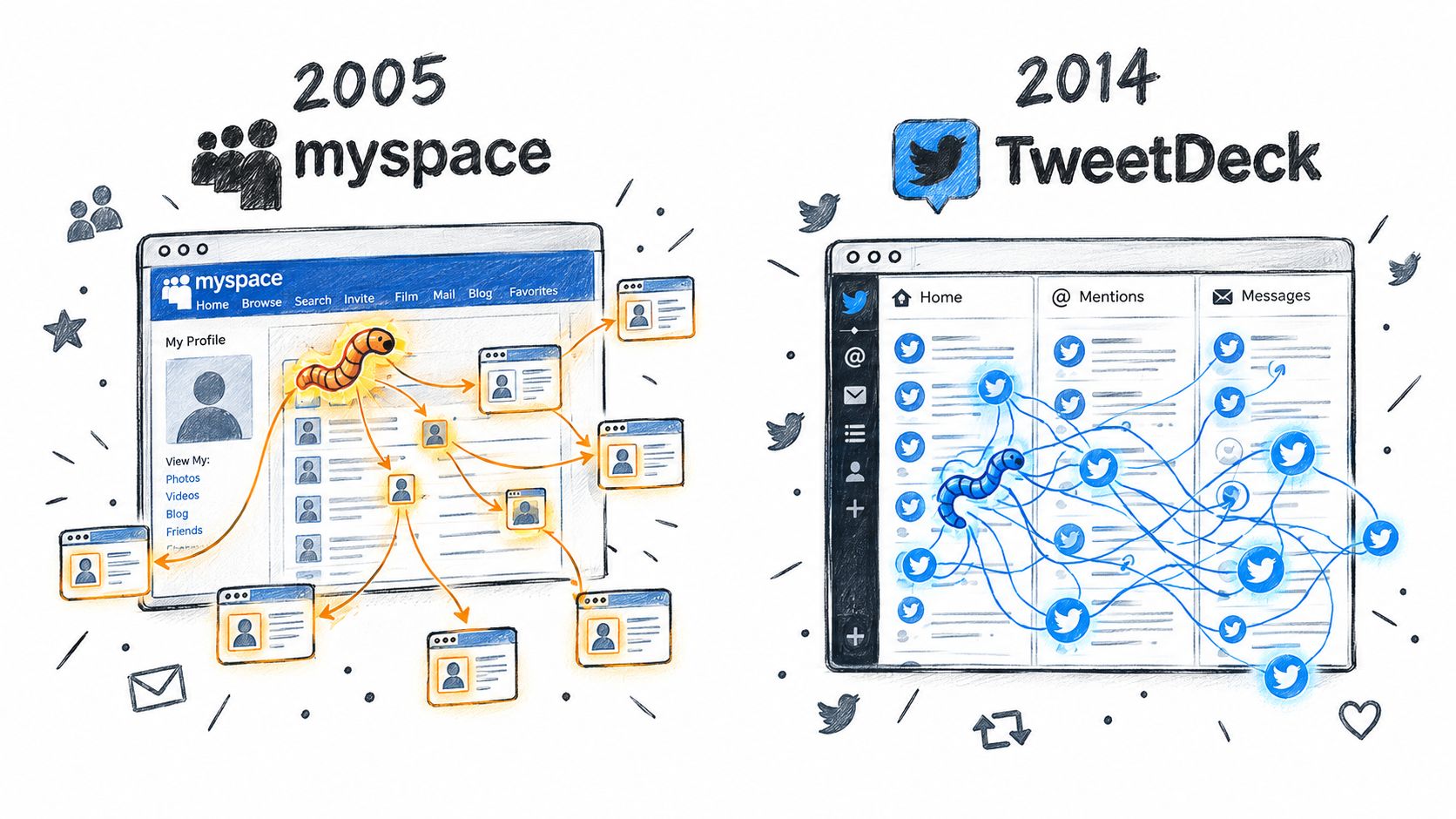
Persistence multiplied the exposure
The MySpace boundary was between profile content and browser instructions. A feature intended to let people publish content allowed attacker-controlled data to affect how the browser executed the page.
The defensive lesson isn't to ban all personalization. It's to define exactly what personalization permits. Plain text needs text-safe rendering; legitimate rich HTML needs a maintained sanitizer with a restrictive policy. Neither requirement justifies unrestricted executable content.
The 2014 TweetDeck worm reinforced the broader warning that browser-side injection can produce rapid, visible effects across a large user population. Its enduring relevance is the relationship between a rendered social surface and the application's ability to distribute content. Don't assume that a familiar content format makes every rendering path safe.
Assess the amplification paths
A security lead should ask more than whether a proof of concept displays a dialog:
- Persistence: Will the application keep serving the attacker-controlled content?
- Privilege: Which authenticated roles will encounter it?
- Reach: Does normal navigation bring other users to the affected surface?
- Amplification: Can application actions copy, publish, or redistribute the content?
For a tool-connected interface, apply those questions to saved agent responses, shared reports, and review queues. A rendering defect in a private draft and the same defect in a published artifact can have different operational consequences.
Treat the historical incidents as architectural warnings. Preventing executable interpretation is the immediate fix; examining distribution and privilege tells you how broadly to investigate.
Payloads That Break Common Output Contexts
Use small, non-destructive test patterns in an authorized development environment. Their purpose is to expose context transitions, not to build a catalog of attack strings. A visible test dialog can demonstrate execution, but it doesn't measure the full impact.
The common mismatch patterns are summarized below:
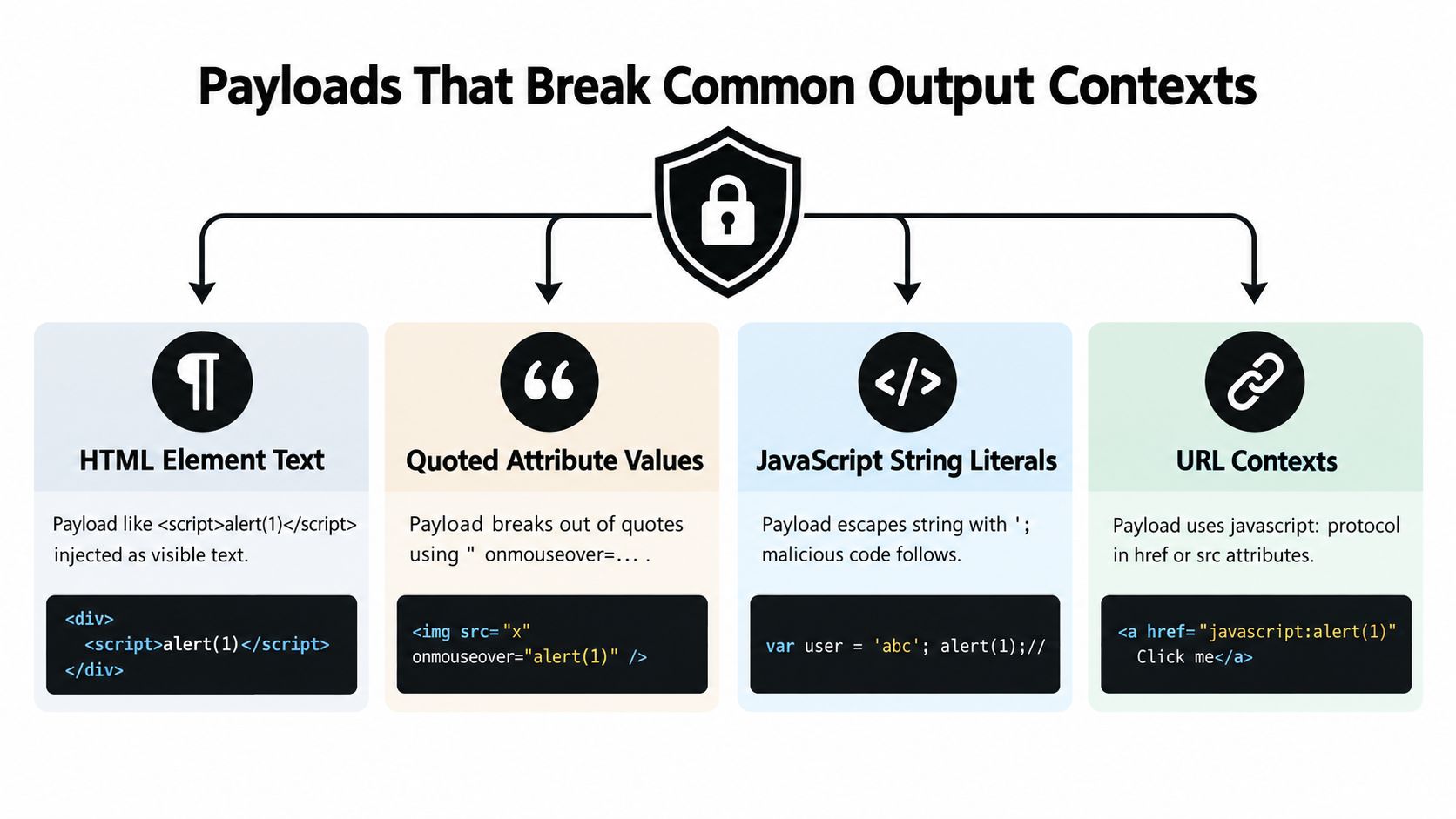
Text and attributes are different contracts
For server-rendered HTML element text, an illustrative test value is <script>alert('test')</script>. Unsafe template concatenation can turn it into markup. Proper text rendering instead displays the characters without creating a script element.
A quoted attribute needs a different test. In a double-quoted value, " onmouseover="alert('test') attempts to close the original value and introduce an event handler. As ordinary element text, that same sequence is just punctuation and words.
The review target is the delimiter and surrounding syntax. Don't conclude that a value is safe because an encoder handled angle brackets if the actual destination requires protection against quote termination.
Script and URL contexts add another parser
Inside a JavaScript string, a pattern such as ';alert('test');// attempts to end the string and introduce another statement. HTML encoding isn't a substitute for JavaScript-string encoding. Prefer designs that pass data separately rather than constructing executable script from strings.
A URL requires two separate decisions. A parameter value needs encoding as a URL component, while a complete navigation target needs validation of its allowed scheme and destination. The illustrative value javascript:alert('test') demonstrates why attribute quoting alone doesn't establish that a link is safe to follow.
| Review surface | What the test probes |
|---|---|
| HTML text | Can data create elements? |
| Quoted attribute | Can data terminate the attribute and introduce syntax? |
| JavaScript string | Can data escape the string literal? |
| URL | Can data select an executable or disallowed scheme? |
| DOM insertion | Does the API parse the value rather than display it? |
DOM APIs can undo earlier safety
For an innerHTML sink, <img src=x onerror=alert('test')> illustrates executable event behavior without relying on insertion of a script element. By contrast, assigning that value through textContent preserves it as text.
Don't use “script tags didn't run” as your acceptance test. Review the complete markup capability, including event attributes and URL-bearing elements. For CSS, prefer constrained values and avoid letting untrusted content construct arbitrary styling syntax.
How Developers and Security Teams Detect XSS
Begin with a source-to-sink review, not a scanner dashboard. Identify the component that displays a value, then work backward through templates, decoders, Markdown processing, and tool transformations. This makes findings actionable: the team can name the specific rendering contract that failed.
Treat the detection mix below as a review strategy, not a promise that any single method proves safety.
Choose complementary evidence
| Method | Useful evidence | Review limitation |
|---|---|---|
| SAST | Unsafe DOM APIs, suspicious concatenation, missing encoder paths | Custom wrappers and dynamic flows require inspection |
| DAST | Reflections and executable behavior in reachable pages | Unvisited states and authenticated workflows need coverage |
| Browser-driven testing | Client-side parsing, navigation, and rendered-state behavior | Tests must exercise the affected component |
| Manual review | Intended context, rich-text requirements, trust boundaries | Review scope determines what gets examined |
| CSP telemetry | Browser reports of blocked policy violations | A report isn't automatically proof of XSS |
For single-page applications, test after rendering and interaction. A clean initial HTML response won't expose a vulnerable component that later consumes a tool result. Include retained content, privileged views, and Markdown settings that permit raw HTML.
Bug bounty reports can provide a reality check on your assumptions. Require a reproducible data flow and investigate related consumers of the same field rather than fixing only the reported screen.
Review configurations before runtime
Agent and tool configuration review belongs upstream of browser testing. Examine permissions, output formats, approval settings, and the capabilities that let generated content reach sensitive workflows. Static AI agent security analysis offers a configuration-focused review lens alongside application code analysis.
Configuration scanning doesn't verify browser escaping or prove a DOM sink safe. It addresses a separate question: which capabilities are being deployed, and are they justified?
Review boundary: A safe configuration doesn't certify a safe renderer, and a safe renderer doesn't justify excessive tool permissions.
A Sink-by-Sink Prevention Framework
Input validation alone isn't a sufficient XSS strategy. Validate structure and business meaning at entry, but choose the browser defense at the final destination. A field accepted as a customer name still needs the correct treatment wherever the application displays it.
OWASP requires context-specific output encoding for every UI variable, including HTML entity encoding for element text, attribute encoding for values such as title or value, JavaScript-string encoding inside scripts, and URL encoding for parameter values in its XSS prevention cheat sheet.
Match the control to the destination
| Destination | Deployment requirement |
|---|---|
| Plain HTML text | Framework-native text escaping or a text-only DOM API |
| Quoted inert attribute | Attribute encoding, fixed attribute name, quoted value |
| JavaScript string | Context-aware string encoding, preferably avoiding dynamic script construction |
| URL parameter | URL-component encoding |
Complete href or src | Scheme and destination validation plus appropriate attribute handling |
| Legitimate rich HTML | Maintained allowlist-based HTML sanitizer |
| CSS | Constrained property values and context-appropriate handling |
| Raw DOM HTML sink | Avoid it or require an explicitly reviewed sanitization path |
Make exceptions visible
Modern templating engines provide safer default rendering contracts, but teams still need to review escape hatches. React's dangerouslySetInnerHTML and Vue's v-html, for example, should trigger a specific rich-content review rather than inherit trust from the framework name.
For each exception, document who supplies the content, why plain text is insufficient, which sanitizer policy applies, and who owns regression tests. Don't implement a homegrown chain of character replacements as an equivalent control.
Agent-generated Markdown deserves the same decision. Decide whether embedded HTML is necessary, which link schemes are allowed, and whether tool-returned values can influence those settings. Output quality isn't a reason to make the renderer more permissive by default.
Use agent policy as code to version configuration-level constraints and make deployment expectations reviewable. Keep browser-specific acceptance tests alongside those policies, since permission checks and output encoding solve different problems.
Finally, treat CSP and Trusted Types as defense in depth, where supported and appropriately configured. They strengthen the deployment boundary, but they don't replace the sink-specific contract.
Putting It Together Before You Ship
Make the release review concrete:
- Map the flows: Inventory browser-bound values, their sources, transformations, and final sinks.
- Verify the controls: Check framework-native encoding, sanitizer policies, and reviewed escape hatches.
- Exercise the interface: Test authenticated views, stored content, and client-side rendering states.
- Check defense in depth: Review CSP and Trusted Types deployment where applicable.
- Constrain agent capabilities: Remove unnecessary HTML, DOM, and shell permissions, and require approval where warranted.
Integrate configuration checks through AI agent CI security, while keeping application rendering tests as a distinct release requirement.
XSS, tracked as CWE-79, remains a persistent global application-security problem across major software ecosystems, as documented in this analysis of public vulnerability records. Don't mark it solved because you adopted a framework. Require evidence that every browser-bound path preserves its intended context.
Foo Guard provides pre-deployment static scanning and policy enforcement for AI agent configurations and MCP/tool definitions, helping teams identify risky permissions, credentials, and autonomy settings before agents run. Visit Foo Guard to review your deployment configurations and add policy checks to CI alongside your browser-level XSS tests.