How to Secure MCP Servers: A Practical Hardening Guide
Learn how to secure MCP servers with proven hardening, sandboxing, and runtime controls. Step-by-step guide for AI teams deploying agents safely.
You can get an MCP deployment working fast, then realize too late that the agent can see tools it shouldn't, the server can reach data it shouldn't, or a harmless-looking config change expanded access. That's the trap with how to secure MCP servers, the hard part isn't just turning on auth, it's controlling what gets approved before deployment and what gets enforced after traffic starts flowing.
The practical answer is a two-part model. First, review the server definition as if it were executable code. Then, put a gateway in front of the live traffic so every sensitive call still gets checked at runtime.
Why MCP Servers Need a Different Security Model
A team ships an agent on Friday afternoon. By Monday morning, a routine tool call has exposed a credential blob, because the server had broader access than anyone expected and the tool description pushed the model down a path nobody reviewed. That failure does not look like a normal API bug. The model is choosing tools from natural-language context, so the risk sits in both the request and the thing that forms the request.
MCP changed the security boundary when Anthropic introduced it in November 2024 to standardize connections between AI applications and external tools, data sources, and services. In practice, the server is not a passive plugin. It behaves like executable code with explicitly granted privileges, so identity, authorization, supply chain trust, and prompt injection all sit in the same review queue. The OWASP MCP Security Cheat Sheet recommends an approved server and tool allowlist, reviewed source repositories and maintainers, pinned tool definitions, change detection after approval to catch rug pull behavior, sandboxing, narrow permissions, and auditable records.
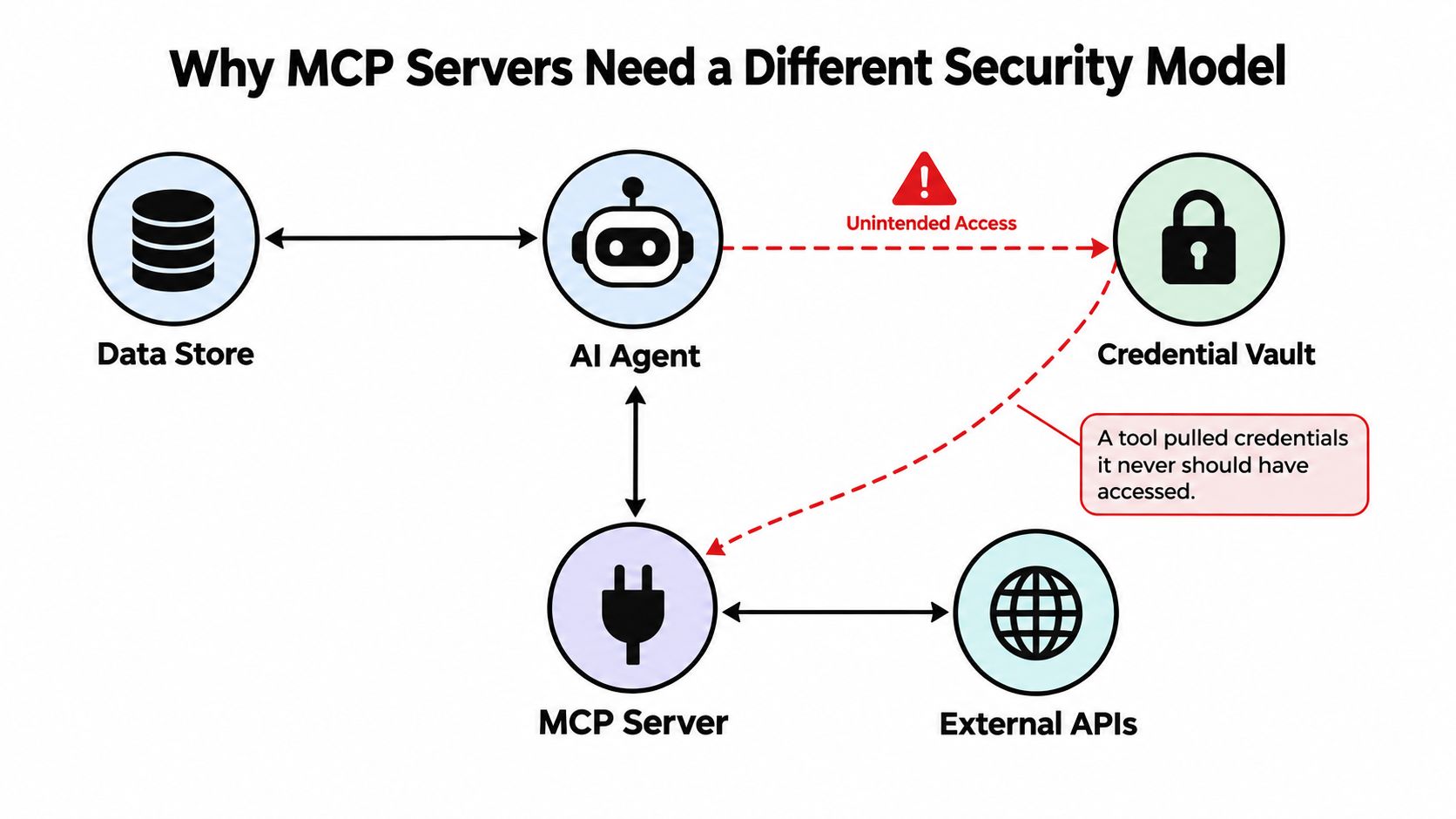
The boundary is the risk
A normal API integration mostly asks whether the caller may send a known request. An MCP server also has to defend the content that shapes the request, because the agent can select tools and build parameters from context.
That matters because tool arguments can carry secrets by accident. I have seen calls where a shell-shaped argument included AWS_SECRET_ACCESS_KEY=..., a file path, and a pasted token in the same payload. That is why validation has to happen before the request leaves the server boundary. Human approval still matters too, and the MCP specification requires hosts to obtain explicit user consent before invoking tools and to provide a way to deny invocations.
Practical rule: If a server can touch a filesystem, a database, a shell, or a downstream API, treat it like a scoped production service, not a convenience plugin.
The controls that hold up are direct, even if they are not all easy to implement. You need an inventory of every server, least privilege, authentication for remote access, frozen tool definitions, argument validation, sandboxed execution, and immutable audit logs. Foo Guard and similar tools fit into that lifecycle by turning the pre-deployment review into policy you can check in CI, then enforcing the same rules again at runtime through a gateway. If one of those controls is missing, the rest usually have to absorb the gap.
Inventory, Approval, and Policy as Code Before Deployment
A team copies a working server config from an old repo, and the new copy inherits shell access nobody re-reviewed. That kind of drift usually shows up before the first production request, which is why the first control is a clean inventory.
Build the baseline before the server goes live
Inventory every server by owner, source, version, transport, reachable data store, credential, and requested capability. Missing even one of those fields makes it hard to tell whether a tool is new, duplicated, or over-permissioned, and the OWASP cheat sheet calls out shadow MCP servers as a recurring risk.
Keep the review rules in code instead of a wiki page. A file like .fooguard.yml can define the minimum grade you will accept and the failure threshold you enforce in CI, so policy drift does not turn into a repo-by-repo exception process.
policy:
  failOn:
    - critical
    - high
  minGrade: B
  requireApproval: true
  requirePinnedDefinitions: true
  blockUnscopedCredentials: true
  blockShellAccess: true
  blockUnrestrictedNetwork: true
That file does two useful things. It puts the rule set beside the server definition in the same pull request, and it gives reviewers a clear pass or fail signal instead of a vague security comment. If a team needs tighter governance later, it changes the organization policy once, instead of chasing one-off repo settings.
Put review into the pull request path
A GitHub Actions check is where this becomes enforceable. Run the scanner on every pull request, fail on critical findings, and leave the assessment summary in the discussion thread so reviewers see evidence next to the code. That is the difference between security visibility and an unblocked merge.
name: MCP config scan

on:
  pull_request:
  push:
    branches:
      - main

jobs:
  scan:
    runs-on: ubuntu-latest
    steps:
      - name: Checkout repository
        uses: actions/checkout@v4

      - name: Run configuration scan
        run: fooguard scan . --policy .fooguard.yml --output json > assessment.json

      - name: Fail on critical findings
        run: |
          critical_count=$(jq '.summary.critical' assessment.json)
          if [ "$critical_count" -gt 0 ]; then
            echo "Critical findings detected"
            exit 1
          fi

      - name: Comment summary on PR
        uses: actions/github-script@v7
        with:
          script: |
            const fs = require('fs');
            const report = JSON.parse(fs.readFileSync('assessment.json', 'utf8'));
            github.rest.issues.createComment({
              ...context.repo,
              issue_number: context.issue.number,
              body: `Assessment complete. Grade: ${report.summary.grade}. Critical: ${report.summary.critical}. High: ${report.summary.high}.`
            });
Operational habit: Reject any MCP change that cannot show its approved baseline, its owning team, and its requested capability set.
Foo Guard and similar tools fit the lifecycle by turning the pre-deployment review into policy you can check in CI. The same rules can then be enforced again at runtime through a gateway, so the server is not depending on one-time review alone.
Authentication, OAuth, and Per-Request Authorization
A lot of MCP teams think auth is solved once a user logs in and a session stays open. It isn't. Authorization has to be enforced on every inbound request, because the MCP security guidance says sessions must not stand in for authentication, and the confused-deputy problem shows up when a server uses its own broad credentials instead of the caller's permissions MCP security best practices.
A real failure mode is easy to miss. A user approves a client for read-only access, then the server keeps a powerful service token and forwards a later write request as if the original approval still applies. The request looks valid at the session layer, but the action is now running under the server's authority, not the user's. That is the gap you have to close.
Treat auth as a request-level control
Start with HTTPS termination, then use OAuth 2.0 metadata discovery, PKCE, validated redirect URIs, and short-lived, rotatable tokens. The MCP guidance requires PKCE, validated redirect URIs, and token rotation, and sessions should never replace authentication. The token still has to be checked again when the request arrives, not only when the client first connects.
Session handles need the same discipline. Generate them with a cryptographically secure random generator, bind them to the right user or authorization context, and expire them on schedule. If someone has a handle, that does not prove ownership. It only proves they possess the handle.
Recheck before every sensitive action
Before any tool action that can modify data, touch a secret, or reach a downstream API, the server should re-evaluate authorization. That blocks the classic confused-deputy pattern, where the server accidentally acts with its own power instead of the caller's.
Keep the auth flow separate from tool logic. The host handles consent, the gateway or server validates the incoming request, and downstream access gets checked again with the user's actual context attached. That separation matters in practice because it prevents a read-only approval from being reused as write access inside the server. If you are wiring this into a productized workflow, Foo Guard's authentication guide shows a clean request boundary and where the checks belong.
Keep the rule simple: possession of a session or state handle is not authentication, and it never should be.
That sounds obvious until you see a proxy forward a request because someone clicked through an old approval prompt. Once that happens, every other control has to compensate for a mistake the auth layer should have stopped first.
Sandboxing, Least Privilege, and Argument Validation at Runtime
Identity checks do not help if a server can still roam across the host, call arbitrary networks, or accept malformed arguments. Runtime is where you narrow the blast radius, and it is also where you catch failures that survive a careful pre-deployment review.
Start with the smallest useful privilege set
A local server should run in a sandbox. A remote server should get only the filesystem, network, database, and API permissions required for the task it performs. The OWASP MCP Security Cheat Sheet says the same thing plainly, sandbox local servers and scope remote access tightly.
Argument validation matters just as much. Tool names and arguments should be checked against schemas, because an agent can pass credentials, environment variables, or sensitive file content where the prompt looked harmless. That check belongs at the server boundary, and it should run again in the gateway if you have one.
Compare the practical tiers
| Control area | Unrestricted server | Least-privilege server | Gateway-fronted server |
|---|---|---|---|
| Filesystem access | Broad host reach | Only approved paths | Routed calls can be constrained by policy |
| Network access | Open egress | Default-deny with allowlist | Gateway can block unauthorized destinations |
| Credentials | Shared or ambient | Scoped per task | Per-request checks plus audit trail |
| Tool arguments | Accepted loosely | Schema-validated | Gateway can reject unsafe arguments |
| Visibility | Low | Moderate | Highest, with request history |
A concrete egress rule makes the difference visible. In a containerized deployment, I want outbound traffic denied by default, then only the exact destinations required by the server allowed through. For example, a network policy or firewall rule can allow api.vendor.example and auth.vendor.example, while dropping everything else. That keeps a compromised tool from phoning home to the first endpoint it finds.
Containerization alone is not enough if the container can still talk to arbitrary endpoints. I have seen teams call a server sandboxed, then leave egress wide open and make exfiltration trivial. If the process can reach the internet freely, the sandbox is doing less work than the team thinks.
Validate both input and intent
A gateway or server should reject commands that do not match the declared schema, and it should also reject tool calls that do not fit the current user context. The permission model in Foo Guard's MCP tool permission security guide is useful here because it separates policy from routed traffic instead of pretending one control can solve everything.
Rule of thumb: if the tool can shell out, fetch URLs, or write files, argument validation has to be stricter than your average API schema check.
Unsafe paths should fail early, before the model can turn a strange prompt into a dangerous request. Runtime controls do not replace review, they absorb what review cannot reliably catch.
Supply Chain, Pinned Versions, and Detecting Rug Pulls
A server can look safe on Tuesday and become a different risk by Thursday, without a visible package vulnerability. Supply chain review for MCP has to cover behavior, not just package identity. The registry study that analyzed 67,057 MCP servers found weak vetting, ownership problems, redirection hijacking, and affix-squatting, and it also found that hosts may fail to independently verify LLM-selected tools or parameters registry study on MCP servers.
Treat approved servers like production dependencies
Pin the reviewed version, verify provenance, rescan on every change, and compare each update against a known baseline. If the manifest changes, the maintainer changes, or the tool description changes, treat it as a review event, not a routine patch. That is the practical response to rug pull risk, where an approved server changes behavior after authorization.
Package scanning alone misses the shift that matters most. A package can have no known CVE and still be wrong for your environment because it suddenly asks for shell access, broad filesystem scope, cloud credentials, or unrestricted outbound networking.
Separate code scanning from permission review
The registry research shows the trust problem is bigger than simple malware. Ownership changes and malicious metadata can steer the model's reasoning toward attacker-directed operations, so manifest diffs, publisher checks, and approval records matter as much as the source tree. Repository-level scanning like Foo Guard's repository scanning catches capability expansion that package scanners miss.
A useful approval record includes the exact manifest, the publisher identity, the dependency state, the requested permissions, the review decision, and later diffs. Without that trail, it is hard to explain why a server was approved or when its behavior changed.
What works: pin reviewed versions, rescan every update, and require a new approval when capability expands.
What doesn't: trusting a package because it already passed one scan months ago.
Static review still pays off here. If permissions are deterministic before deployment, you can compare a new version to the approved baseline and stop a quiet expansion before it reaches runtime.
From Static Review to a Hosted Gateway and a Final Hardening Checklist
Static review and runtime enforcement should work together, not compete. The static scanner tells you what should be allowed. The hosted gateway enforces that policy on routed requests, with Monitoring and Audit mode for visibility and Enforcement mode when you're ready to block violations. Gateway enforcement only applies to traffic you route through it, which is why it stays separate from the pre-deployment scan.
Use monitoring before you block
Monitoring mode is the better first step for teams because it shows what would have been stopped without breaking live workflows. That gives you a cleaner rollout path for allowlists, deny rules, argument validation, and agent blocks. Once the patterns look right, shift the gateway into enforcement for the consequential calls.
Drop this into the runbook
- Inventory every server: Track owner, source, version, transport, data reach, credential use, and requested capability.
- Pin tool definitions: Freeze reviewed tool schemas and descriptions before approval.
- Enforce least privilege: Grant only the filesystem, network, database, and API access the task needs.
- Require OAuth with PKCE: Validate redirect URIs, rotate tokens, and check authorization on every request.
- Sandbox local servers: Keep local execution confined and stop default host access.
- Rescan on every change: Treat manifest edits and capability expansion as new review events.
- Route consequential calls through a gateway: Turn on audit logging, then move to enforcement when the policy is stable.
That checklist is the minimum viable hardening set. If you've got all seven in place, you're already ahead of most deployments I review.
Foo Guard gives teams a deterministic way to scan MCP and agent configurations before they run, then carry those approved rules into a hosted gateway for monitoring or enforcement. If you're tightening an MCP rollout right now, visit Foo Guard and use it to turn your static review into a live control plane.