MCP Security: A Practical Guide to Safer Tool Definitions
MCP security explained for AI teams. Learn the real risks in tool definitions, permissions, and credentials, and how static scanning plus gateways close
You can have a clean-looking agent demo, a green CI run, and still miss the one thing that matters, whether the tool can do more than the task says it should. That's the trap with MCP security. A team adds a research connector, points an agent at it, and only later realizes the same flow can reach files, queries, shell commands, or metadata the source never meant to expose.
When a Research Task Becomes an Authorization Boundary
A common failure starts with a harmless ask. Someone wants an agent to pull a public dataset, summarize it, and attach a few supporting notes. The request sounds narrow, the connector is approved, and the first run works. Then the agent notices related metadata, follows a link the source exposed, and drifts toward non-public material because the surrounding permissions weren't drawn tightly enough.
That drift is the security event, not the original research task. The agent didn't “mean” to do anything malicious. It operated inside a boundary that was wider than the business owner thought it was.
The hard part is that the dangerous line isn't always in the prompt. It sits in the combination of tool definition, credential scope, runtime path, and what the server is willing to return. If you're reviewing an MCP deployment, that boundary is the thing to map first.
Practical rule: if a tool can touch data you wouldn't expose to a junior engineer by hand, it needs explicit policy, not trust in the model's intent.
The rest of the problem is deciding which layer must enforce which limit. That's where teams usually overestimate protocol promises and underestimate deployment controls. A useful reference point is this discussion of authorization boundaries in agent workflows, because the same mistake shows up again and again in MCP setups.
What MCP Actually Is and Where the Trust Boundary Lives
MCP is easiest to understand as a contract between a client and a server. The client asks for tools, resources, or actions, and the server responds with what it says it can do. That's the protocol. It's not the same thing as the host, the agent runtime, the credentials, or the network path that carries the request.
A kitchen analogy works well here. The menu tells the waiter what can be ordered, but it doesn't explain who can enter the pantry, who can use a knife, or who can sign for deliveries. MCP is the menu and the order format. Your deployment is the kitchen, the lock on the pantry, and the policy about who gets the keys.
That distinction matters because MCP can connect AI clients to servers that expose files, databases, shell commands, APIs, and other high-impact capabilities. The protocol defines security requirements, but every server still has to get identity binding, scope control, token handling, redirect validation, and transport protection right. A server that gets those details wrong can be “MCP compatible” and still unsafe in production.
Draw the line explicitly
If you're documenting a deployment, draw one line around the protocol and a second around the runtime. The first line answers what the client is allowed to ask for. The second line answers what the system is allowed to do when the request arrives. Those are not the same question, and confusing them is how teams end up believing a spec-compliant setup is also secure.
The March 26, 2025 authorization specification tightened that picture further by requiring OAuth 2.1 for authorization servers and HTTPS for protected communication, plus secure token storage, redirect-URI validation, token-expiration or rotation, and PKCE for public-client flows specification milestone. Those are useful controls, but they still live inside a broader deployment boundary that your team owns.
The Vulnerability Classes MCP Introduces
MCP inherits the usual security failures, then adds its own because language models consume tool metadata as working context. Missing auth, broad scopes, exposed credentials, weak transport, and unsafe command exposure still matter. So do the MCP-specific paths, where names, descriptions, schemas, and returned content can change what the agent does.
A 2025 academic study identified eight distinct vulnerability types, with only three overlapping traditional software vulnerabilities study. Analysts in the same work reported that 7.2% of examined MCP servers contained general security vulnerabilities, while 5.5% showed MCP-specific tool-poisoning behavior. The more useful takeaway is that much of the risk sits outside the familiar web-app checklist.
Tool metadata is part of the attack surface
Clients often place server-provided names, schemas, and descriptions into the model's working context. A malicious or compromised server can hide instructions inside what looks like documentation. The model may follow those instructions as trusted guidance, even when a human reviewing the tool list would not spot a problem.
That makes tool descriptions a prompt-injection surface. Tool poisoning matters because a server can steer an agent toward unrelated actions, including sensitive file access or calls into other tools, without any obvious UI change.
Cross-tool data access is the other class to keep in view. One tool can return content that nudges the agent to use another tool in a way the user never intended. In logs, that chain can look legitimate until you reconstruct it with the tool definitions in front of you.
Practical rule: treat tool metadata like untrusted user input, because in MCP it can influence execution just as directly.
The benchmark work backs that up. MCPTox tested 353 authentic tools from 45 live MCP servers against 20 prominent LLM agents and reported a 36.5% average tool-poisoning attack-success rate, with a high of 72.8% for o1-mini benchmark. Those numbers do not prove every environment is equally exposed, but they do show how aggressively injected instructions can survive once they enter the model's context.
Why Authentication Alone Leaves a Dangerous Gap
OAuth and PKCE are necessary, but they're not enough. Authentication proves who is calling. It doesn't prove that the caller should be allowed to run a shell command, read an arbitrary path, query a broad database, or send data to a network destination that creates exfiltration risk.
That gap shows up fast in agent environments because the caller is often a trusted identity. Once the connection is established, the question becomes per invocation, which tool, which argument, which resource, which downstream action. If you don't answer those questions explicitly, you've only established that the right party opened the session, not that the session is safe.
The official guidance around MCP authorization reflects that reality. It's not just about proving identity, it's about binding authorization to the specific server, tool, and resource context Azure guidance. That distinction matters when a single trusted identity can enable far more capability than the business intended.
The model still follows bad instructions after login
Authentication doesn't neutralize prompt injection or tool poisoning. Once the agent can see malicious instructions inside tool content, the fact that the caller authenticated doesn't stop the model from acting on them. That's why the benchmark result matters operationally, not just academically.
A secure deployment has to keep the authorization question narrow. Not “is this user real?” but “is this specific tool call, with this specific argument, against this specific resource, acceptable right now?” If the answer lives only in a login layer, you're missing the part that controls damage.
A valid session is not a safe session.
This is also where teams get false confidence from protocol compliance. A setup can satisfy OAuth requirements and still let a prompted agent walk through a wide filesystem, hit internal APIs, or reach a shell. The danger is not the login. The danger is the width of the post-login capability.
What a Pre-Deployment Scanner Should Actually Look For
A static scanner should inspect the parts of the config that change behavior, not just the parts that look like settings. That includes tool definitions, descriptions, declared permissions, approval settings, autonomy flags, and any embedded credential material. If the scanner only checks for auth presence, it's too shallow to matter.
The highest-risk combinations are usually obvious once you read the file as an attacker would. A tool that can execute shell and read broad filesystem paths is one. A description that contains instruction-like content is another. A database connector with wide query access and no approval flow belongs in the same bucket.
The important habit is to scan for composition, not isolated keys. A single permission may be acceptable in a narrow context. Two or three together can create an unsafe blast radius.
What to flag first
- Instruction-shaped descriptions: Look for language in tool metadata that starts telling the model what to do instead of what the tool does.
- High-impact capability pairs: Shell plus broad filesystem access, or database access plus unconstrained natural-language actions, deserve immediate review.
- Credential exposure: Any config that stores secrets, tokens, or keys inline should be treated as a deployment risk, not a convenience.
- Autonomy without approval: If a tool can run without a human checkpoint and the capability is sensitive, the default assumption should be no.
Policy as code helps because the same file can be reviewed the same way every time. A repo-level file such as a .fooguard.yml policy can encode thresholds like failOn and minGrade, so risky changes don't sneak through on a one-off judgment call. The win isn't the file format itself, it's the fact that review becomes deterministic.
For practical MCP tool permission review, this permission security guide is the kind of artifact teams need to align on internally. The useful part is not the branding, it's the discipline of checking the config before the agent ever gets to run.
Static Review Versus Runtime Gateway Enforcement
Static review and runtime enforcement solve different problems. Static analysis is fast, repeatable, and good at catching risky permissions, dangerous tool combinations, and exposed credentials before merge. It cannot see every live request argument, every evolving server behavior, or every route that's configured after deployment.
Runtime gateway enforcement sees the traffic that moves. That lets it verify identity, tool selection, arguments, and data scope on routed requests. It can also apply allowlists, deny rules, agent blocks, and audit logging as the system runs. The catch is simple, it only sees traffic that passes through it.
| Failure Mode | Static Scanner | Runtime Gateway |
|---|---|---|
| Dangerous tool definition | Strong at catching | Weak unless the request is routed |
| Exposed credential in config | Strong at catching | Usually invisible |
| Over-broad shell or filesystem capability | Strong at catching | Can block or narrow use |
| Bad live argument to a safe tool | Limited | Strong at catching |
| Unexpected downstream request path | Limited | Stronger, if routed through the gateway |
| Evolving server behavior after review | Limited | Better at enforcement, still needs policy |
The systematic security picture for MCP fits a layered model, authentication and authorization, provenance tracking, isolation or sandboxing, inline policy enforcement, and centralized governance through gateway architectures systematic analysis. That's the right mental model because no single control covers all failure modes. A static scanner can prove something before release. A gateway can stop something during use.
Know what each layer can't do
Static review can't validate every runtime argument. A gateway can't protect traffic that never reaches it. Static review also can't tell you if a server changed behavior after the last scan, while a gateway can only enforce the rules you wrote.
The strongest programs use both. Static review gives you a clean, reproducible gate before merge. Runtime enforcement gives you a second boundary when the agent is live and the request is real. Treating those as interchangeable is how control gaps survive in production.
Practical rule: if a control doesn't fail closed at the moment of use, it's not the whole answer.
Putting the Layers Behind a Working Policy
The workflow that holds up in production is boring on purpose. Put the policy in code at the organization level, scan every pull request against that policy, fail the build when findings cross the threshold, store reviewed versions in a versioned library, and route production traffic through a gateway that enforces the same rules again at runtime. That gives you one policy shape, two enforcement moments.
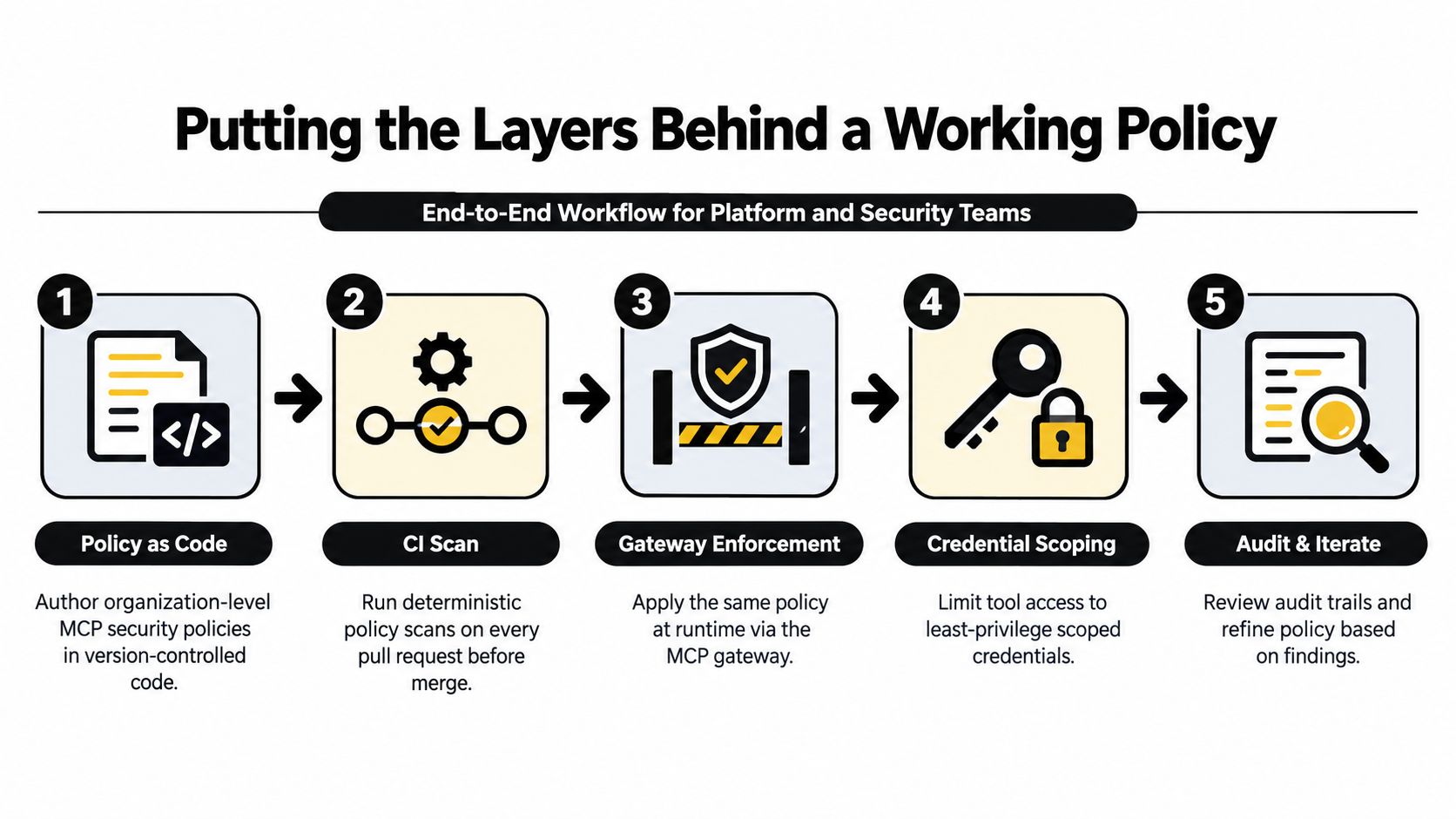
A few habits make that workflow reliable. Pin and diff tool descriptions in CI, because metadata drift is a real source of prompt-injection exposure. Treat tool metadata as untrusted input, because the model will read it. Require explicit approval for sensitive capabilities, and bind authorization to the exact server, tool, resource, and argument constraints that matter in that environment.
The versioned library matters more than teams expect. Once reviewed configurations are stored as immutable versions, you can compare what changed instead of arguing about what someone intended. Audit logs complete the loop, because you need to know which request was allowed, which was denied, and why.
You can also think about the gateway as the place where static review meets live traffic. Policy as code tells you what should be allowed. The gateway tells you what was allowed. That gap between should and did is where most post-incident analysis starts.
For teams building out this operating model, policy-as-code governance is the right pattern to standardize. The useful outcome is not just fewer risky merges, it's a reviewable chain from configuration to deployment to runtime decision.
Posture Checklist and the Benchmarking Gap
A decent baseline starts with five things, static review, gateway enforcement, scoped credentials, explicit approval for high-risk calls, and audit logging. If one of those is missing, the posture is incomplete. If two are missing, you're relying on luck more than control.
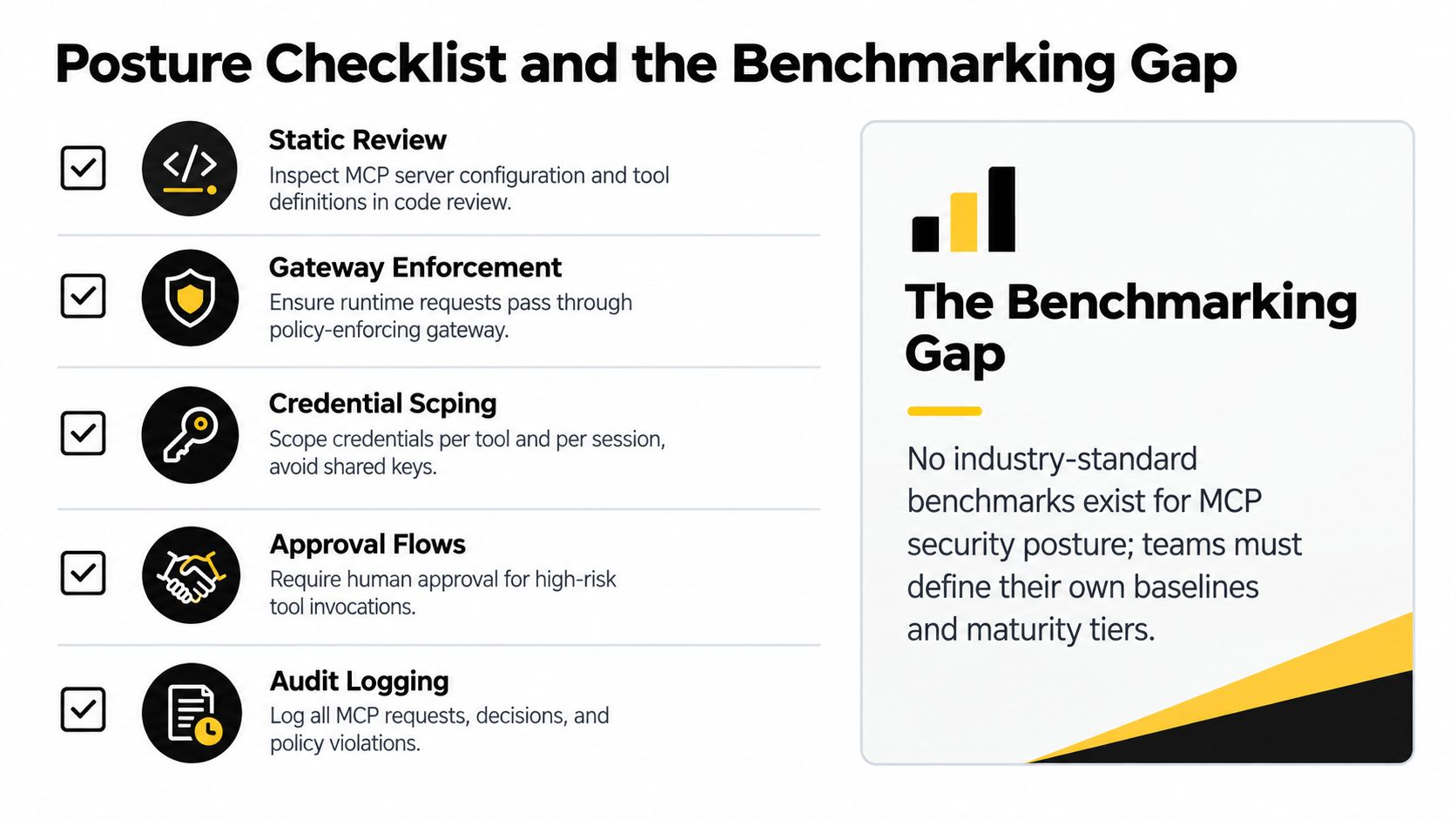
The benchmarking problem is real. Public MCP security numbers use different populations, definitions, and scanning methods, so they don't line up cleanly. A high vulnerability rate can reflect permissive discovery criteria, while a low CVE count can hide systemic misconfiguration. The practical move is to measure your own blast radius by capability and track it over time.
That gives you an internal baseline you can defend. It also keeps you from treating vendor-specific scans as interchangeable evidence. For MCP security, posture improvement is less about chasing a universal benchmark and more about proving your own controls got narrower, clearer, and harder to bypass.
If you're building or reviewing MCP deployments, Foo Guard can help you catch risky permissions, tool definitions, credentials, and autonomy settings before they ship, then keep policy visible through reviewable static scans and gateway enforcement. Visit Foo Guard to see how a pre-deployment scanner and policy platform can fit into your agent security workflow.