AI Agent Governance Framework: Policies, Gates and Audits
Build an AI agent governance framework with risk tiers, policy as code, CI gates, runtime audit logs and KPIs. Synthetic config examples included.
“Write an AI policy and appoint an owner” isn't enough. A developer adds an MCP server to .cursor/mcp.json and opens a pull request. Your immediate task is to decide whether that exact configuration can merge, which permissions need approval, and what evidence you'll keep when someone asks why it passed.
Start with the file, not a governance slide deck. A useful AI agent governance framework connects native configurations, deterministic checks, named approvers, and runtime records without pretending that any one of them proves the others.
What an AI Agent Governance Framework Must Cover
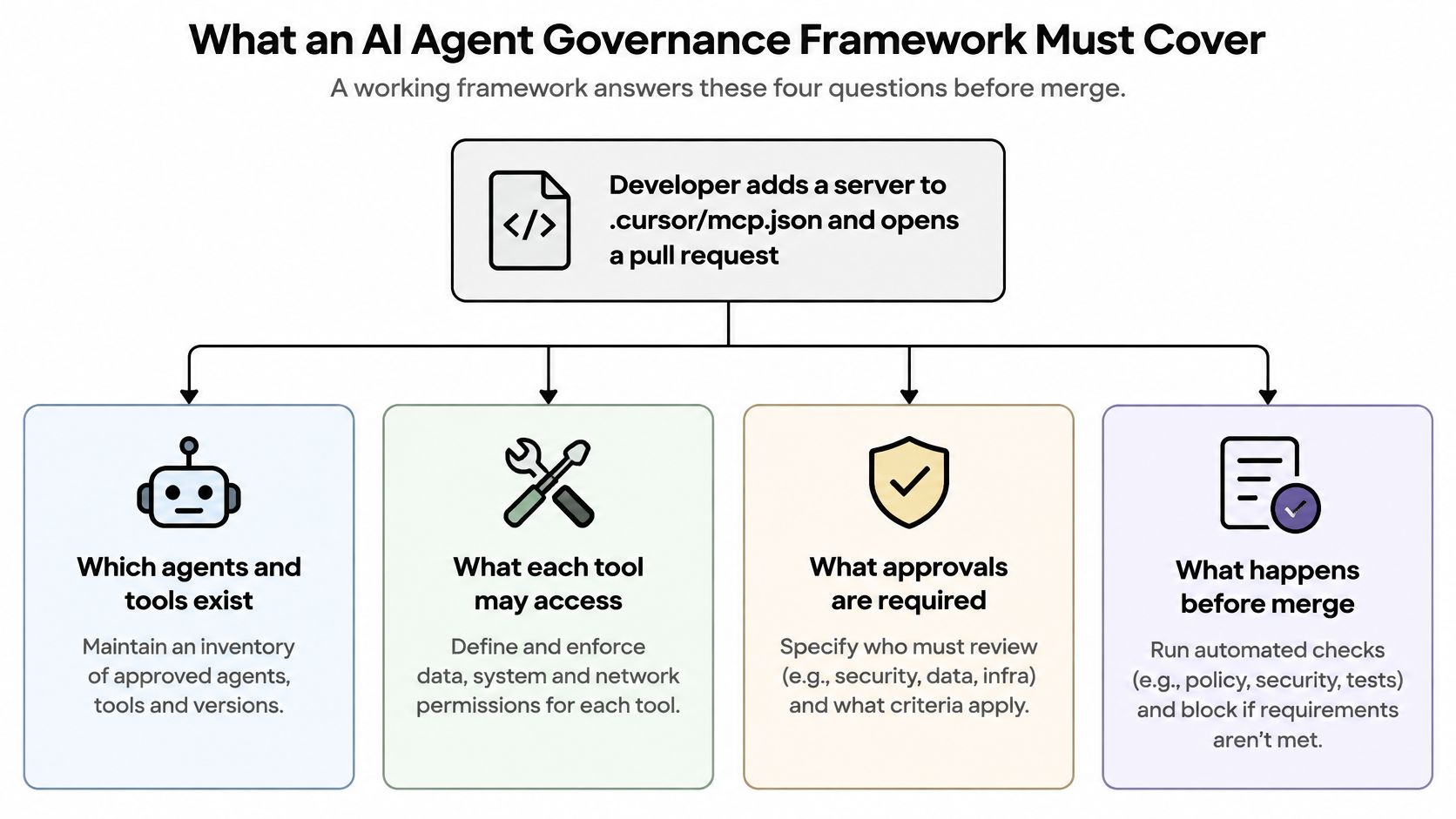
Before that pull request merges, the reviewer needs answers to practical questions: which agents and tools exist, what each tool can access, who owns the decision, and which checks must pass. The approval also needs a durable record. A comment saying “looks good” isn't enough if nobody can identify the configuration and policy the reviewer assessed.
An AI agent governance framework is the written policies, named owners, checks, and records that determine what an agent may use, who approves changes, and how the organization proves both. Treat it like a pre-flight checklist: the checklist determines whether the aircraft may take off, but the flight log records what happened afterward.
The diagram separates the decisions a reviewer needs before merge.
Make approval follow the configuration
ISO/IEC 42001 describes an AI management system that includes risk management, lifecycle controls, monitoring, performance evaluation, and continual improvement. For a development team, that means a continuous loop of inventory, risk-acceptance criteria, pre-deployment tests, post-deployment monitoring, and corrective action.
A one-time approval fails when tool schemas, credential scopes, or autonomy settings change afterward. Bind scan results and approvals to immutable commit SHAs or artifact identifiers, and require re-approval when those boundaries change. Preserve the approver, policy version, decision, and any exception.
Framework components, owners and evidence
| Component | Owner | Evidence artifact | Enforced at |
|---|---|---|---|
| Agent inventory | Platform team | Versioned list of agent configs, tools and credential names per commit | Repository |
| Tool and permission policy | Security engineering | Policy file with deny rules and approval requirements | Pull request check and gateway |
| Named owners | Engineering manager | Owner record for each agent, tool, credential and approval boundary | Access review |
| Pre-deployment review | Security engineer | Scan result bound to the commit SHA | Required pull request check |
| Change re-approval | Agent owner with security | Approval record when tool schemas, scopes, credentials or autonomy change | Merge gate |
| Runtime monitoring | Platform or security operations | Request history with agent identity, tool, decision and policy version | Gateway |
| Corrective action | Incident owner | Ticket, revocation and re-review record | Incident process |
This is an implementation structure, not a certification or compliance mapping. Keep deterministic policy evaluation in charge of pass, fail, exception, and escalation outcomes; automated remediation can suggest edits, but it shouldn't approve its own recommendations.
For workflows involving customer conversations, SupportGPT's guide to governing customer support AI agents provides a useful application-specific companion. Keep the repository-level ownership and evidence requirements explicit even when a business team owns the use case.
Tier Tools by Risk and Set Default Policies
A tool list isn't a policy. Each approved tool needs a purpose, input schema, permitted data domain, credential scope, network boundary, and approval requirement. “Can search tickets” leaves too much unanswered if the same credential can also delete them.
Use risk tiers to make those defaults visible during review.
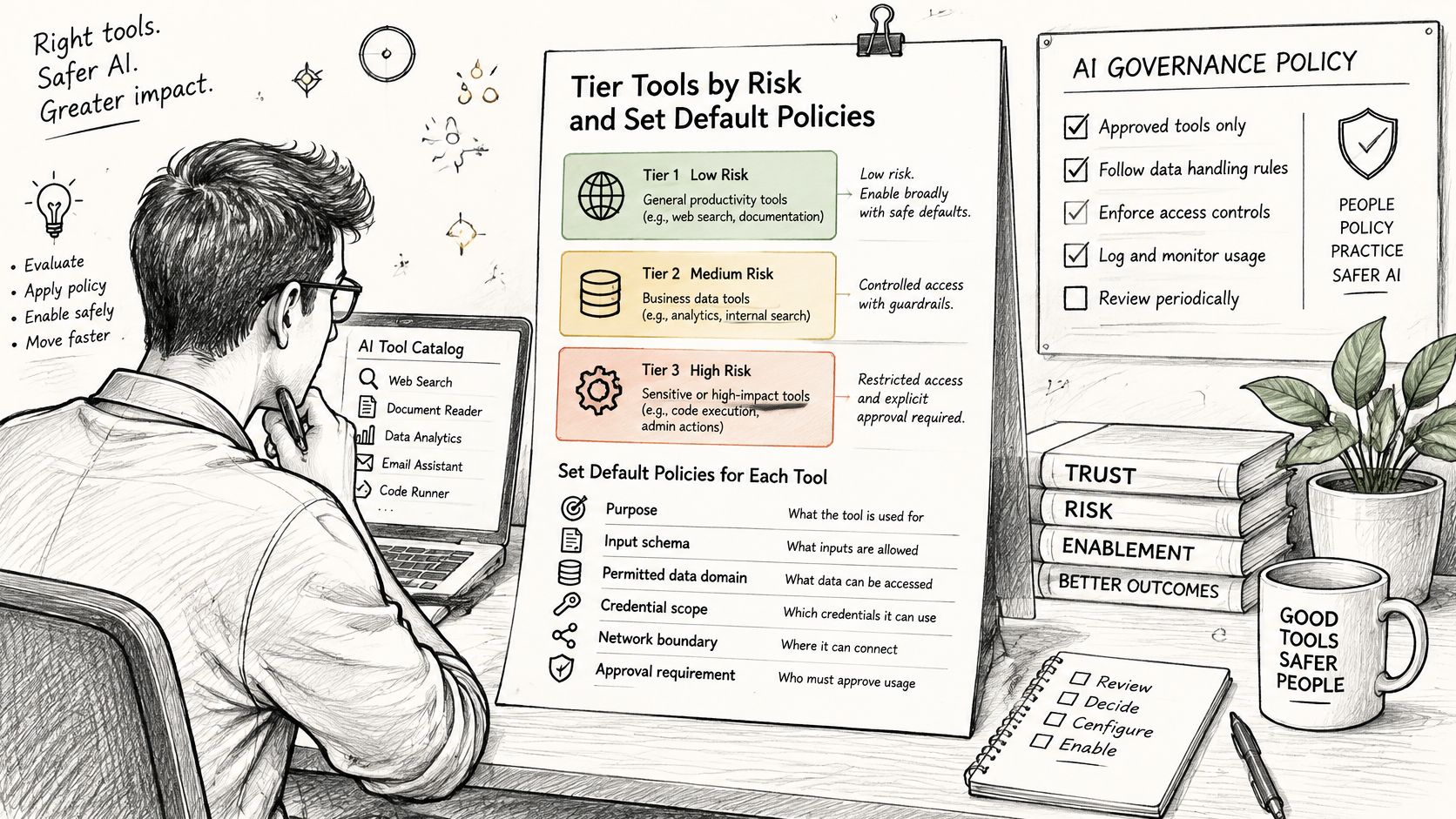
OWASP's agentic-AI security guidance identifies agent behavior hijacking, tool misuse or exploitation, and identity and privilege abuse as material threats. Prompt instructions aren't an authorization boundary. Restrict the underlying credential and validate requests independently of what the model says it intends to do.
Give each tier a usable default
Store approved tool definitions as versioned library entries linked to their source commit SHA. A changed schema, scope, or credential reference creates a new reviewable version rather than inheriting approval.
Default policy by risk tier
| Risk tier | Example operations | Default policy | Approval required |
|---|---|---|---|
| Low: read-only lookups in approved sources | Search of approved document sets | Narrow allowlist of sources and fields | Agent owner confirms at onboarding |
| Medium: writes to non-production files or tickets | Creating or editing a staging ticket | Allowlist plus argument validation | Agent owner and security review |
| High: production database writes, external messages | Writing to a production table or sending email | Deny unless an approval token is present | Named security approver for each change |
| Critical: shell execution, file deletion, financial transactions | Running a shell command or deleting files | Deny by default | Security approval with an expiry date |
These are recommended organizational defaults, not universal classifications. A read operation against sensitive records can deserve stricter treatment than an ordinary staging write. Evaluate the data and destination, not just the operation's verb.
The principle of least privilege guide explains how to narrow authority instead of granting broad access and relying on instructions to constrain its use.
Approve the request, not just the tool
Say an approved read-only ticket-search tool receives an unexpected delete argument. The tool was approved; the request wasn't. Reject that call against the approved schema, even if the server would accept the extra field.
Validate destinations too. A permitted external-message tool should not send to an arbitrary recipient just because its name appears on an allowlist. Approval tokens should bind to the intended operation and scope, not function as reusable permission to do anything.
For an additional visual explanation, use the accompanying video.
The trade-off is review friction. Keep narrowly scoped reads straightforward, and spend human attention on operations that change production state, transmit data, or execute code.
Review Native Agent Config Files Before They Run
Use this complete synthetic Cursor project file at .cursor/mcp.json as a review exercise. The package @example/mcp-demo and its version are fictional placeholders, not an installation recommendation. Don't install or run it.
{
  "mcpServers": {
    "synthetic-review-server": {
      "command": "npx",
      "args": [
        "-y",
        "@example/mcp-demo@1.2.3"
      ],
      "env": {
        "SYNTHETIC_API_TOKEN":
          "PLACEHOLDER_NOT_A_LIVE_TOKEN"
      }
    }
  }
}
Cursor's MCP documentation places project configuration at .cursor/mcp.json, global configuration at ~/.cursor/mcp.json, and server definitions under mcpServers, with commands, arguments, and environment variables. Its CLI and editor share MCP configuration, and configurations can also come from nested locations. Review the effective configuration, not just the file the developer happened to change.
The same declaration in a global file widens its availability across projects. A project-local review therefore needs an explicit scope statement rather than an assumption that the repository contains every applicable server.
Inspect the declaration systematically
- Confirm scope. Identify whether the file is project-local, global, or nested. Record which client and workspace will consume it.
- List every server. Capture its command and arguments, including executable wrappers. A familiar server name doesn't explain what the process launches.
- Flag broad paths and wildcards. Look for home-directory access, filesystem roots, and unrestricted arguments. Ask the owner for the smallest path set that supports the task.
- Inspect credential fields. Review environment-variable names and credential references. Replace live values with placeholders in the review copy, and rotate any secret already exposed in repository history.
- Flag consequential capabilities. Identify declared write, delete, and shell access. If the client file doesn't enumerate the server's tools, request a separate tool manifest rather than assuming they're read-only.
- Record the package pin. The synthetic example references a fixed version. Pinning identifies a version; it doesn't establish package safety, publisher trust, or freedom from malicious code.
- Read finding evidence. Run static analysis and inspect each finding's evidence path. Resolve the actual field, not merely the displayed severity.
Our scanner reviews permissions, tools, credentials, and autonomy without running the agent. Open the synthetic native MCP scan example using placeholder values only.
For Claude Desktop, VS Code, and Continue, confirm each native file path, key name, and supported format against the native-format documentation before applying the checklist. Don't rename keys by analogy with Cursor or rewrite native client configurations into a separate schema merely for review.
This file cannot prove that the server starts, that a credential is valid, or what requests the running process makes.
Gate Pull Requests With a Required Check
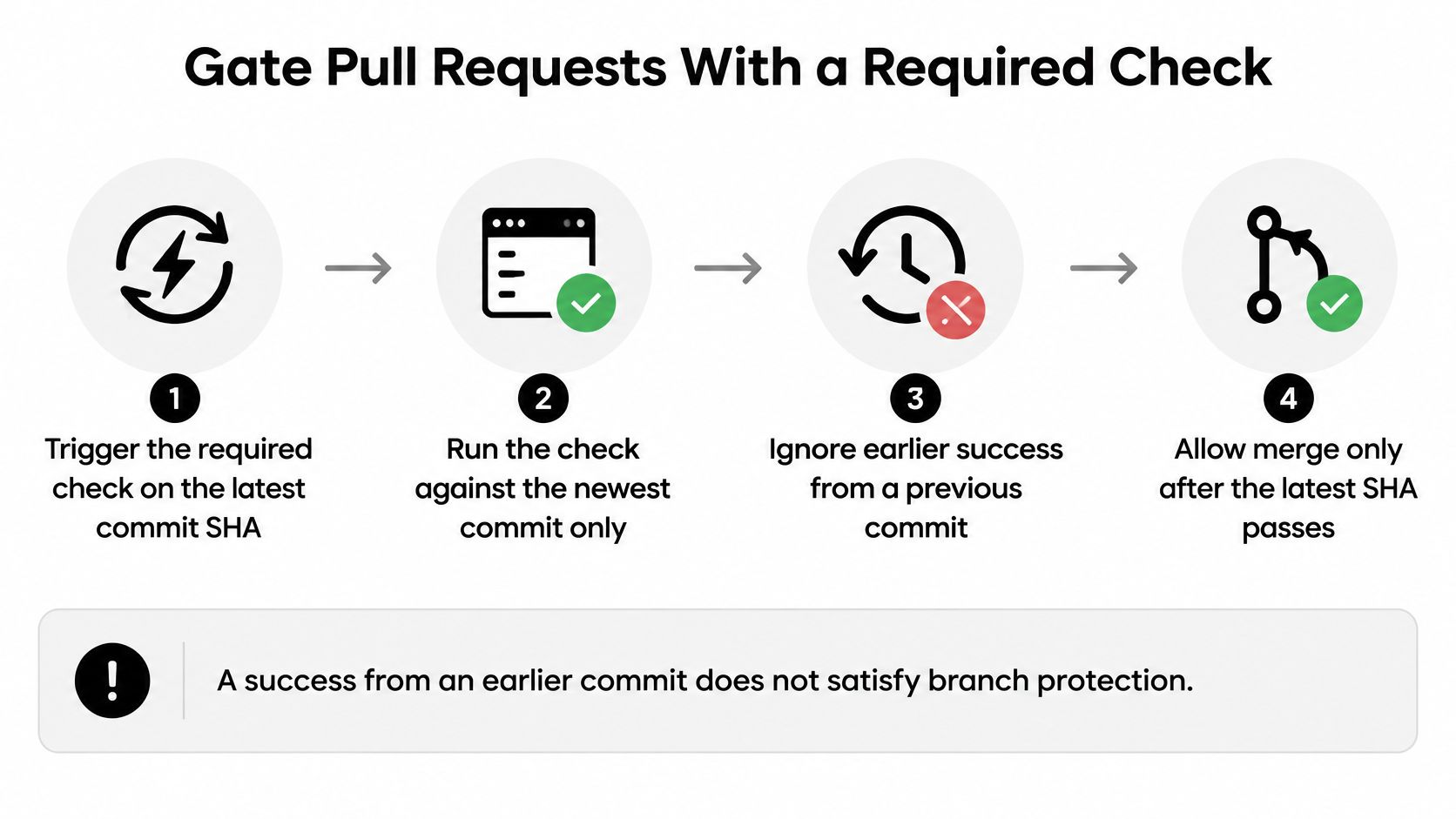
A successful scan on an old revision isn't approval for the current pull request. GitHub's required-check documentation requires checks to pass against the latest commit SHA; earlier successful checks don't satisfy that requirement.
Keep the merge decision tied to the revision being reviewed.
Build a gate that can't silently skip review
- Trigger on pull-request updates. Configure
pull_requestevents so a new push produces a new evaluation. Include changes to native configurations, tool manifests, and the policy files that govern them. - Scan the head revision. Explicitly select the pull-request head commit and record the inspected SHA. Don't label a result as a head scan if the workflow inspected a different checkout.
- Use a unique, stable check name. Choose a name that branch protection can require without ambiguity. Publish actionable findings with file locations rather than a bare failure message.
- Handle skipped jobs deliberately. Required checks can treat
success,skipped, andneutralas successful states, so a conditionally skipped job can avoid blocking a merge. Ensure configuration changes always trigger analysis, and distinguish “no applicable files” from a scan that never ran. - Establish a baseline. Fail on new findings while keeping existing debt visible with owners and remediation records. Don't let a baseline suppress newly expanded permissions merely because a similar finding existed before.
- Require the check on the default branch. Configure branch protection to require the named result. Test the gate with a deliberately noncompliant synthetic change rather than assuming workflow installation enforces merges.
- Scan after merge. Evaluate the default branch to identify drift and retain the merged revision's result. Route discrepancies to an owner instead of allowing them to remain dashboard-only findings.
Use the policy-as-code examples to structure scan paths, failure conditions, and repository policy. Protect policy changes with review too, otherwise a developer can weaken the rule instead of correcting the configuration.
Gate boundary: A passing check means the submitted files met the configured rules at that commit. It doesn't prove runtime behavior, package trustworthiness, or anything outside the inspected files.
Keep the result useful to the next reviewer. Include the policy version, baseline reference, inspected files, and exception identifiers so they can distinguish a clean result from an accepted regression.
Audit and Enforce What Agents Actually Do
A clean configuration review isn't a runtime observation. The file may declare restricted access while a running process receives additional credentials, loads different tools, or takes a route your monitoring doesn't cover. Runtime evidence must come from the execution path.
Place a gateway or proxy where it can inspect supported routed tool calls and compare them with approved definitions. That boundary needs enforceable routing: if an agent can reach the same destination directly, the gateway's record is incomplete. The MCP gateway guide explains this distinction between configuration review and request-time control.
What each evidence type proves and cannot prove
| Evidence | What it proves | What it cannot prove |
|---|---|---|
| Static scan at a commit SHA | Rules matched in the submitted files at that commit | That the server starts, that credentials are valid, or what requests run |
| Pinned package version | Which version the configuration references | That the package is safe or free of malicious code |
| Approval record for a change | Who approved which commit under which policy | That the approval decision was correct |
| Gateway decision log | Whether a routed request was allowed or denied under a policy version | Activity that bypassed the gateway |
| Repeated-denial alert | An agent is repeatedly attempting out-of-policy calls | The intent behind those attempts |
Keep evidence that supports intervention
For each call, retain agent identity, tool identity, requested arguments, decision, policy version, exception status, and timestamp. Protect sensitive argument values with appropriate redaction and access controls; an audit trail shouldn't become an uncontrolled copy of customer data or credentials.
Alert on repeated denials and unusual action sequences. A document read followed by an external send deserves context-sensitive inspection, particularly when the approved workflow never required outbound messaging.
- Deny the individual call. Reject arguments, destinations, or actions outside the approved definition.
- Pause repeated violations. Block the agent pending owner review when it repeatedly attempts prohibited operations.
- Expire exceptions. Give each exception a named owner and expiry date. Return to deny when it expires.
- Preserve the investigation trail. Link the alert, request records, configuration version, and corrective-action ticket.
For delegated workflows, preserve the initiating identity and parent request across agent handoffs. Do not let a downstream agent inherit broader authority just because an upstream agent asked it to act.
An allowed gateway decision isn't proof that the downstream operation completed. Use the tool response and destination-system audit record when you need evidence of the resulting state change.
Test both layers of blocking in staging. A rejected call should leave a decision record, and an agent pause should prevent subsequent routed activity until an authorized reviewer restores access.
Measure Whether Governance Works
Policies are easy to count; effective controls are harder to demonstrate. In a Deloitte survey of 3,235 leaders across 24 countries, only 21% reported a mature agentic-AI governance model. Measure whether your own permissions, approvals, and revocations work rather than assigning a maturity label from document completeness.
Governance metrics and their data sources
| Metric | What it shows | Data source |
|---|---|---|
| Pre-deployment scan coverage | Share of inventoried agent configurations with a passing check at the current commit | Pull request check records |
| Policy-violation escape rate | Violations that reached production | Incident and gateway logs |
| Mean time to revoke a tool | Time from the revocation decision to the revocation record | Revocation records |
| Unauthorized-action frequency | Runtime breaches of approved scope | Gateway denial logs |
| Traceability | Share of runtime actions linked to an accountable identity and approved version | Request logs joined to commit and approval records |
Define the denominator before publishing a rate. For scan coverage, use the configuration inventory, not merely files discovered by the scanner. Otherwise, missing files disappear from both the review process and its apparent success measure.
Establish baselines before targets
Use the first month as a baseline rather than inventing performance targets. Separate repositories and workflows with different exposure so a well-covered development agent doesn't conceal an unreviewed production agent.
Be precise about unauthorized-action frequency. Denial logs show attempted breaches that the gateway blocked, not necessarily successful unauthorized actions. Join them with downstream evidence before claiming an operation escaped enforcement, and document the denominator used for an escape rate.
Revocation needs a practical validation test. In staging, revoke an approved tool, timestamp the decision and revocation record, and confirm that the next call is denied. The administrative record measures processing time; the denied call demonstrates that enforcement took effect.
- Track exception debt. Count open exceptions and review their expiry dates each month.
- Check missing joins. Investigate runtime actions without an accountable identity or approved version.
- Re-run regression cases. Preserve representative prohibited configurations and calls as control tests.
Start with a metric you can calculate reliably. A modest baseline backed by reproducible records is more useful than a dashboard whose definitions change whenever the results look uncomfortable.
Confirm Your First Governed Agent Before the Next Release
Choose a repository with an active agent configuration and a team willing to own the release decision. Don't begin by attempting an organization-wide inventory with no enforcement attached.
Make the release decision reproducible
- Inventory the configuration files. List repository-local, project, nested, and global files used by the developers and deployment environment. Record the client and scope for each entry, including configurations outside version control that need a separate managed record.
- Name accountable owners. Assign an owner to each agent and high-impact tool. Include the credential owner and the person authorized to approve an exception, so a blocked release doesn't turn into an unowned chat thread.
- Apply the risk tiers. Classify each tool using its actual data access and consequences. Flag critical tools without an approval path, and remove unnecessary capabilities before spending time on exception paperwork.
- Review synthetic and real inputs. Open the synthetic scanner example first, then submit a redacted copy of a real configuration. Replace live credentials and tokens with placeholders before pasting or uploading, and preserve the relationship between the reviewed copy and its repository revision.
- Require the pull-request result. Use the latest-SHA gate described above, with an explicit failure policy. Our policy enforcement can fail a pull request or CI job when configuration violates policy; repository scans analyze supported configuration files in memory, don't store repository source code, and persist safe summaries only.
- Record a baseline. Pick a governance metric with a trustworthy data source and save its initial value, definition, and owner. Schedule a staging revocation test so the release has an operational control check, not just a configuration review.
A clean scan means the submitted files passed the configured rules, which is not a safety guarantee or a certification.
Foo Guard offers deterministic configuration review and policy checks that help teams make agent approvals reproducible before deployment. Visit Foo Guard to review a redacted native configuration and connect its findings to your next pull-request decision.