OWASP LLM Top 10 for Agent Config Reviews
Use the OWASP LLM Top 10 to review native MCP configs for agency, secrets, and supply chain, and see what a static scan cannot prove.
You've got a pull request open, a native MCP file for Cursor or Claude Desktop in the diff, and a reviewer asking what this agent can do. The file names a server, passes an environment variable, and declares a few tools. None of that tells you whether the agent will behave well at runtime. It does tell you, in plain text, what authority someone is about to merge.
That's the right place to use the OWASP LLM Top 10. Don't treat it as a scorecard for the whole system. Treat the 2025 list as a taxonomy for reading a configuration file line by line, recording what's declared, and naming what the file can't settle. A clean static scan is evidence about a file at a commit. It isn't proof of runtime safety, and it isn't a certification.
Review a Native MCP File Against the 2025 List
You're reviewing a file that already exists in its native shape, for Cursor, Claude Desktop, VS Code, or Continue, and you need to know which risks that file can expose before the agent runs. The task is one sentence: inspect declared tools, permissions, credentials, package references, and approval settings, then record which risks are represented in the file and which are absent from it.
Start with format, because a finding against the wrong shape wastes everyone's time. Check the client's file against the native-format documentation before you read findings. The file stays in its native format. You don't rewrite a Cursor or Continue config into a Foo Guard schema to review it, and you shouldn't accept a review process that forces that conversion. Conversion adds a second artifact that can drift from the one the client loads.
Name the Edition Before You Map Anything
This review uses the 2025 OWASP LLM Top 10, not the 2023 category names. Category names and numbering move between editions, so a finding that just says OWASP mapped, without an edition, isn't reproducible. Pin the edition in your review notes the same way you'd pin a dependency version.
Use these ten names as navigation for the file in front of you:
- Prompt Injection: outside instructions reaching tools
- Sensitive Information Disclosure: credentials and private data in context
- Supply Chain: named models, packages, datasets, and adapters
- Data and Model Poisoning: tainted training or retrieval data
- Improper Output Handling: model text reaching a downstream sink
- Excessive Agency: more function, permission, or autonomy than the task needs
- System Prompt Leakage: hidden instructions stored where they can be exposed
- Vector and Embedding Weaknesses: retrieval and embedding access
- Misinformation: ungrounded output treated as fact
- Unbounded Consumption: cost and resource use without a declared limit
For a broader view of how a platform describes its own controls and boundaries, the Openbase security overview is a useful companion read when you're comparing what a vendor claims to enforce versus what you still own yourself.
A static match is configuration evidence. It is not an observed call, a model output, a successful exploit, or a certification.
That boundary is the whole method. If a tool declares shell access, you can say shell access is declared. You can't say the agent ran a command. If no approval setting exists, you can say no gate is declared in this file. You can't say a runtime layer elsewhere won't block the call. Keep those two columns separate in every note you write.
To see the shape of the review before you run it on your own file, open the synthetic native MCP example scan. Compare its declared server, tools, and env entries with the file in your pull request. You're looking for the same evidence pattern, not for identical findings.
The 2025 OWASP LLM Top 10 at a Glance
Use this table as your single lookup for the 2025 edition. The OWASP LLM Top 10 list is structured around 10 major risk categories that include Prompt Injection, Sensitive Information Disclosure, Supply Chain, Data and Model Poisoning, Improper Output Handling, Excessive Agency, System Prompt Leakage, Vector and Embedding Weaknesses, Misinformation, and Unbounded Consumption. That same source notes Excessive Agency explicitly addresses applications that grant models too much functionality, permission, or autonomy, and that Unbounded Consumption expands beyond traditional denial-of-service concerns to include resource-management problems and unexpected costs.
Don't read a row as a pass or fail for the system. Read it as a question you can ask of one declared item in one file.
2025 OWASP LLM Top 10 Static Review Questions
| Risk | 2025 focus | Static question | Cannot prove |
|---|---|---|---|
| LLM01 Prompt Injection | Untrusted instructions change behavior | Can declared tools act on outside instructions | That an injection will succeed at runtime |
| LLM02 Sensitive Information Disclosure | Secrets and private data in context | Is a credential or broad env grant written in the file | That a secret was or was not sent |
| LLM03 Supply Chain | Models, data, packages, adapters | Which component and version are named | That the named component is benign |
| LLM04 Data and Model Poisoning | Tainted training or retrieval data | Is a dataset or model source declared here | Integrity of data that is not in the file |
| LLM05 Improper Output Handling | Model output used downstream | Does output reach a shell, file, or tool unsafely | How a live model will format output |
| LLM06 Excessive Agency | Too much function, permission, or autonomy | Are shell, filesystem, network, database, or approvals excessive | That the agent will misuse that authority |
| LLM07 System Prompt Leakage | Hidden instructions exposed | Is a system prompt stored in the client file | That a prompt will be extracted in chat |
| LLM08 Vector and Embedding Weaknesses | RAG and embedding access | Does this file declare retrieval scope or ACLs | Tenant isolation of a vector store |
| LLM09 Misinformation | Ungrounded or false output | Does the file constrain sources for factual claims | Accuracy of generated answers |
| LLM10 Unbounded Consumption | Cost and resource exhaustion | Is a budget, rate, or call limit declared | Actual spend or call volume |
Read each row in three steps. First, find the declared item in the native file, such as a tool, an env entry, a package reference, a retrieval scope, or a declared limit. Second, ask the static question against that item only. Third, record the cannot prove column as the boundary of your finding, in the finding itself, not in a footnote nobody reads.
Unrepresented Is Not the Same as Controlled
Many rows will come back unrepresented rather than controlled. A file with no retrieval server doesn't show that retrieval is safe. It shows the risk is absent from this file. A file with no dataset declaration doesn't clear poisoning. It tells you the corpus lives somewhere you haven't reviewed. Write that distinction down, because it's where mapping exercises slide into false coverage claims.
Foo Guard mappings anchor each finding to one of these categories, but the analyzer only sees declared tools, permissions, credentials, and policies. Runtime behavior and model-generated content need separate controls, owned by whoever operates the running system. I would reject any review summary that collapses those two into a single green check.
The useful output of this table isn't ten answers. It's a short list of answered questions with file locations, plus an explicit list of questions this file can't answer. That second list is your handoff to runtime monitoring, data owners, and platform limits. If a row has no declared item, don't invent a verdict. Mark it unrepresented, name the layer where it would live, and move on.
Native Client Files to Review First
Start with the MCP server block in the file each client already uses, Cursor, Claude Desktop, VS Code, or Continue. Confirm the shape against the supported formats documentation first. The review happens in the native shape, not after conversion to another schema.
Review in this order:
- Server command and package reference: what's executed, and whether the version is pinned.
- Env entries: any literal that looks like a token, key, or password, and any setting that passes the whole environment into the server.
- Declared tools: shell, filesystem path, network host, database, or write capability.
- Approval settings: whether high-impact tools need a human gate or run by default.
- Stored instructions: any system prompt or hidden instruction sitting in the client file.
Record each item with its file location so a later reader can find the line that produced the finding. Pinning a version makes the reference reproducible. It doesn't make the package safe. An empty approval setting is a finding, not an absence of risk.
A Synthetic Wildfire Assistant Configuration
One fictional task keeps this concrete: a local assistant that summarizes public wildfire statistics. It needs to fetch a public dataset and write a summary. It does not need shell access, it does not need to write outside the workspace, and it does not need to run without approval. Keep that task in mind while you read the file, because excessive agency is always measured against the task.
The complete synthetic native-style entry looks like this:
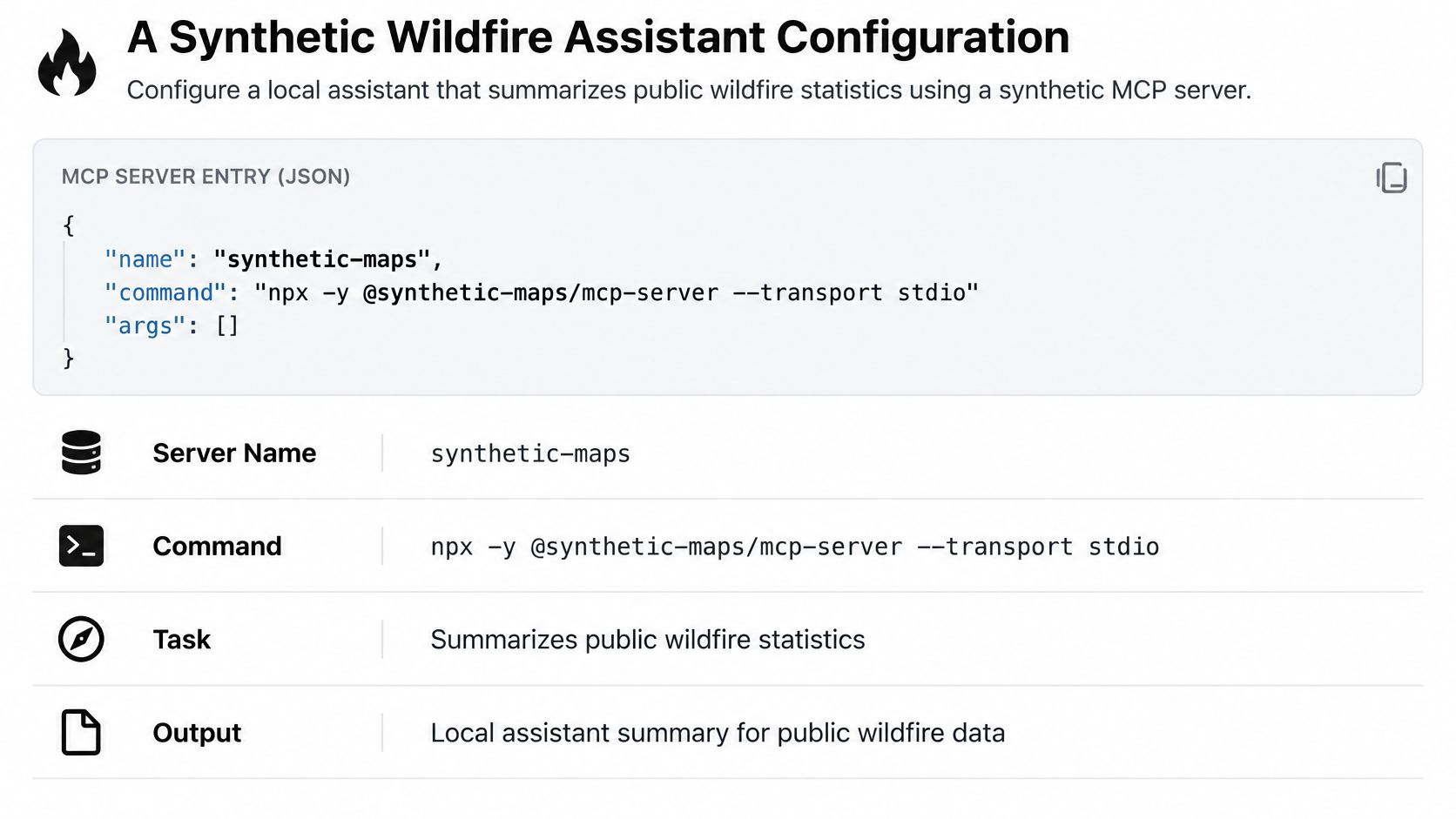
Read the declared values exactly as written:
- Server name:
synthetic-maps - Command:
npxwith args-yand@example/mcp-demo@1.2.3 - Env:
MAPS_TOKENset tosk-example-not-a-secret - Tool read_dataset: network GET of a public dataset
- Tool run_query: shell execution enabled
- Tool write_notes: writes to a filesystem path beyond the workspace, including a parent path
- Approvals: none
@example/mcp-demo is a synthetic package name. Do not install @example/mcp-demo. The token value is an obvious fake literal, written that way so you can see the pattern without handling a real secret. Treat both as labels for review, not as instructions.
Judge One Line at a Time
The pinned string 1.2.3 is an LLM03 Supply Chain reference. A static pass shows the declared command and the pinned version. It cannot show that the package is safe, maintained, or free of malicious behavior. Reproducible resolution and package safety are different claims, and only the first one is in this file.
The literal token is an LLM02 Sensitive Information Disclosure exposure. A static pass shows a secret-like literal committed in an env entry. It cannot show whether that token is valid, whether it was ever sent anywhere, or what it gives access to. The finding is about the storage pattern. Rotate anything real that matches this pattern, then replace the literal with a reference.
Shell execution plus a write path beyond the workspace plus approvals set to none is LLM06 Excessive Agency. Compare it with the task. Summarizing a public dataset needs a network read and a local write inside the workspace. It doesn't need a shell, and it doesn't need a parent path. A static pass shows the declared capabilities and the missing approval. It cannot show that the agent will misuse them, or that a runtime policy elsewhere would block a call.
The network tool with no declared rate, timeout, or argument limit leaves LLM10 Unbounded Consumption unanswered. Absence of a limit in this file isn't proof that no limit exists anywhere. It's proof that this file doesn't declare one, so the reviewer can't credit it.
This short walkthrough shows the same line by line reading applied to a running example:
Downloading a public dataset and probing for unpublished metadata are different requests, even under one research task. A static review can show that read_dataset can make network calls and that run_query can execute shell commands. It cannot show that a query would reach non-public metadata. Don't let a legitimate task description launder a capability the task doesn't need. The legitimate use and the abuse case often share the same tool. Your job is to size the tool to the legitimate use.
Open the example native MCP scan and compare each finding with the line that produced it. If you need to confirm your own client's shape first, use the supported formats page. Then apply the same four anchors, LLM03, LLM02, LLM06, LLM10, to your file before you look at any score.
Static Checks for Agency Secrets and Prompts
A native client file earns trust by declaring less than it could. The OWASP Top 10 for LLM Applications 2025 resource frames the list as a lifecycle oriented control taxonomy rather than a checklist limited to prompt filtering, and it makes LLM06 Excessive Agency, LLM03 Supply Chain, LLM07 System Prompt Leakage, and LLM02 Sensitive Information Disclosure especially actionable before release. Use that framing to separate what the file proves from what only runtime can prove. A clean static scan does not certify SOC 2 or OWASP coverage, and it does not prove the agent will behave once a tool is live.
LLM06 Compare Each Tool with the Task
For excessive agency, write the task in one line, then test each declared capability against it. In mcp.json, the evidence is concrete: command, args, env, allowed hosts, filesystem scope, and the tool list the client will load. A public dataset summary does not need shell execution, database writes, or a filesystem path outside the workspace. If a tool cannot be justified by that one line, remove it or narrow it. Prefer the narrowest network host list the task uses, not a wildcard added during setup and never revisited.
Require an explicit approval gate on high-impact operations. Shell execution, writes outside the workspace, database mutations, and network calls to new hosts belong behind a human decision that shows the raw operation. An approval that only shows the model's summary of the action is a rubber stamp with better formatting.
LLM02 Flag Literals and Whole Environment Grants
For sensitive information disclosure, flag embedded tokens, private keys, and any setting that passes the whole environment into a server. The whole environment grant is the quiet one. A server that needs one token should not inherit every variable on the developer's machine, including credentials for unrelated systems.
The mitigation is a reference to a secret store or a client-specific secret slot. It is a different field shape, not the same pasted value moved under a nicer key. For the mechanics of getting values out of committed files, follow the guidance to keep credentials out of committed MCP configurations rather than inventing a local convention your team will not repeat.
Practical rule: if a secret value is readable in the diff, the finding is already made, regardless of whether the token still works.
LLM07 and LLM01 Record the Pairing and Stop There
For system prompt leakage, record whether the client file stores a hidden instruction. Moving that text out of a shared repository is a config change you can verify. It still leaves the later question of whether a model can be induced to reveal instructions in chat. Design as if stored instructions are readable, and never put a credential or an internal rule you cannot afford to disclose inside a prompt.
For prompt injection, separate untrusted instruction paths from tool arguments. A file can show a dangerous pairing: a tool that accepts free-form input and has a powerful side effect. That pairing is worth flagging before deployment. The file cannot show that a model will resist an injection at runtime. That question belongs to runtime testing, including human-led AI safety testing when the agent's tools can cause real damage and automated checks cannot exercise the live instruction paths.
Tie Every Finding to Evidence
Each finding needs rule id, severity, file location, and commit. Without that evidence path, a reviewer cannot reproduce the result, and a later clean scan cannot prove the earlier issue was fixed rather than renamed. When findings move into SARIF, keep the rule IDs, deterministic explanations, remediation hints, original severity, and file-level security scores and grades attached to the same result. For how score, grade, and evidence fit together, read how to read an assessment instead of guessing from the grade alone.
An AI suggestion can propose a narrower permission or an approval requirement. Treat it as drafting help. Foo Guard's AI remediation generates a suggested configuration for review, and a completed suggestion remains with the saved scan so it can be reopened without spending another AI credit. The score changes only after the file changes and the deterministic scan runs again on the new content. I would never accept a remediation claim that skips the rescan. The rescan is the evidence.
Supply Chain Pinning Poisoning and Embeddings
A version pin doesn't close supply chain risk. It closes one narrow question: will this reference resolve to the same version string on the next run. Teams collapse three different risks into that one check, then report supply chain as covered. Separate them.
The AWS prescriptive guidance on agentic AI security and the OWASP Top Ten separates Prompt Injection (LLM01), Supply Chain (LLM03), and Excessive Agency (LLM06) into different static questions, and states that package version pinning can make dependency resolution reproducible but cannot establish that the package itself is benign, maintained, or free of malicious behavior. It also recommends agent scoping, threat modeling, treating prompts as code artifacts, and granular access controls. A configuration review can identify declared capabilities and package references. That is not proof an exploit will succeed or that runtime traffic is safe.
LLM03 Name the Component and Assign Provenance Elsewhere
LLM03 Supply Chain covers the component named anywhere in the lifecycle: model, dataset, package, server command, or adapter. In the synthetic file, @example/mcp-demo@1.2.3 is a declared reference. Record registry, name, and version, then assign the residual question, is this component trustworthy, to the team that owns dependency provenance. That owner checks publisher, maintenance, and known vulnerabilities. The config file can't answer any of that.
For the mechanics of pinning and proving the change landed, use the dedicated guide to pin MCP server package versions and verify the change. Keep the claim narrow after you follow it. You've made resolution reproducible across a pull request and a later rerun. You have not established safety, and your review notes should say so in the same sentence as the pin.
LLM04 Say Undeclared Instead of Absent
LLM04 Data and Model Poisoning applies when training data, fine-tunes, or retrieval corpora can be tainted. A native MCP client file usually doesn't contain that corpus. So the honest finding is often that the file does not declare a data source, not that poisoning is absent.
That wording matters in an audit. Absent claims a negative you didn't test. Undeclared tells the next reviewer exactly where the gap is and who owns it. If the file does name a dataset or model source, record the name and hand integrity verification to the data or model owner. Hashes, provenance records, and training pipeline controls live there, not in a client config.
LLM08 Retrieval Scope Is the Only Static Question
LLM08 Vector and Embedding Weaknesses applies to vector stores and embeddings. If the reviewed file has no retrieval server, no collection name, and no access scope, say the risk is unrepresented rather than controlled. Don't credit tenant isolation you can't see.
Where a retrieval tool is declared, ask two static questions. Which collection can it query. Are its arguments constrained, or can the model supply an arbitrary collection, filter, or namespace at call time. Authorization inside the store, embedding integrity, and tenant isolation remain outside the file. Those belong to the data owner who runs the index.
Name the asset and the owner for each of the three risks in your review. A mapped finding that doesn't name an owner becomes an orphan. It looks covered in a dashboard and gets fixed by nobody. I would rather see three honest unrepresented rows with owners than one green supply chain row built on a version pin.
Runtime Limits and Residual Owners
Three risks rarely settle inside a client file. The OWASP LLM Top 10 page supports asking which controls apply before deployment versus at runtime and what evidence demonstrates a control works, and it distinguishes configuration review, which can establish intended capabilities, from runtime monitoring, which verifies actual calls and attempted policy violations. That's the split to apply here. Don't ask the file to answer for the running system.
Three Risks the File Can Only Point At
Improper Output Handling depends on where model text goes after generation. A config can show a dangerous destination, a shell tool or an unsandboxed file writer. The pre-deployment fix is to remove that destination, or put an approval and an argument constraint in front of it. The config cannot show the text a model will emit, so sink-side validation at runtime still has to exist.
Misinformation concerns ungrounded claims. A named allowed source, such as the one public dataset in the synthetic assistant, is a useful declaration. The file doesn't measure whether an answer stayed inside it. Grounding checks and human review of consequential output belong to the application owner.
Unbounded Consumption covers resource exhaustion and unexpected cost, not only a crash. Look for a declared rate, budget, timeout, or max-call field. Absence means the limit isn't in the reviewed file. Presence means a limit was declared, not that spend was observed or enforced under load. Billing alerts and runtime circuit breakers close the rest.
Where Each Risk Family Leaves Residual Work
| Risk family | Asset owner | In the native file | Residual risk |
|---|---|---|---|
| Prompt injection and system prompt | Agent author | Instructions and powerful tools declared together | Live goal hijack or prompt extraction |
| Excessive agency | Platform or tool owner | Shell, filesystem, network, database, approval | Calls and arguments after release |
| Sensitive information | Secrets owner | Literals and broad env grants | Whether a secret was transmitted |
| Supply chain and poisoning | Dependency or data owner | Package, model, or dataset name | Malicious or tainted contents |
| Vector and embedding | Data owner | Retrieval scope only if a tool declares it | Tenant isolation and index integrity |
| Output, misinformation, consumption | App and platform owners | Dangerous destinations or declared limits | Output, accuracy, and spend |
Assign each residual risk before you close the review. Prompt text sits with the agent author. Tool permission and approval sit with the platform owner. Package name and pin sit with the dependency owner. Retrieval collections sit with the data owner. Cost limits sit with the platform owner. For a fuller ownership model, the AI agent governance framework covers the roles around the file review.
Keep a finding only if its asset is in the reviewed file. Otherwise hand it to the owner of the missing layer, with the unrepresented row as your evidence. Don't invent mapping codes that aren't on a finding. Free, Pro, and Team include OWASP and SOC 2 control mappings for security reviews, but the mappings are not a compliance certification. A label is a control reference attached to an evidence path. Treating an OWASP Agentic Top 10 or SOC 2 label as certification overstates what any static mapping can prove.
Require the Scan on the Pull Request SHA
End at the merge decision. The GitHub documentation on troubleshooting required status checks states that a required check must pass on the pull request's latest commit SHA, and a successful result from an earlier commit does not satisfy the requirement. It documents success, skipped, and neutral as statuses that can satisfy required checks, subject to repository configuration. A green result from yesterday's commit, or from a mutable branch name, proves nothing about the file you're about to merge.
Run the scan as a GitHub Actions check run on the exact revision containing the Cursor, Claude Desktop, VS Code, or Continue file. Avoid duplicate names for the same required check, because a matching check and a commit status may both need to pass, and ambiguous names create merges blocked for reasons nobody can explain. If you're wiring this kind of gating into a small team's pipeline from scratch, this walkthrough of vulnerability scanning automation for small teams covers the surrounding CI plumbing.
The check should publish evidence reviewers can use. SARIF exports include rule IDs, deterministic explanations, remediation hints, original severity, and file-level security scores and grades. SARIF carries those fields when a recorded source line exists. Older scans without detailed findings need a fresh scan before export, so rescan rather than exporting a thin result and calling it evidence.
Every Foo Guard plan includes deterministic security analysis, 30 configuration checks, secret exposure detection, permission and tool capability analysis, compound-risk detection, and HTML security reports. Fail the pull request on your organization's threshold, change the native file, and scan the new SHA. Don't treat a previous clean scan as proof the agent is safe, and don't treat the check as framework certification or as validation of the scanner's rules. It supports baseline and regression workflows. That's the claim, and it's enough.
To start, open the synthetic native example scan, compare it with your local file line by line, and scan the revision under review.
Run your native Cursor, Claude Desktop, VS Code, or Continue file through a deterministic static scan before the next merge, with findings mapped to the 2025 OWASP LLM Top 10 and evidence tied to the exact commit. You'll get rule ids, file locations, and a clear line between what the configuration proves and what runtime controls still own. Start at Foo Guard and scan the revision your reviewers are approving.