Pin MCP Server Package Versions and Verify the Change
Pin MCP server package versions and verify the change with a synthetic config example, deterministic checks, and what a pin does not prove.
You're reviewing a pull request that replaces latest with an exact MCP server version. The diff looks small enough to approve immediately, but the important question isn't whether the string is valid. It's whether the package, dependencies, and capabilities selected by that string match what you reviewed.
Pin the Server Version in the Native Config
Start with this complete, synthetic Claude Desktop-style configuration. The fictional package example-notes-server is for explanation only. Don't install it.
Before:
{
  "mcpServers": {
    "example-notes-server": {
      "command": "npx",
      "args": ["-y", "example-notes-server@latest"]
    }
  }
}
After:
{
  "mcpServers": {
    "example-notes-server": {
      "command": "npx",
      "args": ["-y", "example-notes-server@1.4.2"]
    }
  }
}| Old string | New string |
|---|---|
example-notes-server@latest | example-notes-server@1.4.2 |
The diff changes a package argument. The review concerns the artifact that argument selects, not just the spelling of the reference.
Pin forms and what each one covers
| Launcher or artifact | Pin form | Floating form to replace | What the pin covers |
|---|---|---|---|
| npx (npm) | example-notes-server@1.4.2 with -y | example-notes-server or @latest | Top-level package only; transitive dependencies may still resolve at install |
| uvx (Python) | example-notes-server==1.4.2 | Unversioned name or a >= range | Top-level package only; resolution depends on the tooling |
| Container image | image@sha256:digest | A mutable tag such as latest | The whole image artifact, including its contents |
| npm lockfile | package-lock.json committed and reviewed | No lockfile, or a regenerated one | Exact dependency tree, resolved sources, and integrity values |
The digest shown is a placeholder, not a usable image reference. A lockfile also needs an execution path that uses it. Committing a project lockfile doesn't automatically constrain an unrelated npx invocation.
Keep the client's native shape
Cursor, Claude Desktop, VS Code, and Continue have their own configuration shapes. Confirm supported files and field paths in the native-format documentation; don't assume the mcpServers wrapper applies everywhere. Scanning isn't a requirement to rewrite native files into another schema.
For VS Code-specific review, use the existing VS Code MCP configuration security checks guide. If you're establishing the connection itself, Croft's guide to setting up MCP with Croft provides that setup context.
To pin MCP server package versions and verify the change, answer a more demanding question: how can another reviewer prove that the deployed change is the reviewed one?
How to Verify a Pin Change from Old Version to New
Record the old exact version, lockfile integrity values, and configuration commit SHA. Preserve the approved starting point before editing. If the old configuration uses
latest, record that literal reference and recover the previously executed version from trustworthy installation records; don't describe a floating reference as an exact baseline.Change the pin to the new exact version. Update the intended dependency and review the resulting lockfile changes. Don't regenerate a lockfile merely to make an unexpected integrity mismatch disappear.
Run a clean, lockfile-enforced installation in a fresh directory. For an npm project, use
npm ciagainst the reviewed manifest and lockfile. Keep installation and package lifecycle scripts inside an isolated review environment without production credentials.Diff the resolved dependency tree against the previous commit. List added, removed, and changed transitive packages, then inspect their vulnerability results. This separates the direct package edit from everything else the installation would introduce.
Run
npm audit signatureswhere registry signatures are supported. Treat an integrity or signature failure as a stop, not a warning to suppress. Record unavailable verification separately from successful verification.Capture advertised tools and input schemas before and after. Flag added or removed tools, new required fields, changed defaults, and newly declared shell, filesystem, or network capabilities. Collect these snapshots in a controlled environment because starting a server executes its code.
Redact live tokens, scan the revised configuration, and compare findings. Replace credentials with placeholders before pasting or uploading a copy. Compare the relevant finding and field path with the previous result to establish whether the configuration issue was resolved.
Save the approval evidence. Record the old and new versions, resolved integrity value, dependency diff, schema diff, scan result, and approving commit SHA. Another reviewer should be able to identify the exact inputs without reconstructing your workstation.
Keep artifact verification separate from scan comparison
The OWASP CI/CD Security Cheat Sheet recommends immutable dependency references and checking downloaded package integrity against known-good hashes or checksums. A changed configuration string alone doesn't provide that evidence.
Check publisher identity and source provenance alongside the bytes. Where available, preserve signatures, build attestations, source commits, build identity, and a software bill of materials. Compare the SBOM with the resolved tree rather than assuming package metadata describes every included dependency.
Use this visual checklist for the configuration-comparison portion of the review.
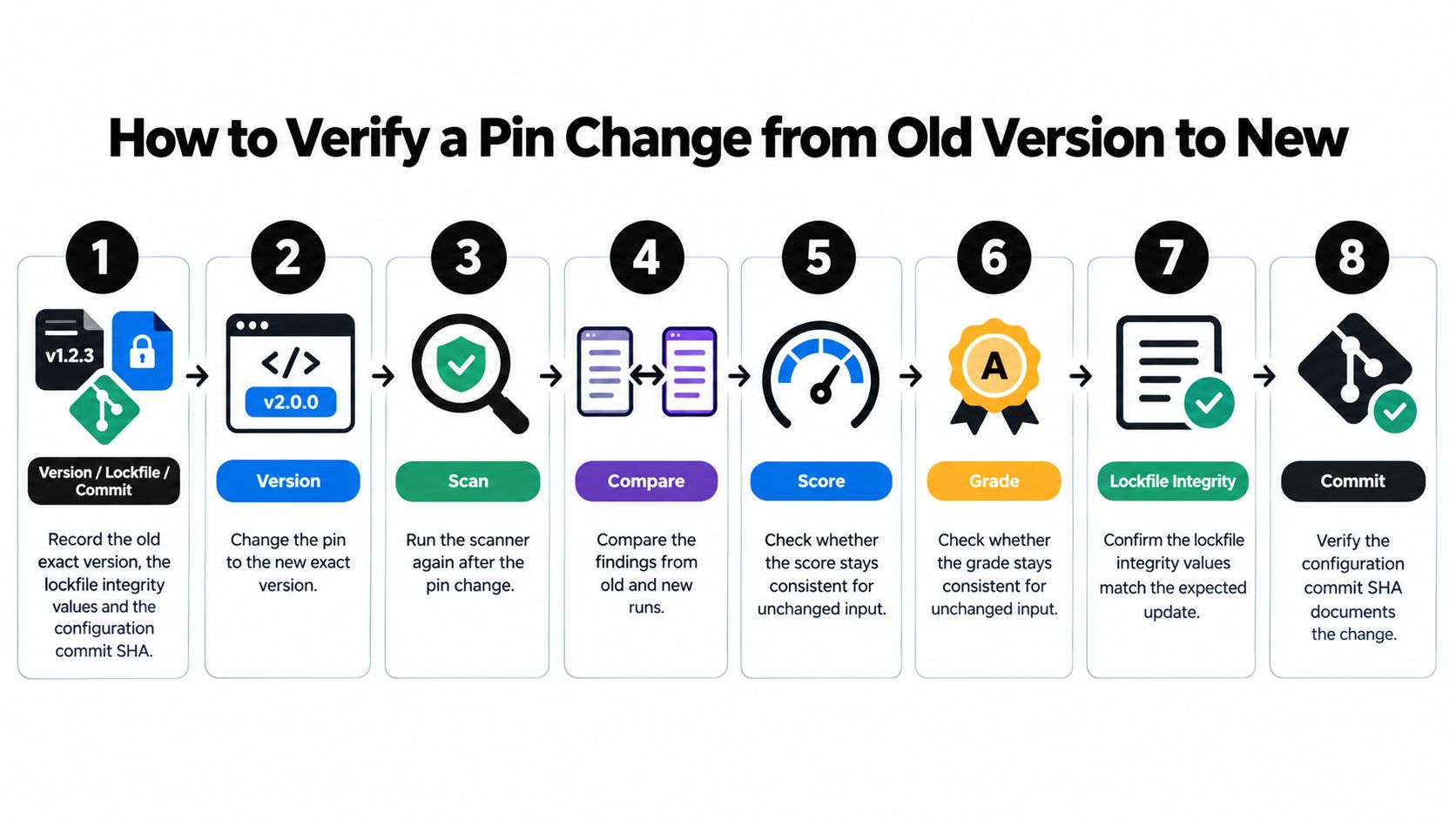
Score and grade consistency in this checklist concern unchanged scan inputs. They don't replace dependency resolution, signature verification, or tool-schema comparison.
Promotion rule: An unexpected change in package bytes requires investigation even when the version string hasn't changed.
The npm audit documentation describes registry-signature verification with npm audit signatures. Preserve its result alongside the reviewed lockfile, rather than recording only that installation succeeded.
A legitimate upgrade changes the version and may change the reviewed schema. A substituted or republished artifact can retain the version while changing the bytes. Python launchers and container images need equivalent resolution, integrity, and provenance checks in their own tooling.
What Deterministic Means for a Configuration Scanner
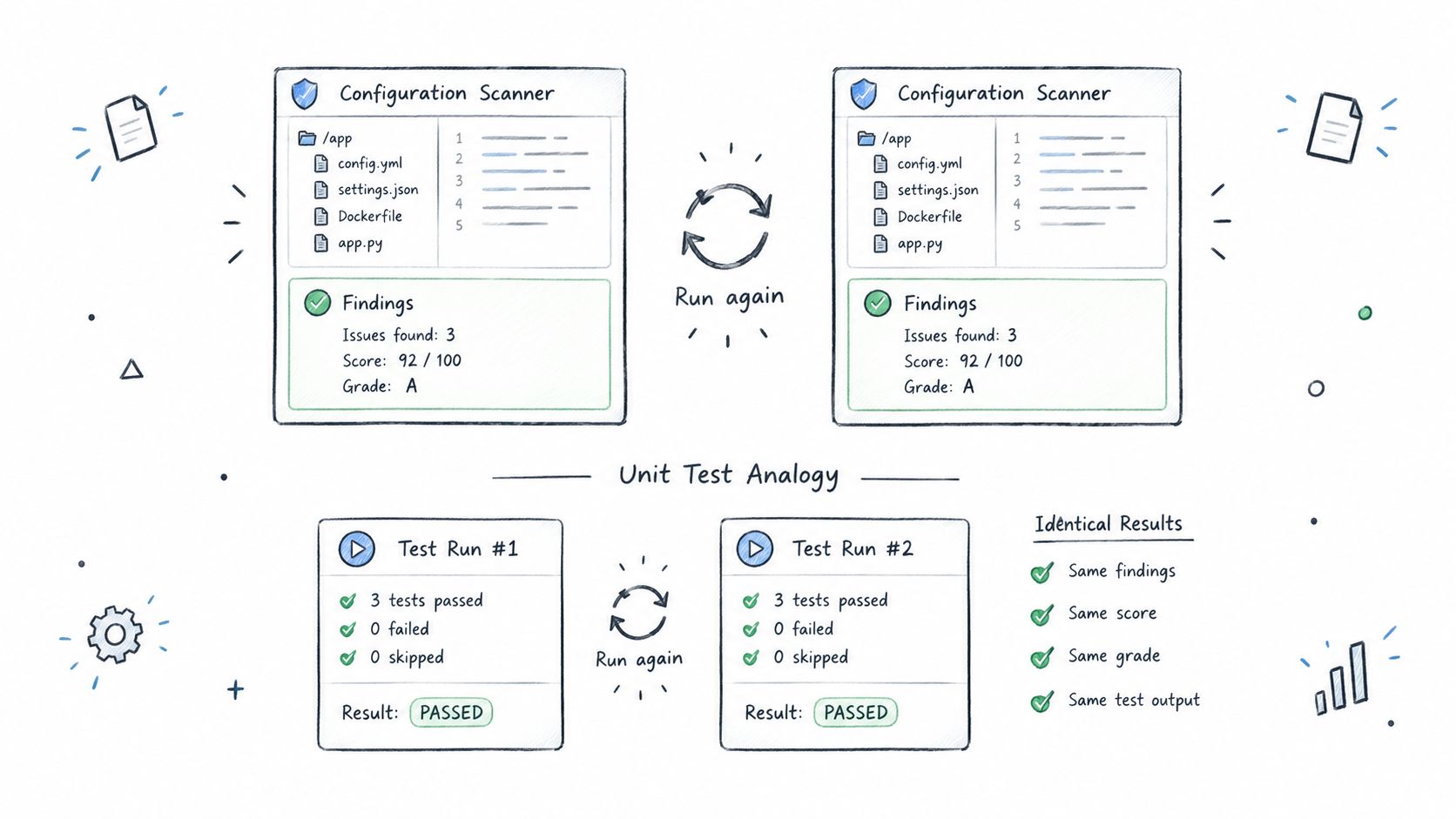
A deterministic scanner produces the same findings, score, and grade from the same file, analysis engine, rule set, and policy. Think of a unit test suite with fixed dependencies and fixtures: running identical inputs again should reproduce the result, unlike an informal review that depends on what someone notices that day.
This illustration connects configuration checks with that testing model.
Fix the condition and its evidence
Consider an illustrative rule for the synthetic configuration:
| Rule component | Fixed definition |
|---|---|
| Condition | A parsed npm package argument ends in @latest |
| Location | mcpServers.example-notes-server.args[1] |
| Evidence | example-notes-server@latest |
| Severity | A fixed policy choice, such as medium |
| Suggested change | Replace the floating tag with an approved exact reference |
That severity is a teaching choice, not a published product rule. A reviewer should be able to reproduce the condition and explain why the finding appeared.
Changing the engine, rules, or policy changes the comparison. Record those inputs with the result so a later reviewer can distinguish a configuration regression from an intentional analysis update.
Separate file inspection from execution
A static configuration scanner reads submitted configuration and definitions. It doesn't start the server, call its tools, or inspect model traffic. A finding therefore establishes that text at a field path matched a rule, not that the server performed an action.
Our CLI uses the same deterministic analysis engine as our REST API and web analyzer. For interpretation of scores and grades, use the guide to reading an assessment rather than treating the overall grade as a package verdict.
The accompanying video provides another format for considering the review workflow.
Repeatability helps reviewers isolate differences. It doesn't establish that a rule covers every risky syntax, that its severity fits your deployment, or that the underlying package deserves trust.
Determinism makes a result repeatable, not necessarily correct.
Deterministic Rules for Floating Package References
Illustrative rules for unpinned MCP references
These are teaching definitions, not a published Foo Guard rule list. Confirm the supported rule set in the documentation before making any of them a repository requirement.
| Illustrative rule | Matches in config | Evidence reported | Not shown |
|---|---|---|---|
| Floating tag | example-notes-server@latest | Field path, matched string, tag name | Whether the newest release is safe |
| Semver range | example-notes-server@^1.4.0 | Field path, range string | Which exact version installs today |
| Unversioned launcher | npx -y example-notes-server with no @version | Args index, launcher name | The version chosen at install time |
| Python range | example-notes-server>=1.4.2 | Args index, specifier string | The resolved version and its dependencies |
| Unpinned image tag | image:latest with no SHA-256 digest | Image field, tag string | The content behind the tag at pull time |
For the floating tag, report the original argument and the matched latest token. For the semver range, preserve the full range and identify ^ as the operator that permits a selection rather than an exact release.
An unversioned-launcher rule must understand launcher options before identifying the package argument. Otherwise, it could mistake an option value or server argument for the package name.
For Python, distinguish an exact == version from a range and report the actual specifier. For containers, inspect the image reference for a digest rather than accepting a version-looking tag as immutable.
Parse the launch form before applying policy
Avoid treating every @ character as a version separator. Scoped npm names, wrapper commands, and launcher flags need ecosystem-aware parsing. If the scanner can't determine what launches, report that uncertainty instead of passing the file without reporting it.
The MCP version-pinning guide recommends exact package references and reviewing release notes, lockfile changes, and before-and-after tool schemas. Its important distinction is that a version pin constrains artifact selection, while schema review constrains the server's effective capability surface.
A syntax rule can establish whether a reference is exact, a digest is present, or a lockfile path is declared. It can't establish that the declared lockfile controls execution without checking the launch and installation workflow.
For enforcement patterns, use the existing policy-as-code examples. Keep a rule's identity and evidence stable enough for reviewers to compare runs.
A passing syntax check says something about the submitted text. It doesn't establish that the synthetic release is safe, that dependencies remained unchanged, or that the server retained its previous tools.
Keep Credentials and Least Privilege in Pin Reviews
A package update shouldn't expand access without notice. Review credential and capability edits as separate changes with their own reasons, even when they appear beside the version pin.
For example, a redacted synthetic server entry might contain "env": {"NOTES_API_TOKEN": "<REDACTED>"}. That placeholder belongs in the review copy; it isn't a working credential or a promise that the client supports variable interpolation.
Check access changes explicitly
- Literal credentials: Inspect
args,env, and headers across Cursor, Claude Desktop, VS Code, and Continue files. A token in an argument can also appear in process listings or logs. - Upload hygiene: Replace live values with placeholders before submitting any configuration. Don't rely on downstream redaction as permission to upload secrets.
- Capability scope: Keep a filesystem server limited to the directory its task needs. Don't add a shell tool merely because the updated server offers one.
- New environment variables: Record each addition, its purpose, and whether it carries a secret or changes behavior. Confirm where the production value comes from.
Treat disclosure as a separate incident
If a live credential entered a commit or shared review artifact, removing it from the latest file doesn't resolve the exposure. Follow the credential owner's rotation and revocation process, and keep that response separate from approving the package update.
A static scan may identify secret-like text at a field path. It can't establish whether that credential was previously copied, remains valid, or has already been revoked.
Why Repeatable Results Help Audits and Regression Checks
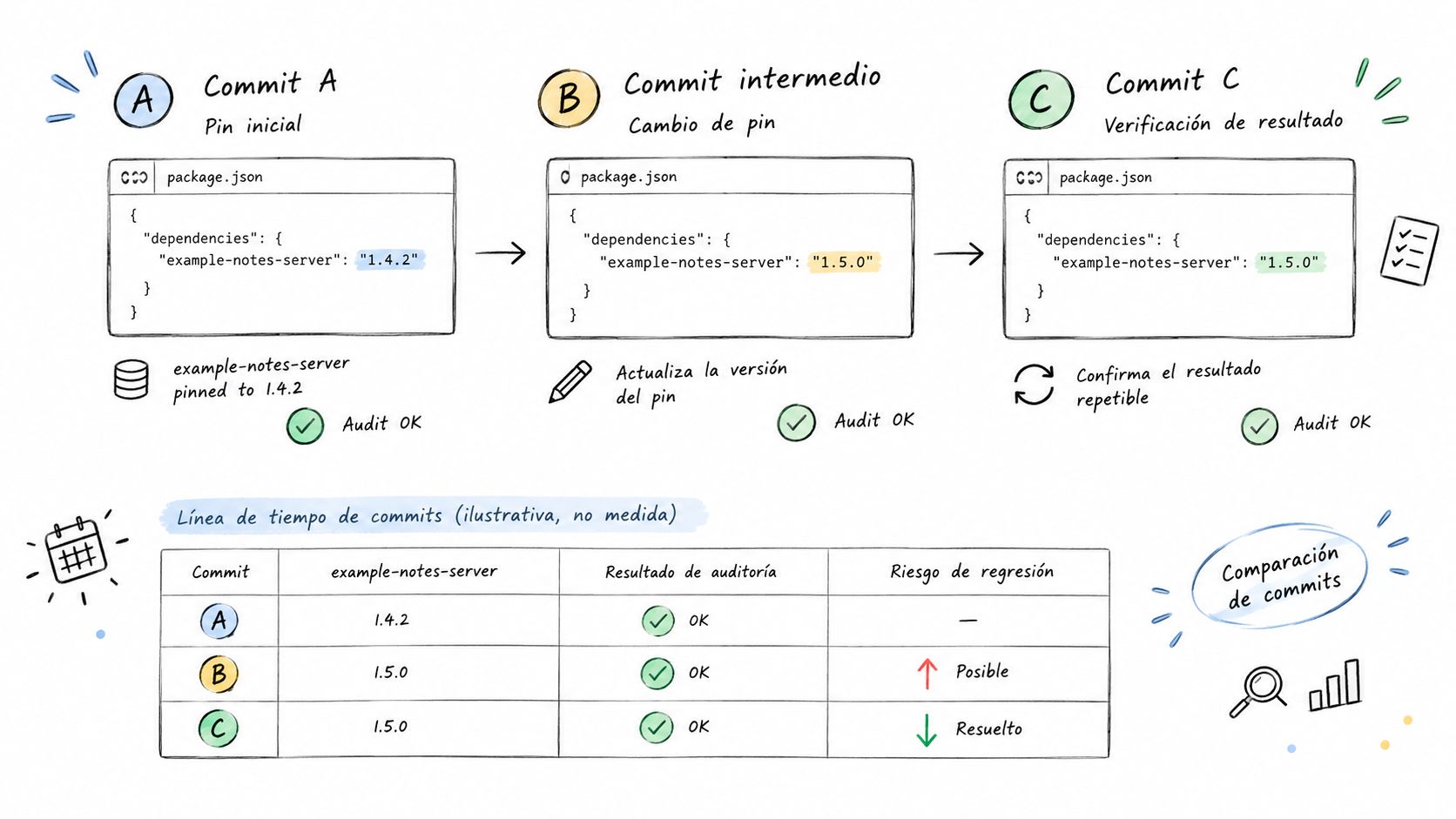
Synthetic three-commit timeline
This timeline is illustrative, not measured. The finding in commit B represents an example policy requiring review of a newly added configuration argument, not a claimed built-in scanner rule.
| Commit | Pin in config | Scan result | Review action |
|---|---|---|---|
| A | example-notes-server@1.4.2 | No pinning findings | Approved baseline |
| B | example-notes-server@1.5.0 | One new finding: new required argument | Review as regression |
| C | example-notes-server@latest | Floating tag flagged | Review as regression |
Commit B doesn't demonstrate that a static scanner discovered a changed runtime schema. The example assumes the required argument was added to the submitted configuration and matched an applicable review rule.
Keep the configuration edit, dependency evidence, and approval connected as the update moves through review.
Use an approved baseline without hiding history
A baseline captures an approved repository scan snapshot for regression comparison. Future scans can be compared against its score and finding rule IDs, so reviewers can separate existing findings from newly introduced ones.
Approval doesn't require pretending the baseline had no findings. It requires preserving which findings were accepted, why, and under which policy. Don't replace the baseline because a new result is inconvenient.
For an audit, retain enough context to reproduce the decision:
- Input identity: Configuration commit, file paths, and retained redacted contents.
- Analysis identity: Engine or rule-set identity and effective policy.
- Decision evidence: Finding IDs, exceptions, reviewer, and approval commit.
- Artifact evidence: Resolved package integrity, dependency changes, and schema snapshot references.
Interpret the baseline score using the assessment guide's definitions. A score comparison without the associated finding IDs can conceal a tradeoff, such as resolving one issue while introducing another.
With fixed analysis inputs, changed results can be attributed to changed configuration rather than scanner variance. Stable findings can still be false positives, and absent findings can still represent missed risks; an audit trail records the decision, not proof that it was flawless.
What a Pin Cannot Prove
Pinned doesn't mean safe or approved. Treat pinning as a way to make artifact selection deliberate and auditable, then require separate evidence for trust.
A top-level npx or uvx reference can still leave dependencies to installation-time resolution. Conversely, holding an exact release indefinitely can preserve a vulnerability after a fix becomes available.
Verify identity before approving a version
Check the package name against the intended publisher's documentation and repository. A perfectly pinned lookalike package is still the wrong dependency.
The Loginsoft analysis of npm and PyPI supply-chain attacks highlights why package identity and supply-chain verification matter beyond package metadata. Record the registry coordinates and publisher you checked, not just a familiar-looking name.
For the synthetic configuration, the version edit cannot prove:
- Artifact cleanliness: The selected release contains no malicious or vulnerable code.
- Source correspondence: The registry artifact was built from the repository commit you reviewed.
- Network restraint: The process makes no unexpected outbound connections.
- Filesystem restraint: The process reads only the files its tools describe.
- Behavioral accuracy: Tool implementations behave exactly as their schemas suggest.
Make exceptions reviewable
Emergency upgrades sometimes need a shorter approval path. Record a named reviewer, the reason, the evidence still missing, compensating restrictions, and an expiry condition for the exception.
Use the same discipline when temporarily retaining a known-vulnerable pin. State why immediate replacement isn't possible and assign an owner to remove the exception, rather than letting the exact version become an indefinite waiver.
Approval boundary: A clean configuration scan is neither a package-safety guarantee nor certification of any framework.
Runtime testing, sandboxing, and network observation answer different questions from configuration review. Record those observations as separate evidence instead of attaching them to a static result.
Gate the Pull Request and Confirm the Result
A skipped job can still satisfy a required check. GitHub's required-status-check documentation recognizes success, skipped, and neutral as successful conclusions and requires checks against the pull request's latest commit SHA, not an earlier commit.
That means a green check isn't sufficient evidence that the pin review ran. Inspect job conditions and path selection, then make the substantive policy result required.
Confirm coverage before requiring the check
- Select every applicable native file: Include the repository's Cursor, Claude Desktop, VS Code, and Continue configurations, wherever they live.
- Report evaluated inputs: Use a named required check whose summary identifies files, pinned package references, and the evaluated commit.
- Test bypass cases: Confirm that conditional jobs can't skip relevant changes while leaving an acceptable check conclusion.
- Keep failures actionable: Preserve findings and evidence even when the policy blocks merging.
For workflow implementation, use the existing GitHub Actions security guide. Branch protection controls merging; it doesn't establish that the scan selected every intended file.
Compare the revised result
Our pre-deployment inspection includes MCP tool permissions and MCP-style tool definitions. This is configuration review before servers run, not observation of their execution.
Run a synthetic or redacted revised configuration through the MCP native configuration scan. Compare the relevant findings with the previous result and confirm field paths against the native-format documentation before approving the latest commit.
Policy Failed means the scan completed successfully but the repository result didn't meet the effective organization or repository thresholds. Findings and scores remain available for remediation; don't confuse a policy rejection with a scanner execution failure.
Approve when the evidence package and current required check describe the same commit. Keep artifact verification and capability approval attached to that decision.
Foo Guard offers deterministic configuration analysis and policy checks for reviewing MCP permissions, credentials, and agent settings before deployment. Visit Foo Guard to compare a redacted configuration before and after a pin change, then carry the resulting evidence into your pull-request review.