VS Code MCP Configuration Security Checks: What to Verify
Learn which VS Code MCP configuration security checks matter, how to write .fooguard.yml policies, and how to gate pull requests with static scans.
You're reviewing a pull request that adds a shared .vscode/mcp.json. The local notes server works on its author's laptop, but its env block contains a literal API token. Every teammate who checks out the file receives that token, whether or not they ever approve the server.
Start by reviewing the complete entry before launching it. This synthetic configuration illustrates the problem; the token is fictional, and @example/mcp-demo is a synthetic package name, not something to install.
{
  "servers": {
    "synthetic-notes": {
      "type": "stdio",
      "command": "npx",
      "args": ["-y", "@example/mcp-demo"],
      "env": {
        "NOTES_TOKEN": "SYNTHETIC_NOT_A_REAL_TOKEN",
        "CLOUD_TOKEN": "${env:CLOUD_TOKEN}"
      }
    }
  }
}
The review task isn't just to validate JSON. It's to decide which executable, credentials, filesystem access, and network permissions your team is approving at this commit.
The Checks a VS Code MCP Configuration Should Pass
Run VS Code MCP configuration security checks against each server entry, then inspect the shared controls around those entries. A file can contain a narrowly scoped lookup server beside a shell-capable server with much broader access, and both deserve the same scrutiny at the commit that introduces them.
Nine checks for VS Code MCP server entries
Four of these checks correspond to named Foo Guard rules. The other five are general configuration review practices, and they still belong in your policy even without a named rule behind them.
| Check | What the entry shows | Foo Guard rule | Usual fix |
|---|---|---|---|
| Embedded credential | Literal token, key, or Authorization value in env, args, or headers | AG-004 Embedded Credential | Replace with a variable reference and rotate the value |
| Shell command execution | Command is a shell or interpreter evaluating inline code | AG-013 Shell or Command Execution | Call a fixed binary with fixed arguments |
| Wildcard permission | Tool or path grant uses a wildcard | AG-008 Wildcard Permission | Enumerate exact tools and paths |
| Administrative permission | Server runs with admin or owner scope | AG-009 Administrative Permission | Reduce to the scope the task needs |
| Unpinned package runner | npx, uvx, or similar resolves a floating version | General review practice | Pin an exact version; pinning doesn't prove package safety |
| Broad filesystem path | Home directory, drive root, or whole workspace is reachable | General review practice | Scope to a project subdirectory |
| Unrestricted network | No domain list, or open outbound access | General review practice | List exact service domains |
| Missing sandbox | Shell, file, or database server without sandboxEnabled | General review practice | Enable the sandbox and set narrow grants |
| Unreviewed remote endpoint | URL outside an approved list or registry | General review practice | Route the server through an approved entry |
A missing field needs interpretation, not an invented default. An absent network restriction is evidence that the configuration doesn't declare one; it isn't proof that the operating system permits every outbound connection. The same caution applies to sandbox flags and approval prompts: record what the file says, not what you hope the runtime defaults to.
Read findings as evidence
Each finding shows the rule, severity, configuration field, and evidence, followed by a suggested change. Read those fields together: an inline command in args means something different when command is bash than when the receiving program treats the argument as plain text.
Treat the suggested change as a review proposal. Replacing a shell invocation with a fixed binary reduces interpretation risk, but that binary still needs an owner, a reviewed source, and constrained access.
Review rule: Approve the effective execution path, not the server's friendly name.
These checks describe configuration text at a specific commit. They don't establish what the process did after startup; that is a question for runtime monitoring, not static review.
Why a Server Entry Is Executable Code
A server entry is a work order and a set of keys handed to a contractor who works under your badge. The declared task may be small; the authority you hand over may not be.

The VS Code MCP server documentation states that local servers can run code on the developer's machine and that their tools inherit the user's permissions. A local stdio entry therefore deserves executable-code review, including its working directory and interpolated values.
Read the synthetic entry as a chain
In the opening example, command: "npx" selects a package runner. Its arguments name an unpinned package, and -y skips the runner's installation confirmation; it doesn't replace or describe VS Code's trust decisions.
The env block then supplies both a literal notes credential and the host's cloud token. Read together, those fields authorize package-selected local code to receive credentials unrelated to a simple notes lookup. Checking each key independently would miss that combination.
Our scanner inspects MCP-style tool definitions before those servers run. A reviewer should likewise resolve the chain from launcher to package or script, then to credentials and reachable resources.
Keep trust and execution separate
Workspace MCP configurations inherit Workspace Trust. Servers from other sources can require a separate trust decision, and configuration changes can prompt again.
Keep a review inventory for each entry:
- Executable: The resolved binary, package, or repository script.
- Evaluation flags: Interpreter arguments that evaluate inline code.
- Environment: Every explicitly passed variable and any inherited environment assumptions.
- Reach: Working directories, interpolated paths, and resources available to the process.
A trusted workspace isn't a reason to stop inspecting that inventory. It's a boundary within which the execution still needs constraints.
Keep Credentials Out of Shared Configuration
A literal value and a variable reference solve different problems. The literal puts credential material in the file; the reference tells the client where to obtain a value when it runs.
For the same synthetic notes entry, compare these forms:
| Form | Example field | Meaning |
|---|---|---|
| Literal credential | "NOTES_TOKEN": "SYNTHETIC_NOT_A_REAL_TOKEN" | The value travels with the file |
| Environment reference | "NOTES_TOKEN": "${env:NOTES_TOKEN}" | The client resolves a developer-specific environment value |
| Deployment input | "NOTES_ENDPOINT": "${input:ENDPOINT}" | The client resolves a separately declared input |
The input form also needs a matching input declaration. It isn't a complete configuration merely because the placeholder looks plausible.
Remove secrets without hiding permissions
VS Code's version 1.99 release notes, for the release in March 2025, introduced built-in MCP support and variable substitution for credentials and deployment-specific values. Personal configuration files aren't secret stores either: don't commit tokens, passwords, or populated authentication headers.
A 2025 report summarizing the Queen's University study stated that 3.6% of the 1,899 analyzed MCP servers exposed credentials. That's a finding about that sample, not an exposure rate for your repository.
Check literal values in env, populated Authorization headers, and credentials embedded in URL query strings. Also investigate credential names that are declared but never referenced; they may indicate stale wiring, not necessarily a leaked value.
- Replace the literal with an appropriate reference.
- Rotate any credential that was committed.
- Remove it from Git history through your team's coordinated history-cleanup process.
AG-004 Embedded Credential is the matching rule name, with native-field applicability pending confirmation. Our severity levels include critical, high, medium, and low; AG-004 is among the critical rules.
A reference removes the secret from the shared file. It doesn't reduce the authority of the secret supplied at runtime.
Review where the environment value originates and who can read it. Don't pass a general cloud credential when a task-specific identity will do.
Least Privilege Through Sandbox Grants
Which filesystem and network reach does this server need for its declared task? Answer that before deciding whether its grants are acceptable.
The VS Code MCP configuration reference documents "sandboxEnabled": true and a sandbox object for filesystem restrictions, narrow write grants, and specified network domains on supported macOS and Linux setups. Check current platform documentation before assuming equivalent enforcement elsewhere.
A 2025 study summarized by DeepLearning.AI tested more than 280 MCP servers and found that 72% exposed at least one sensitive capability to attackers. That sample finding supports reviewing capability scope, not declaring any particular server unsafe.
Sandbox grants and review postures
| Grant | Review posture | Reason |
|---|---|---|
| Read-only access to project files | Allow by default for approved project scope | Matches most review and lookup tasks |
| Write access to a named build or temp directory | Allow with a stated reason | Output paths stay predictable |
| Write access to the whole workspace | Flag | The process can change tracked files |
| Home directory access | Flag | Reaches SSH keys, browser profiles, and other tools' settings |
| Named service domains | Allow when listed and justified | Each domain is visible to the reviewer |
| Unrestricted outbound network | Flag | Data can leave the machine without a declared destination boundary |
| Wildcard or pattern domain rule | Flag | The reachable scope is harder to establish |
| Shell-capable server without sandbox | Flag | The command runs with the user's permissions |
Read-only doesn't mean nonsensitive. Source files can contain private business logic, test credentials, or customer fixtures, so the approved project scope still matters.
Review the shared boundary
All servers defined in the same mcp.json file share that file's sandbox configuration. Adding a high-risk server can therefore widen the effective grants available to otherwise modest entries.
Start with read-only project access, allow writes only to named build or temporary directories, and enumerate required service domains. Don't invent per-server isolation where the client applies a file-level policy.
For workloads needing a separate execution environment, Beam's guide to isolated MCP servers for agent workloads provides useful context beyond local configuration review. Isolation adds operational work, but it can separate sensitive host resources from server execution.
The scanner should report shared grants as evidence. Reviewers should see which entries coexist inside that boundary, not receive an apparently isolated verdict for each server.
Write a .fooguard.yml Policy Beside the Config
Keep scan policy beside the native configuration and review both in the same pull request. A synthetic repository for a local notes server could have this layout:
repository/
  .vscode/
    mcp.json
  .fooguard.yml
  mcp/
    notes-server.js
  .cache/
The native server entry is:
{
  "servers": {
    "synthetic-notes": {
      "type": "stdio",
      "command": "node",
      "args": ["./mcp/notes-server.js"],
      "env": {
        "NOTES_TOKEN": "${env:NOTES_TOKEN}"
      }
    }
  }
}
This is a complete server-entry example, not a complete sandbox policy. Its intended sandbox is project-read access with writes limited to ./.cache; the actual sandbox keys must come from the current client reference rather than a guessed JSON structure.
Keep executable syntax separate from policy intent
Our policy-as-code support lets teams declare scan paths, fail conditions, and a minimum grade in .fooguard.yml. Team scans read that file at the commit SHA, so the reviewed policy produces the named security check.
Confirm the exact YAML schema in the current Foo Guard policy documentation before wiring the file into CI. Treat the following as a policy worksheet, not YAML to paste into a pipeline:
| Policy item | Synthetic repository choice |
|---|---|
| Scan path | .vscode/mcp.json |
| Fail condition | Reject findings at the team's selected severity threshold |
| Minimum grade | Require the organization's approved minimum |
| Sandbox review | Project reads, writes limited to ./.cache |
| Policy revision | The same commit as the configuration |
The scan-path setting selects the file under review. The fail condition decides which findings block acceptance. The minimum grade adds an aggregate threshold, without replacing field-level evidence.
CLI flags can tighten a single run, but they can't undercut organization policy. Use the documented key names for each setting rather than inferring them from their labels. A plausible-looking key the parser ignores fails without any warning and gives the team a false sense of enforcement.
Preserve native client files
Use the native-format documentation to establish accepted paths, schemas, and parser coverage before enabling a required check. Don't assume Cursor, Claude Desktop, VS Code, and Continue use interchangeable fields, and don't rewrite their files into a different schema merely to make them look alike.
For each client, record its actual native configuration path, consult its current product documentation, and confirm that the scanner read that file. Verify coverage per client in the supported-formats reference rather than assuming every product's file is parsed.
Use our policy-as-code examples rather than maintaining a second, improvised syntax guide. This synthetic repository doesn't launch the notes server, fetch a package, or test whether a sandbox blocks access. A static pass proves the committed fields met policy at that revision; whether the server stays inside its declared boundary once running is a separate question for runtime monitoring.
Gate Pull Requests on the Reviewed Commit
Require a named check that reads the exact revision being considered for merge. A log message without a required-check rule doesn't enforce review.
The flow below shows the intended merge gate.
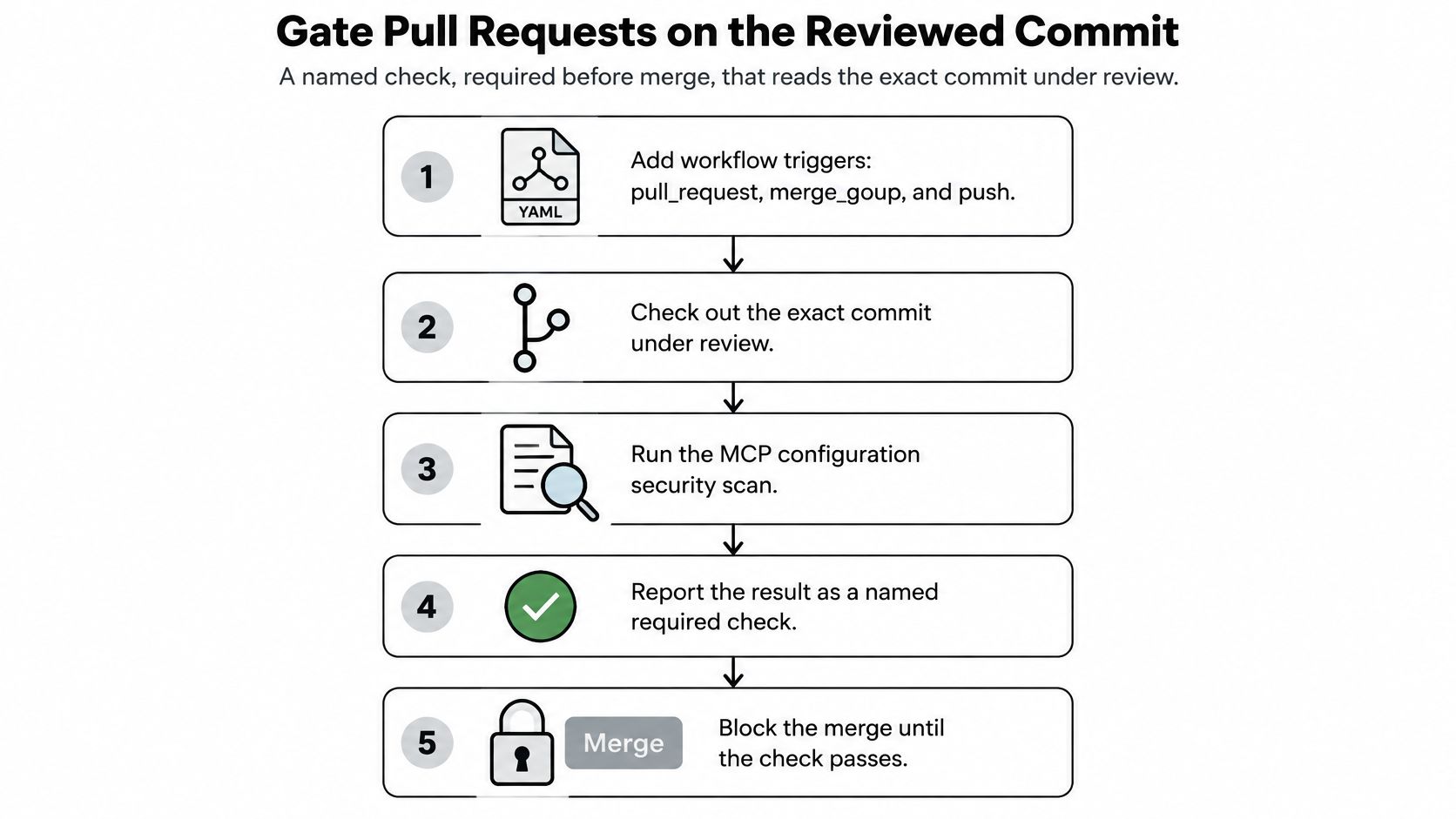
Wire the check into merge protection
- Add
pull_request, default-branchpush, and, for queued merges,merge_grouptriggers. GitHub's required-status-check troubleshooting guide requires merge-queue event coverage and evaluates required checks against the latest pull-request commit SHA. - Check out the pull-request head for a head-revision scan. For a merge-group event, scan the merge-group revision instead; don't reuse pull-request-only checkout logic.
- Run our CLI against the policy's declared scan paths. It supports local scans and CI enforcement, but use documented installation and invocation syntax rather than an invented command.
- Preserve the exit code. Code
0means policy passed,1means policy failed, and2means an operational or configuration error; both failing codes must fail the pipeline step. - Publish a stable, named result. GitHub's status-check documentation distinguishes detailed Checks generated by Actions or Apps from simpler commit statuses.
- Require that exact check name through branch protection or a repository ruleset. Our integration supports required checks; repository administrators still need to select the intended check.
- Push a new commit and verify that the scanner reruns against it. Inspect the reported revision rather than trusting a familiar green badge.
- Investigate skipped jobs. GitHub accepts
success,skipped, andneutralas successful states, so conditional execution must not bypass the security scan without anyone noticing.
Test the enforcement path
Use a synthetic policy violation to exercise the merge gate, then remove it. Confirm that a scanner error blocks merging too; unavailable analysis isn't a passing security decision.
For broader workflow design, security automation insights from PushOps provide useful context. Our guide to MCP security checks in GitHub pull requests covers the repository integration in more detail.
The accompanying walkthrough provides another view of the process.
Govern Server Approvals Across Teams
A teammate approves a source-control MCP server, then the shared configuration changes to a package version with broader permissions. The original consent still exists, but it does not identify which command, endpoint, and permission set was accepted.
The VS Code full-MCP-support article describes the authorization foundation. Use that consent boundary as an input to team governance: approval belongs to the reviewed execution path in a specific commit, and a material change needs a fresh decision.
Record what was approved
Keep an approval record that connects the configuration to its operational identity:
- Approver: The person or accountable team accepting the entry.
- Execution path: The exact command, arguments, package version, or remote endpoint.
- Reviewed revision: The commit SHA containing the approved configuration and policy.
- Credentials: The service identity, intended scope, and credential source, without storing secret values.
- Runtime result: Whether supported requests routed through Gateway were permitted or blocked, under which policy, and what request history supports the outcome.
Workspace trust, server trust, extensions, and network domains remain distinct boundaries. A server approval should expire when the command, endpoint, package version, credential scope, or tool permissions change.
Connect intent to observed behavior
Static analysis identifies permissions, credentials, and approval settings that need attention without running the agent. Runtime verification needs evidence tied to the same identity and configuration revision.
Store the reviewed configuration in the Library so teams can reuse the approved version. Connect the server to Gateway for the separate runtime boundary: Gateway checks supported MCP requests routed through it, beginning with the connection and continuing through policy behavior and request history.
Approval should expire when the approved execution path changes.
The VS Code trust-and-safety guidance supports treating approval as a lifecycle concern: bind local services appropriately, isolate networks, use role-based access, and prefer short-lived, narrowly scoped credentials.
Do not claim visibility into requests that bypass the monitored route. An absence of blocked requests could mean permitted behavior, missing coverage, or no requests at all.
Decide What a Passing Scan Covers Before You Merge
A static finding comes from configuration text. Observed runtime behavior comes from running the server and watching its actions and requests.
Define the acceptance boundary
A passing scan covers only the files, parser coverage, and policy that were really applied:
- Configuration fields: Commands, arguments, endpoints, and environment references successfully read.
- Rule evaluation: Matching findings and thresholds for the selected policy.
- Pins as written: Whether a package reference declares a fixed version.
It doesn't establish facts outside that evidence:
- Package contents: A pinned version can still contain malicious or vulnerable code.
- Runtime calls: Declared destinations aren't proof of actual outbound behavior.
- Approval history: A passing result doesn't establish who authorized the server.
- Platform enforcement: Sandbox settings aren't proof of enforcement on an untested platform.
- Unread files: An omitted Cursor, Claude Desktop, VS Code, or Continue file remains outside the result.
Our rule packs group related checks around security goals; they don't certify compliance. A clean scan isn't a safety guarantee or framework certification.
Make the merge decision explicit
Open the synthetic native MCP scan example, then read each finding in order: rule, severity, field, evidence, and suggested change. Compare the output with the entry-level checklist, without assuming every checklist item maps to a confirmed native rule.
Use our MCP security best practices guide for the broader operating baseline. If findings match expectations, make the check required; if a finding is unexpected, fix the entry and rescan; if an expected finding is missing, inspect which file and fields the scan read.
Foo Guard offers pre-deployment configuration scanning and repository policy enforcement for reviewing MCP execution paths before merge. Visit Foo Guard to inspect a configuration, review evidence-backed findings, and connect supported routed requests to runtime controls where your workflow needs them.