Application Security Tester: Role, Skills and Tools
Learn what an application security tester does, which skills and tools the role needs, and how to review AI agent and MCP configurations before release.
A developer on your team has just added a new MCP server to a Cursor project and opened a pull request. The diff is small, a few lines of JSON, but it can launch a local process, pass it a credential, and give an agent new tools. You're asked a simple question before it merges. Does this file create risk, and can you prove your answer?
What an Application Security Tester Does Day to Day
Say that pull request lands on an application security tester. The first job isn't scanning. It's scoping, deciding which components, data, and trust boundaries the new server touches, using the architecture diagram and data-flow notes. From there the work follows the artifacts the change touches.
| Task Area | What the Tester Does | Typical Artifacts or Tools | Core Skill |
|---|---|---|---|
| Scoping | Defines components, data and trust boundaries to test | Architecture diagrams, data-flow notes | Threat modeling |
| Static analysis | Reviews source and build output for insecure patterns | SAST scanners, code review | Reading code in the team's language |
| Dynamic and manual testing | Probes running applications for exploitable behavior | DAST scanners, intercepting proxy | HTTP, authentication and session knowledge |
| Dependency review | Checks libraries against known vulnerability advisories | SCA tools, lockfiles, SBOM | Package and version analysis |
| Configuration review | Checks permissions, tools, credentials and approvals in agent and tool configs | JSON or YAML configs, MCP definitions, CI checks | Least-privilege reasoning |
| Reporting and retest | Writes reproducible findings and verifies fixes | Tickets, reports, commit SHAs | Clear writing and developer communication |
Static analysis reads the code behind the endpoint. Dynamic and manual testing probes the running build. Dependency review checks the lockfile and SBOM. Configuration review is where your MCP file belongs, checking declared permissions, credentials, and approvals before anything runs. Reporting ties each finding to a ticket and a commit SHA, then retest confirms the fix on that exact commit.
The role sits between developers, security engineers, and operations teams. It's also part of a large workforce. The U.S. Bureau of Labor Statistics information security analysts outlook counted 192,900 information security analyst jobs in 2025 in the United States, a profession closely tied to application security testing, and projects 233,400 by 2035.
If you're mapping how people enter this work, Mojolin's guide to junior security jobs is a useful reference for adjacent titles. Whatever the title, two skills recur in every row above. You need to reason about what an attacker could reach, and you need to write findings a developer can reproduce without you in the room.
How the Tester Role Differs from Pentesters and AppSec Engineers
These three roles overlap, but they work at different points in the lifecycle. Confusing them leads to gaps, because each one leaves work the others are meant to pick up.
A penetration tester usually runs a time-boxed engagement against a built system. The deliverable is evidence of attack paths that worked against that deployment, at that time. An application security tester works across development, from scoping and code review to pull-request checks, and stays to retest fixes after they land. An application security engineer builds the tooling, policies, and default paths that let developers run those tests without specialist help.
Apply all three to the same synthetic change, a new internal API endpoint plus a new MCP server entry. The penetration tester probes the deployed endpoint for exploitable behavior. The application security tester reviews the code and the MCP configuration before merge, files reproducible findings, and schedules the retest. The AppSec engineer adds a shared rule so that same risky MCP pattern gets flagged in every repository, not just this one.
Judge a role by the tasks it owns, not by the title on the posting.
Small teams often combine these roles in one person, and employers use the titles inconsistently. That's fine, as long as someone owns each task. The risk isn't a missing title. It's assuming a periodic penetration test replaces pre-merge review, or that buying tooling replaces the person who validates whether a finding is real.
Testing Methods and What Each One Proves
No single method is complete, and treating one clean result as a safety verdict is the most common error I see in test plans. Each method examines a different surface and produces a different kind of evidence.
| Method | What It Examines | Typical Output | What It Cannot Prove |
|---|---|---|---|
| Static analysis (SAST) | Source code and build artifacts, without running them | Rule-matched findings with file and line | Whether a flagged path is reachable at runtime |
| Dynamic analysis (DAST) | Responses from a running application to crafted requests | Observed responses and reproduced requests | Coverage of code paths the test never reaches |
| Software composition analysis (SCA) | Third-party dependencies and their known vulnerabilities | Dependency list with matched advisories | Whether a package is malicious or safe |
| Manual and penetration testing | Business logic, authorization and multi-step abuse | Reproduced attack path with evidence | Completeness beyond the tested scope |
| Configuration review | Declared permissions, tools, credentials and approval settings | Rule findings tied to the configuration location | What the launched process actually does |
White-box, gray-box, and black-box describe the access level you have, not rival methods. White-box means you can see internals, black-box means you test from outside, and gray-box sits between them. NIST SP 800-115, the Guide to Information Security Testing and Assessment, describes black-box testing as particularly useful for assessing how effectively the deployed application handles threats, while gray-box testing combines external behavior analysis with limited internal knowledge.
Reading the Cannot Prove Column
That last column is the point. SAST can flag a dangerous code path it can't confirm is reachable. DAST can only speak for paths it exercised. SCA matches known advisories, so it can't declare a package benign. Manual testing gives strong evidence for what it reproduced and silence on everything outside scope. Configuration review proves intended permissions, not effective behavior once a process launches.
For background on combining these in a web program, web security guidance for development teams covers the practical trade-offs, and it's worth pairing that with a shared vocabulary for common flaw classes such as the OWASP Top 10 categories.
I pick the first method based on what changed and what that change can reach. Code changed, start static. Behavior changed, test it running. A config grants new capability, review the declaration first, then decide what runtime validation you still need.
The Testing Workflow from Scope to Retest
A repeatable sequence matters more than any single tool. Follow these steps in order and you'll produce findings another person can verify.
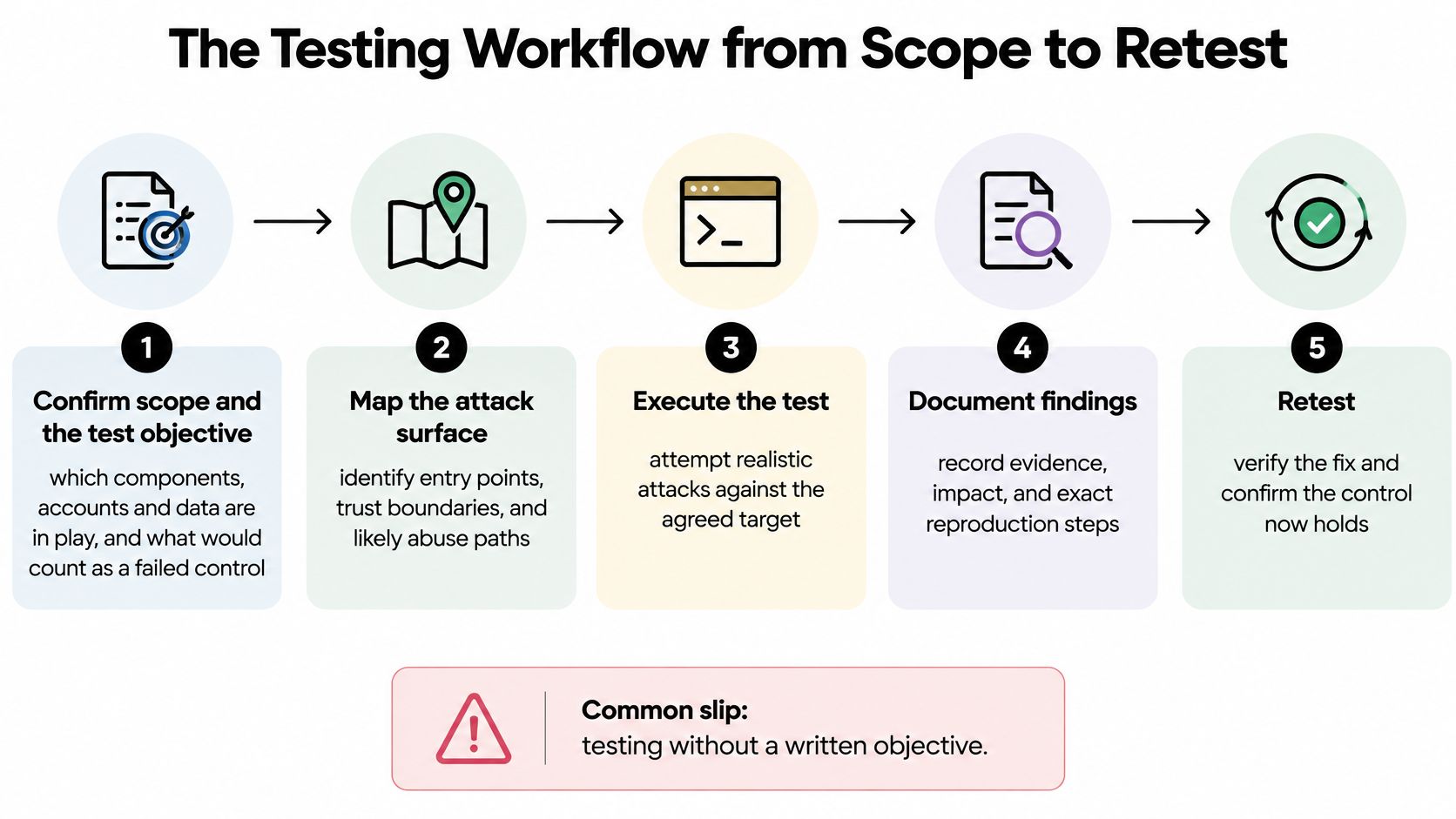
Confirm scope and the test objective. Name the components, accounts, and data in play, and write down what would count as a failed control. The common slip is testing without a written objective, so nobody can say whether you finished.
Map the attack surface. List entry points and trust boundaries, then follow any tool, credential, or network path that leads further in. For an MCP entry, that means the command it launches, the environment it inherits, and the systems its credential can reach.
Run static and dependency checks on the exact commit. Scan the commit under test, not a branch name that can move overnight. Scanning a branch is the slip that makes results impossible to reproduce later.
Run dynamic or manual tests on a non-production build. Use test accounts only, with data you created for the test. Using real customer data turns a security test into an exposure of its own.
Recording Evidence That Survives Handover
Record commands, inputs, timestamps, build identifier, and observed output. Log enough that a colleague can repeat the result cold. If they can't, you have an observation, not a finding.
Write the finding. Include the affected location, reproduction steps, evidence, plain-language impact, and a suggested fix. Don't file a raw scanner result as a verified finding. A rule match is a lead until you've checked reachability and context.
Practical rule: If the developer cannot reproduce it from your ticket alone, the finding is not finished yet.
Retest the fixed commit. Confirm the original reproduction no longer works on the new build, and check the fix didn't break the legitimate path. Close the ticket against that commit SHA, not against a verbal assurance.
Hand repeatable checks to the pull-request gate. Anything you checked by hand that a deterministic rule can check should run automatically on the next change. That's how one review becomes lasting coverage instead of a one-off opinion.
Triaging Findings and Measuring Remediation
Start with the merge decision. Which findings block a pull request, and which can wait? That answer depends on separating severity, how bad the outcome would be if exploited, from exploitability, whether the reproduced path works in this deployment.
A high-severity scanner hit on unreachable code shouldn't block a release on its own. A lower-severity issue you've reproduced end to end against real permissions often should. Severity without exploitability creates noise. Exploitability without severity context creates panic.
Four Decisions to Make Explicit
- Block the merge for reproduced, high-impact findings, such as a credential committed in a config or an authorization bypass you've demonstrated.
- Accept risk only with a named owner and an expiry date, recorded where the team will see it again. Undated acceptance is just forgetting.
- Separate regressions from inherited debt with a baseline, so a new scan shows what this change introduced instead of relitigating everything already present.
- Assign configuration findings to the file owner, the developer for a project config, the platform team for shared policy. Unowned findings don't get fixed.
Metrics Worth Tracking
Track median time to remediation, reopened-finding rate, exploitable-finding validation rate, coverage by component, and baseline regression count. Together they show speed, quality of fixes, and whether you're testing the whole surface or the same easy parts.
The scale of the backlog problem is real. The 2025 State of Software Security report reported an overall flaw half-life of slightly more than eight months, the time required to fix 50% of identified flaws, and found that frequent application testing, use of multiple testing types such as SAST, DAST, and SCA, and developer security training correlate with faster remediation.
My rule of thumb is simple. A metric matters only when someone reviews it each sprint and changes something because of it. If the regression count climbs and nobody adjusts the gate, you're collecting numbers, not managing risk.
Reviewing a Synthetic MCP Configuration Step by Step
Here's the concrete task. Review a project MCP file before it merges, using a complete synthetic example. If you're new to the protocol itself, start with what the Model Context Protocol is before judging the config.
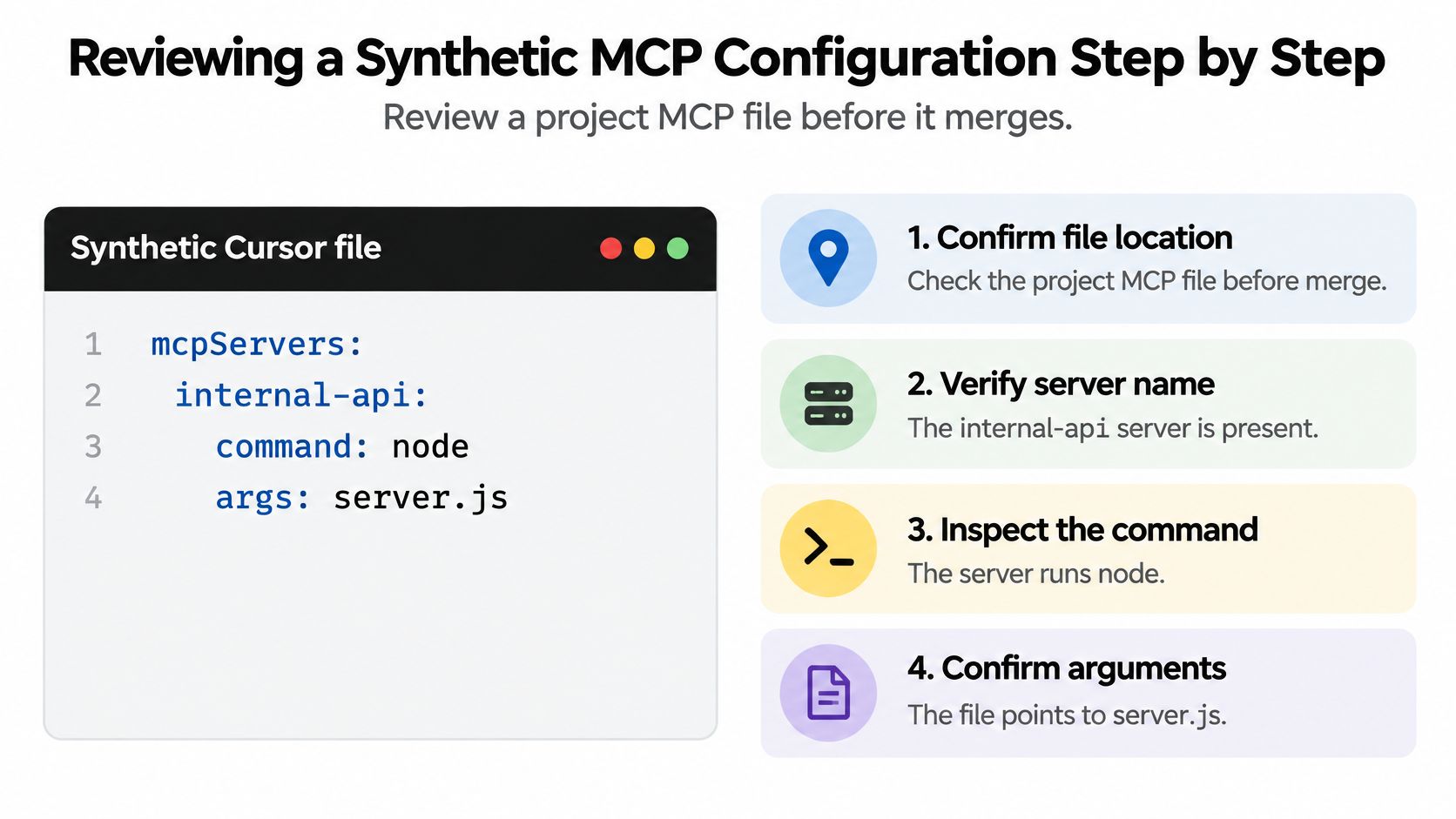
The synthetic Cursor file at .cursor/mcp.json contains one server. In compact form it reads { "mcpServers": { "internal-api": { "command": "node", "args": ["server.js"], "env": { "API_KEY": "${API_KEY}" } } } }, and for this exercise assume server.js loads a package referenced as synthetic-notes-mcp@1.2.3. That package name is synthetic, invented for this review. Don't install it.
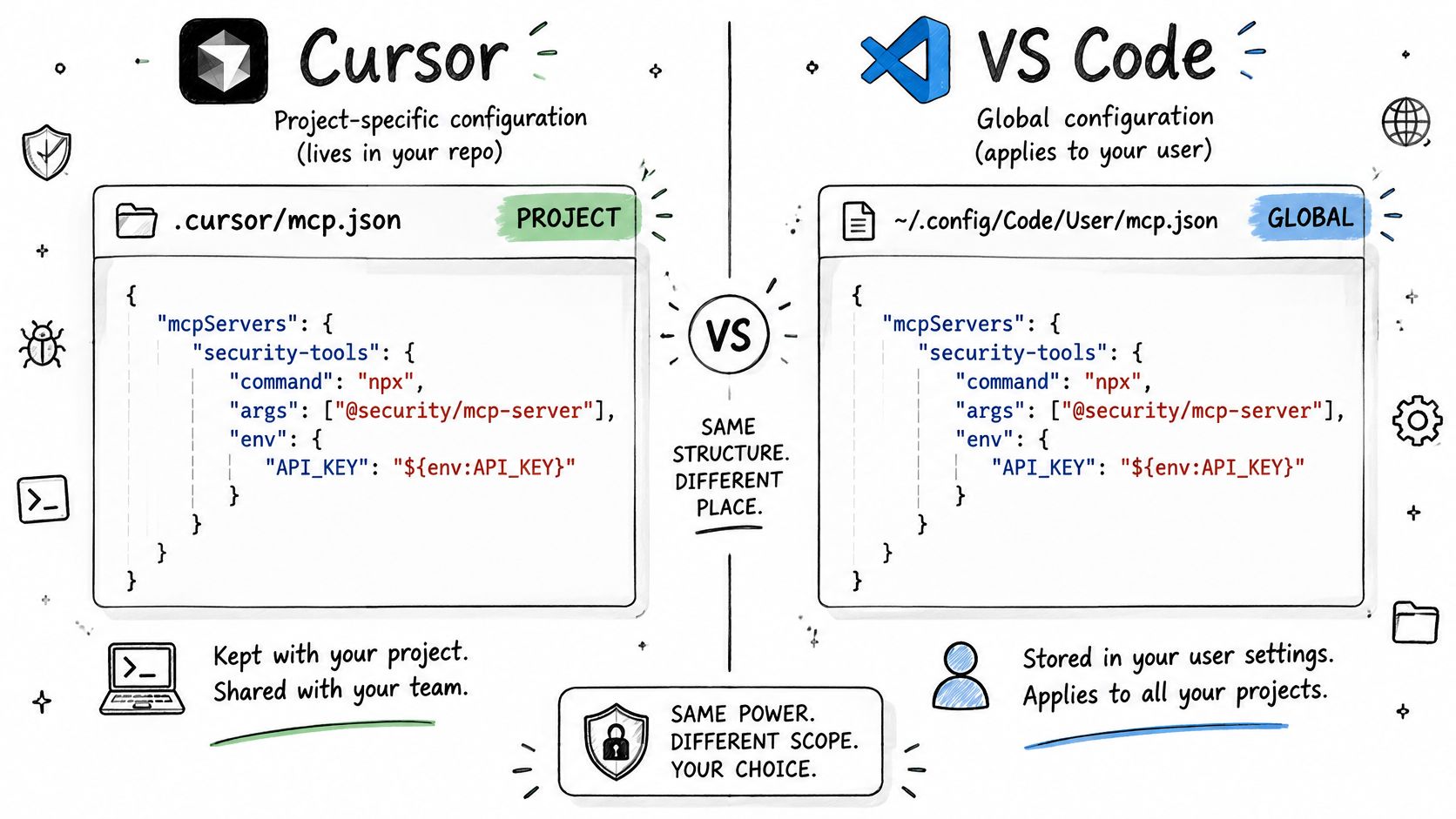
That shape is native, not converted. Cursor's MCP documentation identifies mcp.json as the native format, with a project-specific .cursor/mcp.json and a global ~/.cursor/mcp.json, and states that when the same server name appears in both files, the project-level configuration takes priority. You review the file as the client reads it. It doesn't need rewriting into another schema.
Three Checks on the First Version
- Is the command narrow with fixed arguments? Here it's
nodewith a single fixed argument,server.js. That's a constrained launch, unlike a shell string built from variables. - Is the credential referenced, not embedded?
${API_KEY}passes a reference to an environment variable. The secret value itself isn't committed in the file. - Does the scope match the task? Check the shell, filesystem, and network capability this server needs for its stated job, and question anything broader. Least privilege means the minimum capability that still works.
For the operational side of running such servers day to day, it's worth learning how teams manage MCP server services so your review reflects how the process will be operated.
What Changes in a Risky Second Version
Now imagine a second version that replaces the reference with a literal key value and adds a broad shell tool. A static finding for the literal key should point to the rule that matched, the exact configuration location, and the evidence, without reproducing the secret in the ticket. A finding for the shell tool should name the capability granted and why it exceeds the task. Both are configuration evidence, statements about what's declared.
To run that check yourself, use the native MCP example scan. Paste a configuration or upload a JSON or YAML file, choose rules or keep the default selection, run the analysis, then read the findings, security score, and remediation guidance top to bottom.
A clean static result describes the file you tested. It doesn't describe the process that file launches.
Be explicit about the boundary. Pinning synthetic-notes-mcp@1.2.3 does not establish that the package is safe. A pinned version gives you reproducibility, nothing more. The example can't show what server.js does after launch, whether a remote endpoint is trustworthy, or whether transitive dependencies are benign. Those need dependency review and runtime observation, separate evidence from separate methods.
Native MCP File Formats for Cursor and VS Code
Reviewers lose findings when they assume every client reads the same file. Cursor and VS Code don't, so check the format your client really parses.
| Client | Project or workspace file | Global or user location | Top-level key | Name clash rule |
|---|---|---|---|---|
| Cursor | .cursor/mcp.json | ~/.cursor/mcp.json | mcpServers | Project entry takes priority |
| VS Code | .vscode/mcp.json | User profile | servers | Workspace file scopes servers to that workspace |
Cursor reads a top-level mcpServers object and also supports remote servers declared with a url and authentication headers, which means your review has to cover headers and endpoints, not just local commands. VS Code reads .vscode/mcp.json for a workspace or its user profile, declaring servers under a top-level servers object with a type field such as stdio.
A parser must accept each client's native shape rather than assume one universal schema. If your scanner expects mcpServers and the repo contains a VS Code file keyed by servers, you'll get a quiet miss instead of a finding. Quiet misses are worse than failures because they look like passes.
The short video below walks through how these client configurations are set up in practice.
Before relying on any result, confirm which files and formats the scanner accepts in the supported formats documentation. We scan agent configurations for permissions, tools, credentials, and autonomy, and native files don't need to be rewritten into another schema for that review. The same caution applies to Claude Desktop and Continue files. Verify the exact native format first, then scan the file as written.
Add a Required Configuration Check to Pull Requests
Manual review doesn't scale, so make the deterministic part a required check. If you're tightening repository controls generally, pair this with your GitHub security settings review.
- Add a pull-request workflow that scans changed native files such as
.cursor/mcp.jsonand.vscode/mcp.jsonand publishes a stable check name. We provide an API for deterministic configuration scans, a CLI, a GitHub Action, and API-key authentication for personal or team workspaces. - Mark that check as required on the protected branch.
- Confirm it runs on the latest commit. GitHub's required status checks documentation states that checks from earlier commits do not satisfy a required-check requirement, and lists
success,skipped, andneutralas successful states. - Set blocking severities in your repository policy file and handle accepted risk with an owner and expiry date.
You can start without budget approval. We offer a Free plan at $0 for deterministic security analysis, JSON and YAML uploads, and analyzer use without an account.
State the boundary plainly to your team. A passing check means the deterministic policy passed for the tested files and commit. It doesn't guarantee safety, framework certification, or safe runtime behavior, and a pinned package version doesn't establish that the package is safe.
If your team is merging agent and MCP configurations on trust, put a deterministic check in the pull request instead. Paste or upload a native JSON or YAML file, review evidence-backed findings on permissions, tools, and credentials before anything runs, and keep runtime claims for runtime evidence. Start with Foo Guard and scan your first configuration today.