Cursor MCP Configuration Security Checklist 2026
Use this Cursor MCP configuration security checklist to review native files, credentials, pinning, and static versus runtime controls before deployment.
A teammate is waiting on a project change so they can repeat a research task in Cursor. You're about to commit .cursor/mcp.json, but the file doesn't just name the task. It specifies a server, how to launch it, which environment values it receives, and possibly which remote service it can contact. The prompt might ask the agent to download a public dataset. That task name doesn't stop a server from probing for data that wasn't meant to be exposed.
This Cursor MCP configuration security checklist starts with the permissions the configuration grants, not the description of the work. It reviews native Cursor, Claude Desktop, VS Code, and Continue files as they are, without asking developers to rewrite them into another schema. A fictional, synthetic Cursor example later in the article shows what a file-based review can flag and what it can't establish.
Before approving a server entry, ask who owns and maintains it, which tools it declares, what files or commands it can reach, where its credentials live, and whether its package version is fixed. Then separate what the file shows from what only runtime testing can confirm.
Start with One Server and One Task
The task sounds harmless: download a public dataset and summarize it. The project's .cursor/mcp.json is meant to let a teammate repeat the work, so sharing the configuration seems useful. But a server entry is also a request to run a particular program or contact a particular endpoint, potentially with credentials and access to local resources.
Keep the task and the capability separate during review. “Download a public dataset” describes what the agent is being asked to do. The command, args, env, url, and headers fields describe how a server runs and what it may be able to reach while doing it. A server with broad filesystem, shell, database, or network access may have more authority than this task needs.
Cursor supports project-scoped configuration that can be committed for team use, as well as a global configuration on an individual developer's machine. That makes repository review important, but a project file alone may not show the full configuration that applies to a particular user. Cursor's MCP configuration guidance describes the native setup and local and remote server options.
Define the task's actual boundary
Write down the intended data source and the actions the server needs to complete the task. Then inspect the server's declared tools and launch details. If the task needs read access to one public source, don't treat write access to a database or unrestricted local files as an incidental implementation detail.
The example later in this guide is synthetic. Its fictional package names are there to make the review concrete, not to recommend software. Do not install @example/mcp-demo or any other example package.
A useful review asks:
- Source: Is the server from a repository or developer the team trusts?
- Tools: Do the declared tools match the task?
- Access: Can the process reach sensitive files, shell commands, or unrelated network destinations?
- Credentials: Where are secrets supplied, and what can use them?
- Evidence: Which concerns can a static review identify, and which require runtime checks?
That distinction keeps a plausible task description from substituting for an actual permission review.
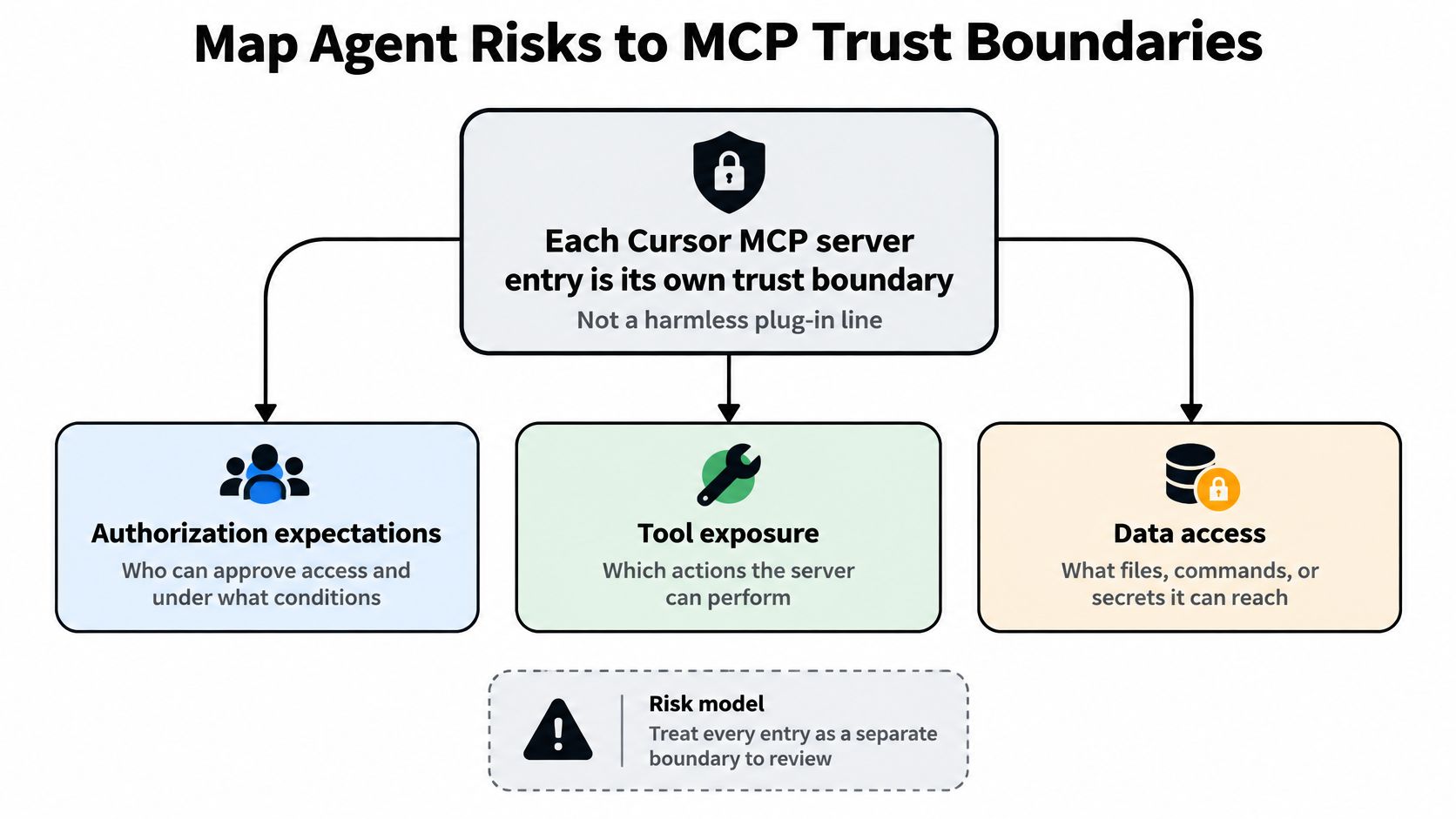
Map Agent Risks to MCP Trust Boundaries
Treat each entry in mcpServers as its own trust boundary. Every server has an identity, a transport, a set of declared tools, credentials, and resources it can reach. A review establishes who authorizes access and which service receives it.
Connection success is the easy part.
For remote servers, the MCP authorization specification builds on OAuth 2.1. Its expectations include HTTPS on authorization endpoints, protected resource metadata so a client can discover which authorization server covers a resource, and token audience checks so a credential issued for one resource gets rejected by another. Each expectation maps to a config review: reject production authorization URLs on plain HTTP, confirm the metadata points at the authorization server you expect, and verify the token audience matches the resource receiving it. A token that parses cleanly can still be wrong for the server holding it.
Turn attack classes into review questions
OAuth-based deployments have well-known failure modes: token theft, authorization-code interception, mix-up and confused-deputy attacks, and open redirection. Audience validation counters several of them, so treat it as a control to verify rather than a line to skip. A configuration review turns those concerns into questions:
- Authentication mode and endpoints: Is the server protected as intended, and do production authorization endpoints use HTTPS?
- Resource identity: Does the authorization metadata identify the expected authorization server, and does the token audience name the intended resource?
- Redirect behavior: Are redirect destinations constrained and consistent with the expected authorization flow?
- Credential placement: Are credentials scoped to this server, or could another tool entry reuse them?
The answers shape least privilege, and least privilege applies to the effective capability set: the permissions that remain after Cursor resolves the project file against the developer's user-level config. Scopes and credentials should cover only what the declared tools need in that merged result. Keep sensitive integrations away from broad filesystem, shell, database, or network access. Foo Guard's overview of AI agent security risks offers a broader risk orientation. Mappings to the OWASP Agentic Top 10, OWASP LLM Top 10, and SOC 2 criteria help organize findings, though a mapping or scan does not certify compliance with any framework. For score and grade mechanics, use the existing guide to reading a security assessment.
Read Native MCP Files Without Rewriting Them
Review starts from the file the client reads, because the file's location and schema decide what it controls. A project file committed to the repository applies to everyone who opens it. A user-level file applies on top of that, and it never appears in the diff. The effective capability set is what the project and user layers resolve to together, which is what least privilege has to constrain.
| Client | File | What to inspect |
|---|---|---|
| Cursor | Project .cursor/mcp.json; global ~/.cursor/mcp.json | The mcpServers object, project ownership, commands, arguments, environment values, URLs, and headers |
| VS Code | Workspace .vscode/mcp.json; account-level MCP configuration | The servers object; for HTTP servers, inspect type, url, and optional headers |
| Claude Desktop | claude_desktop_config.json | The native server entries and where their credentials and launch details are defined |
| Continue | Check the configuration in use | Confirm the exact accepted file shape and location against the supported-format documentation |
The object names differ. Cursor uses mcpServers; VS Code uses servers. VS Code also keeps an account-level MCP configuration opened through its command palette, and Claude Desktop reads claude_desktop_config.json. These distinctions tell a reviewer whether a setting is shared in source control or exists only in a developer's local environment. They also narrow the search when you are tracing where a headers or env value was defined.
Scope changes the answer.
Keep findings attached to the original file
Report findings against the native file developers maintain, at the path they will diff. Translating a Cursor, VS Code, or Claude Desktop config into an intermediate schema before review can hide which original field needs the fix, and the corrected output may never match what the client parses. For Continue, confirm the accepted layout against the vendor's current supported-format documentation, as noted earlier, before trusting an example or claiming a format is supported.
Apply the same rule in a pull request: review the actual file path and its diff. A project file shows what a team intends to share, but it cannot show what a reviewer's account-level configuration adds on top. Record both the file under review and the scope it represents, or the resolved result will surprise you later.
Check Privilege Credentials and Package Pins
Cursor's MCP guidance describes servers that authenticate through environment variables, configuration values that pass API keys or tokens, and OAuth using the authorization-code flow with PKCE. It also recommends trusted sources, permission minimization, secret handling, and considering local stdio transport and isolation for sensitive servers. Treat a confirmation prompt as one safeguard, not as authorization: it can reduce accidental actions, but it doesn't restrict a token, sandbox a process, review code, or enforce access on the server.
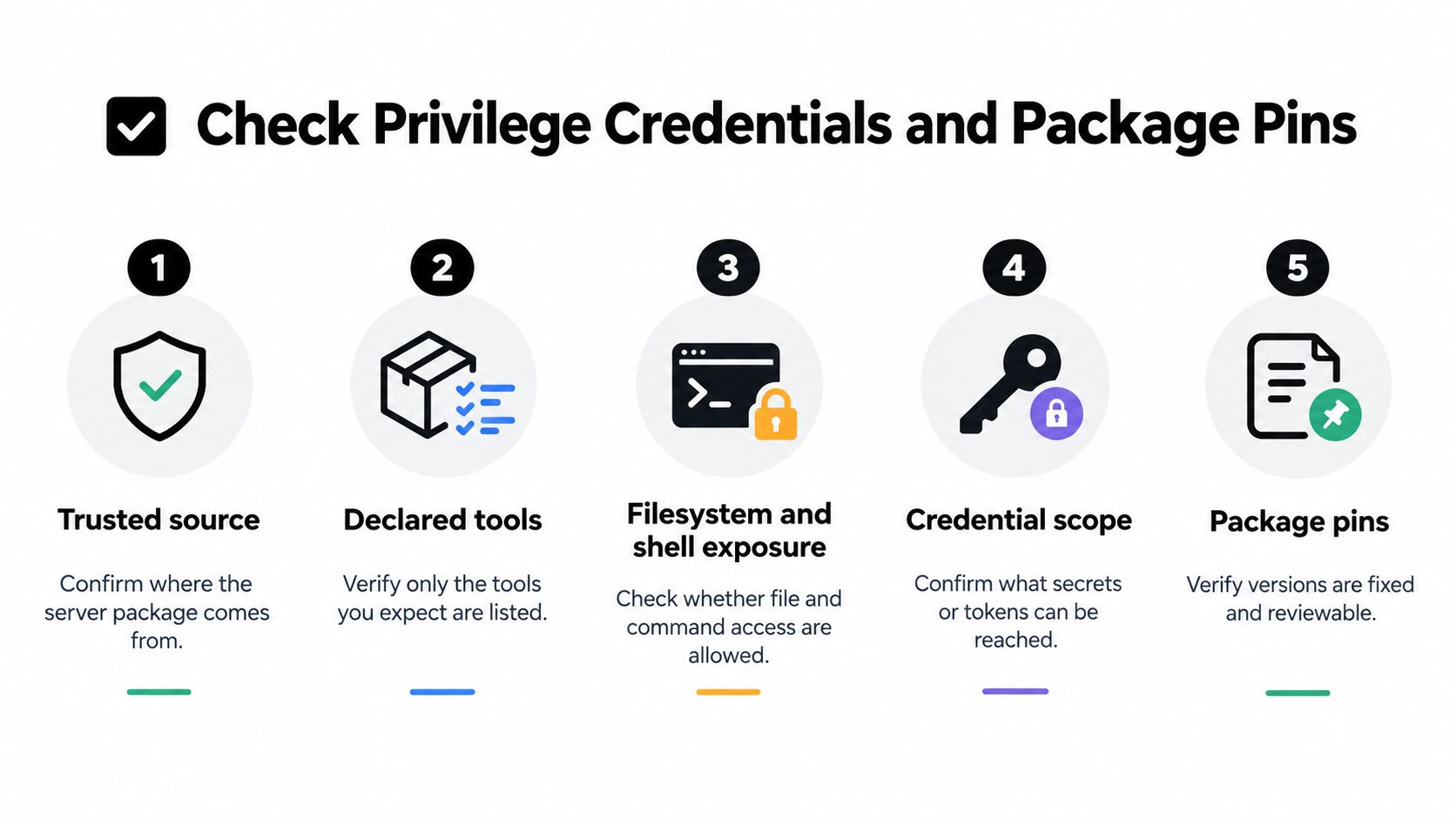
For each entry, record five checkable facts: trusted source, declared tools, filesystem and shell exposure, credential location, and network or API scope. Then follow the credentials beyond the JSON. Moving a secret into an environment variable prevents hardcoding it in that file, but doesn't prove who can read the environment, whether child processes inherit it, or whether it appears in logs, command-line arguments, backups, or remote authorization flows.
Practical rule: Use credentials scoped to one server and narrow to its job. Don't reuse a broad token across unrelated tools.
For a local stdio server, examine the privileges of the child process and its filesystem and network reach. For a remote server, review the endpoint, its identity, and the scope of its credentials. In either case, limit approved binaries, arguments, environment variables, and network destinations. Cursor's guidance for MCP server configuration is a starting point, not a substitute for checking the values in your own file.
Pin versions, then review the package
A floating launch such as npx -y can resolve to different package contents over time. Pin the executable package and version, keep the applicable lockfile current, and review package provenance and requested permissions. GitHub recommends lockfiles such as package-lock.json, yarn.lock, and Pipfile.lock to pin dependency versions, while noting the need to keep reviewing dependencies. Its pull request dependency review can identify vulnerabilities introduced by dependency changes.
A pin improves reproducibility; it doesn't establish package safety. A fixed version lets a reviewer inspect the same version again. It doesn't prove that the package is benign, certified, or safe to execute. Use pull-request checks alongside source and permission review. Foo Guard's GitHub Actions security guide covers the separate workflow side of that review.
Finally, inspect tool-approval patterns. A wildcard allow can extend permission without notice when a server adds a tool or another server exposes a matching name. Prefer explicit approvals that make additions visible to reviewers.
Walk Through a Synthetic Cursor MCP Example
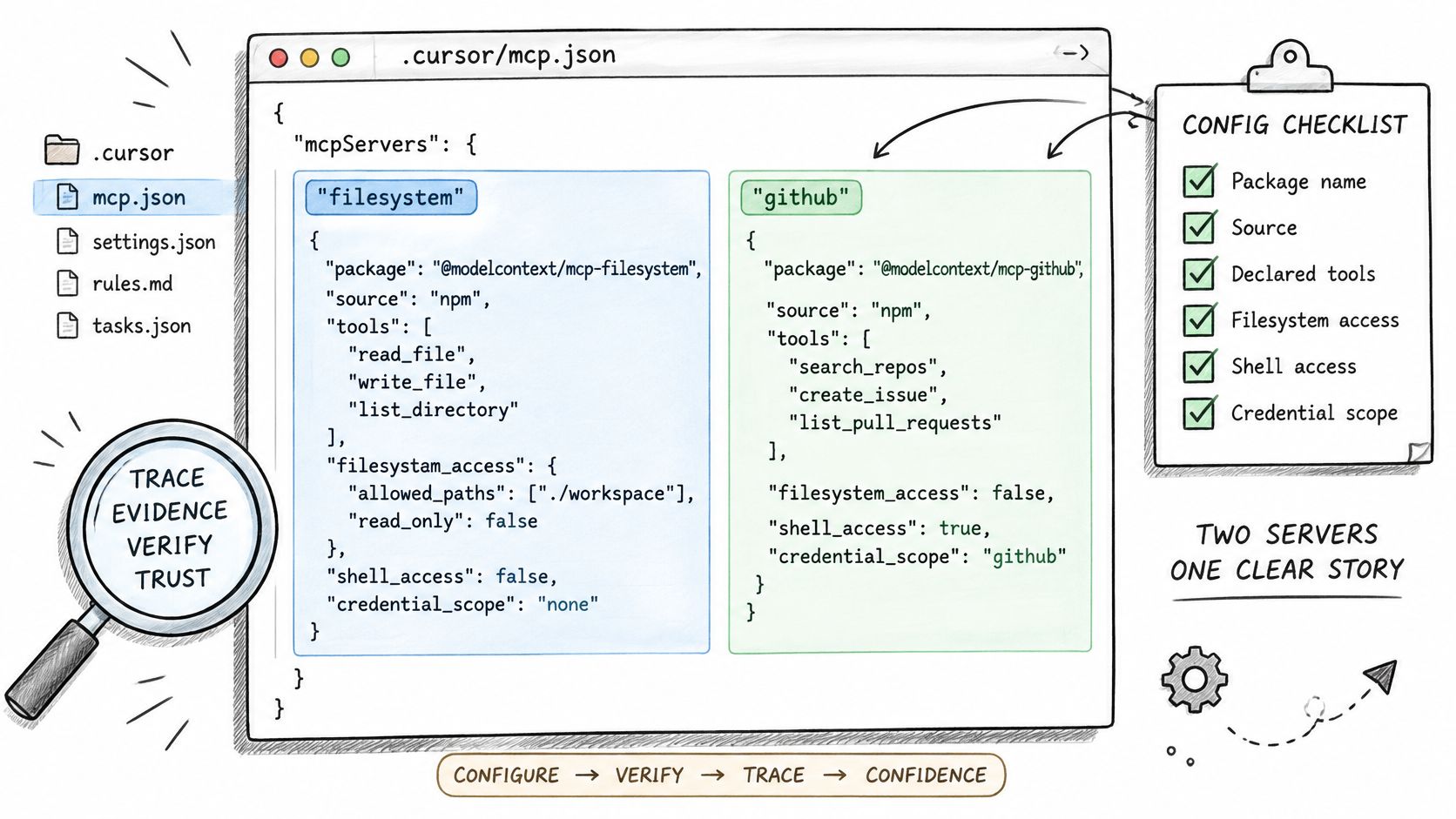
This fictional .cursor/mcp.json shows two contrasting entries. Both package and service names are synthetic placeholders. Do not install @example/mcp-demo or any other package shown here. The example illustrates fields to review, not a working server or a recommendation.
{
  "mcpServers": {
    "synthetic-local-research": {
      "command": "node",
      "args": [
        "node_modules/@example/mcp-demo/server.js",
        "--read-only"
      ],
      "env": {
        "DATASET_TOKEN": "${DATASET_TOKEN}"
      }
    },
    "synthetic-remote-catalog": {
      "url": "https://mcp.synthetic.invalid/catalog",
      "headers": {
        "Authorization": "Bearer ${CATALOG_TOKEN}"
      }
    }
  }
}
The local entry names a binary and arguments. Review who owns the project and its dependency files, whether node is an approved executable, and where the package comes from. The --read-only argument is a declaration, not proof that the program enforces read-only access. Check which paths the child process can write to, whether its behavior can invoke shell commands, and which network destinations it can contact. The environment value avoids placing a secret directly in this JSON, but it doesn't show who can read DATASET_TOKEN at runtime.
The remote entry uses HTTPS, but that alone doesn't prove the service identity or the token's intended audience. headers.Authorization is a visible credential placement that should prompt review of token scope, storage, rotation, and which service receives it. Keep that credential specific to this server.
Separate visible evidence from assumptions
A static review can flag hardcoded secret-like material, broad keys, untrusted sources, sensitive transport choices, excessive tool capabilities, and powerful tools combined with weak approval or isolation. It can also identify a floating package reference or a broad wildcard approval. An explicit tool allowlist is easier to review than an allow that automatically covers future tools.
But this file doesn't execute the server. It can't show whether a child process inherits additional environment values, whether a denied tool argument leaks a secret, or how the server behaves after deployment. A clean result on this file wouldn't prove the package is safe, and it wouldn't mean a framework certified the agent.
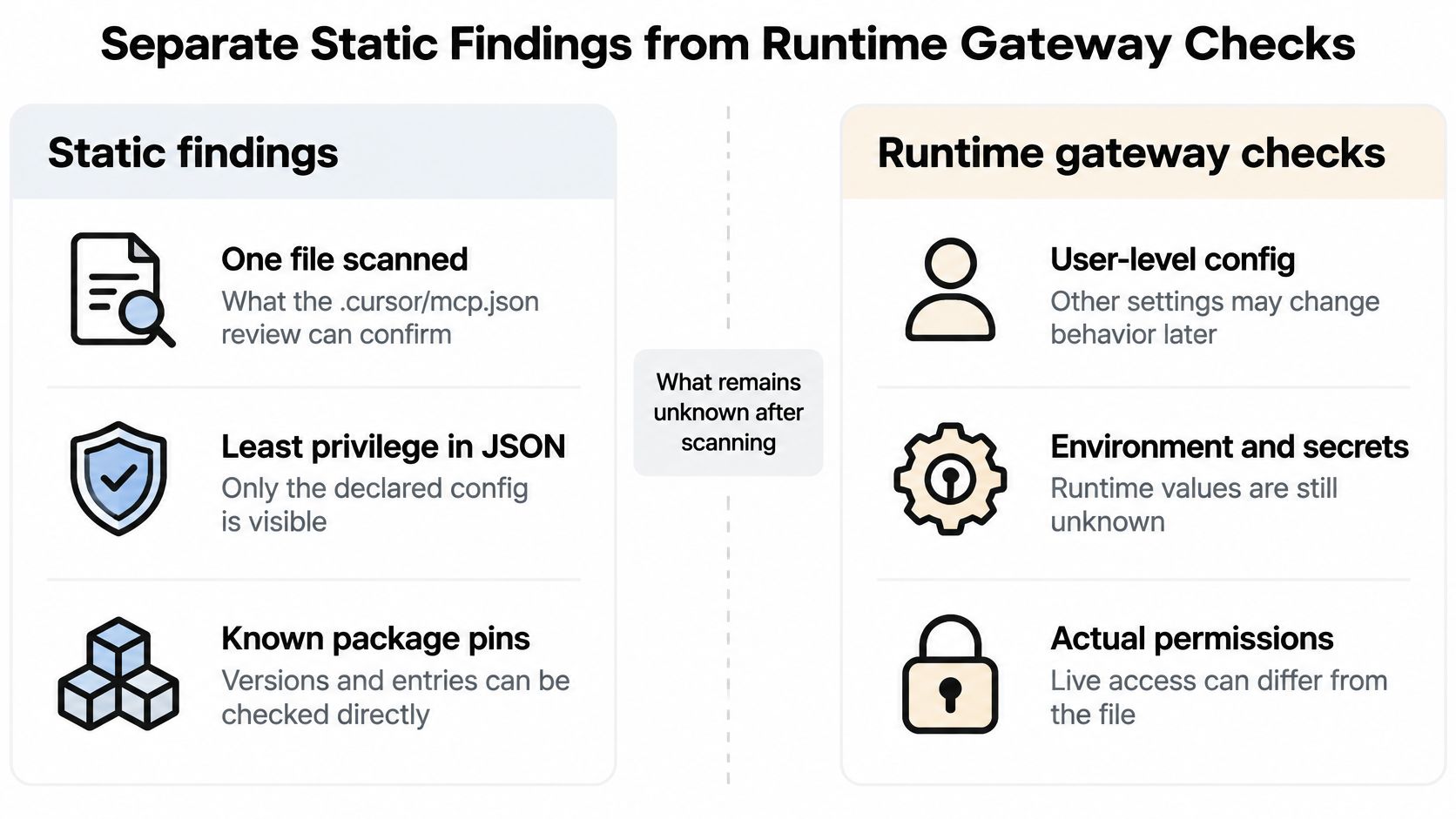
Separate Static Findings from Runtime Gateway Checks
A file scan answers questions about the configuration it received. It doesn't establish the effective capability set for every commit, workspace, user, and server version. A project entry, inherited user-level settings, renamed tools, and newly added tools can change what the agent can do. Wildcards make that drift harder to spot because approval may extend to tools that weren't present when the rule was first reviewed.
Deterministic diffing helps reviewers see resolved configuration changes. Detect wildcard patterns, inventory servers and tools, and require review when a server introduces a tool rather than letting it inherit approval. The key question is: what exact capability set applies here, and what change expands it?
Static evidence and routed enforcement answer different questions
A static scanner can inspect supported JSON and YAML agent definitions and MCP-style tool specifications without observing live conversation or model traffic. Deterministic analysis means the same file and policy produce the same findings, score, and grade. Evidence paths point reviewers to the configuration locations behind findings. Secret-like values are redacted before storage, and anonymous in-browser scans aren't saved.
Policy as code in .fooguard.yml, organization thresholds such as failOn and minGrade, GitHub App checks, GitHub Actions, and baseline comparison can make a pull request fail when policy isn't met. A repository file can't weaken a Team workspace policy. AI remediation suggestions are separate from scoring and pass-or-fail decisions.
A Hosted Gateway covers a different boundary: supported MCP tool calls routed through it. In Monitoring and Audit or Enforcement mode, it can use request history, allowlists, argument validation, deny rules, exceptions, and agent blocks. It doesn't rewrite the native client file, and it can't observe traffic that wasn't routed through it. The MCP gateway guide explains that runtime distinction. Use assessment evidence paths to decide what to change; don't treat static findings as observations of live behavior.
A scan can establish what a supported configuration declares. Runtime enforcement can govern only requests that pass through its route.
Scan the Native File and Review the Next Change
Open the file the client reads: .cursor/mcp.json in the project, or the user-level config when one exists. The supported format list, covered earlier, tells you which files a scanner can parse, so check the resolved set before treating any example as complete. Scan the native MCP configuration, read each finding at its evidence path, change the smallest thing that fixes it, then scan the revised file.
Effective privilege is what remains after project and user entries resolve. Review that merged result rather than either file alone, because a server defined broadly at the user level and narrowed in the project file has a different real capability set than either file shows by itself.
A clean output says something narrow: this file, against this policy, produced no findings. It says nothing about package behavior, model judgment, or calls the scan never saw. Keep that boundary explicit in the review instead of letting a pass harden into a broader assurance claim.
Make the pull request the review boundary for the next change. Pin the server package, keep the lockfile current, and let dependency review flag added or updated packages. Policy thresholds fail the check when they should. If a tool call routes through a gateway, enforcement applies to that routed request; calls outside the route stay outside its view.
Keep reviewed versions in a Library when your team needs history, with the client file staying in its native schema.
Foo Guard offers deterministic configuration scanning, evidence-backed policy checks for pull requests, a versioned Library, and a Hosted Gateway for supported routed MCP calls. Use Foo Guard to review the native configuration you already maintain and build a clear check into the next change.