
Signature Failed Verification: How to Fix It
Signature failed verification usually means bad bytes, the wrong secret, or a stale key. Classify the error, then fix the check.
A receiver logs “Signature failed verification” during a synthetic Gateway alert test. The most common first move, rotating the secret or rewriting the agent configuration, can make diagnosis harder: the same error can describe several different failures. Name the failure class and preserve the exact signed input before changing anything.
For this synthetic example, the request body is {"id":"del_synth_01","version":"1","event":"alert.test"}. The signed input is the Unix timestamp, a period, and those exact UTF-8 bytes. Start by classifying the receiver's result.
Classify a Signature Failed Verification
“Signature failed verification” does not prove tampering. The same message can describe an invalid, untrusted, expired, or unverifiable signature, so classify the failure before changing a secret or editing configuration.
| Class | What you see | Retry the same request | First check |
|---|---|---|---|
| Invalid | Malformed or non-hex signature header | No | Header format: v1= followed by lowercase hexadecimal |
| Untrusted | HMAC check ran but did not match | No | Stored secret text and exact raw body |
| Expired | Timestamp or receiver clock causes rejection | No, until the time issue is fixed | Synchronized clock and timestamp |
| Unverifiable | Secret is missing or the check cannot be completed | Only after the missing input exists | Whether the signing secret was saved |
Invalid means the verifier cannot parse the signature header in the expected format. Repeating the unchanged request will not fix it. Untrusted means the HMAC check ran but did not match. Check the stored secret and the original request bytes before considering a secret rotation.
Expired points to a time problem, such as a receiver clock that is not synchronized. Unverifiable means the receiver lacks an input needed to complete verification, such as a signing secret that was not saved. Resolve that missing input before retrying.
A failed check is a signal to investigate, not proof that someone altered the request. Record the failure class, delivery ID, and timestamp from the receiver's logs. That runtime evidence describes what happened while the receiver processed the request; a static MCP configuration file cannot establish why an HTTP signature check failed.
A valid signature confirms the signed input matched the secret. It does not prove that a person was paged or that downstream work completed. Browser identity checks are a separate topic; browser verification without CAPTCHAs does not help classify a webhook signature failure.
Rebuild the Signed Bytes Step by Step
Verify the signed input before changing a secret. Gateway webhook verification uses X-FooGuard-Delivery, X-FooGuard-Timestamp, and X-FooGuard-Signature. The timestamp is Unix seconds, and the signature header must contain v1= followed by lowercase hexadecimal HMAC-SHA256.
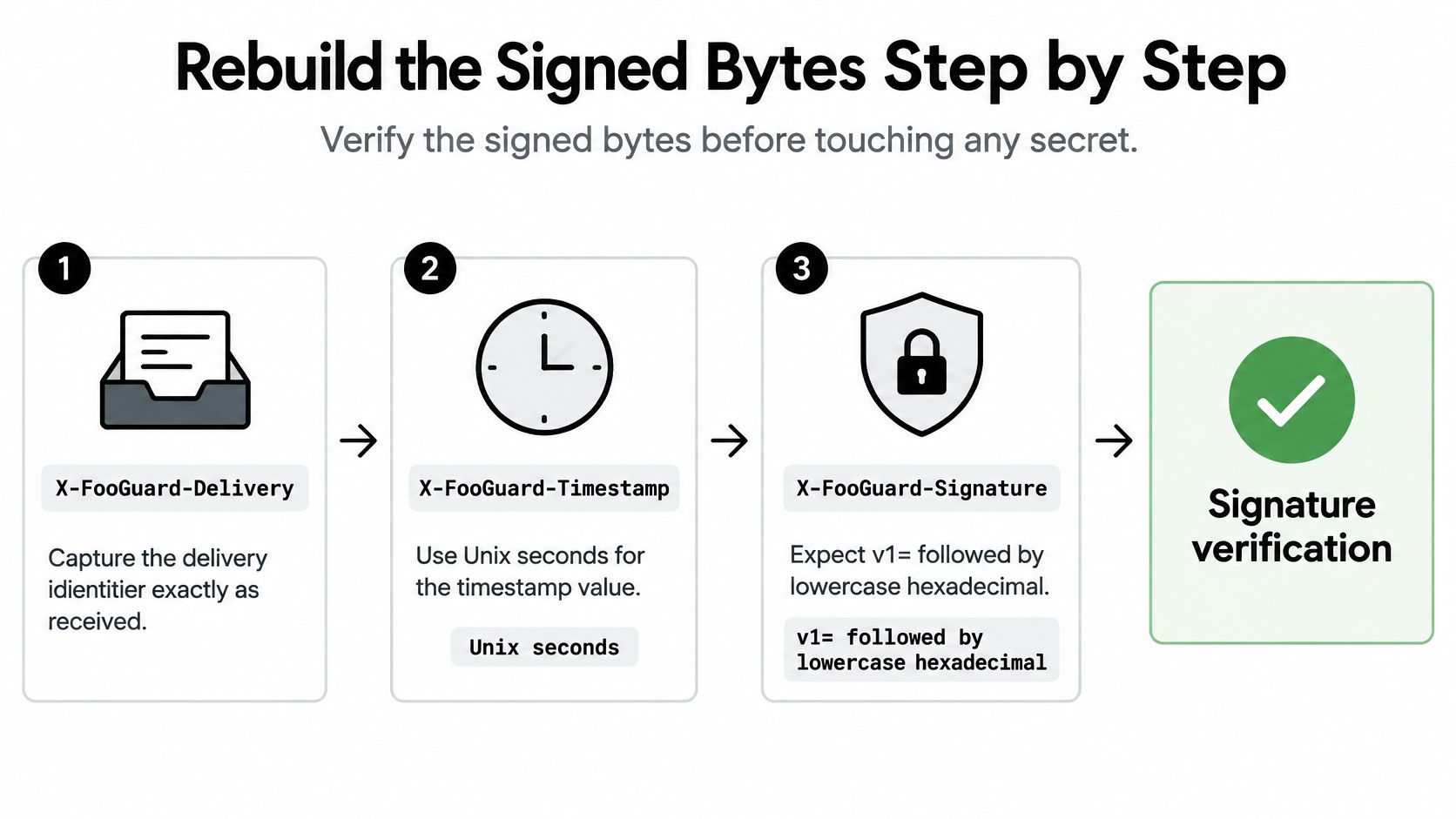
Capture the delivery ID. Read
X-FooGuard-Deliveryexactly as received. A missing or malformed value is a header or request problem, not a reason to try another secret.Capture the timestamp. Read
X-FooGuard-Timestampas Unix seconds. Use the received value in the signed input. If the receiver rejects an otherwise correct signature as expired, check clock synchronization and the applicable validity rules.Validate the signature header. Read
X-FooGuard-Signature. If it's missing, truncated, or not lowercase hexadecimal afterv1=, classify the result as invalid. Don't try a different key to make malformed input pass.Reconstruct the HMAC input. Join the timestamp, a period, and the exact raw UTF-8 request body, in that order. Use the secret as displayed text. Don't parse and re-serialize the JSON first: whitespace or other byte changes can change the signed input even when the JSON appears equivalent.
Compute and compare. Calculate the local HMAC-SHA256 from that input and the stored secret, then compare the result with the supplied value using a constant-time comparison. A mismatch is untrusted. Check that you used the intended secret and unmodified bytes.
Match the IDs. Confirm that
X-FooGuard-Deliveryequals theidinside the signed payload. Reject a mismatch before creating work.Keep JWT issues separate. For a JWT on a different request, inspect its algorithm, key ID, and exact compact signing input. A webhook HMAC mismatch and a JWT algorithm mismatch are distinct defects.
Record useful evidence. Log the class, delivery ID, raw-body hash, relevant header values, and computed digest. Redact the secret. If the receiver's library reports only “signature failed verification,” that exception alone isn't enough to determine whether the request can be retried.
RFC 6376's DKIM verification procedure likewise calls for validating signature fields, reconstructing the signed bytes, checking the cryptographic value, and preserving the specific failure reason. It distinguishes malformed input from temporary inability to verify, because those conditions don't have the same retry behavior.
Keep the receiver's request-size limit in view: enforce 64 KiB, and keep its clock synchronized. Reject malformed JSON and invalid signatures; after verification, validate the payload's version and event fields. Store the delivery ID atomically with the work item so repeat delivery can't create duplicate work.
Handle Rotation Timeouts and Rejects
Once the failure class is clear, apply the matching fix. Don't treat every rejection as a prompt to rotate credentials: malformed bytes, a missing secret, and expired trust material need different responses.
| Mistake | Why the check fails | Fix |
|---|---|---|
| Pretty-printed or re-serialized body | Signed bytes no longer match | Verify the exact raw UTF-8 body |
| Secret copied incorrectly or missed at creation | Secret is shown only once | Store it server-side and run a new test |
| Old secret used after rotation | Pending deliveries and the old secret are cancelled | Use the replacement secret and retest before enabling |
| Work done before the 2xx | Receiver exceeds eight seconds | Durably accept, then return 2xx |
| Delivery header doesn't match payload ID | Signed ID and header disagree | Reject before creating work |
Saving Gateway alert notifications pauses them and creates a signing secret that's shown only once. Store it in the receiver's server-side secret store, not in a chat or ticket. If it wasn't captured, restore the missing input through the supported configuration flow and run a new test.
Save changes & rotate secret has a distinct effect: it cancels pending and failed deliveries, replaces the destination configuration and secret, and requires another successful test before enabling. Don't expect a delivery associated with the previous secret to become valid just because the receiver has been updated. Use the replacement secret and test again.
A successful test confirms that the destination returned a successful HTTP response. It does not prove that the receiver verified the signature, paged a person, or completed downstream processing. The receiver still needs to verify each signature, validate the payload, and durably accept the work before returning a 2xx response. Do the processing after durable acceptance rather than holding the response open for downstream work.
Keep old evidence distinct from new requests: Retain historical verification material only when needed to validate evidence signed with it. Don't accept new signatures from a retired or compromised secret.
Key rotation can leave receivers unable to verify old evidence if trust material disappears too early, while continuing to accept new signatures from a compromised key creates a different risk. The IETF draft on key rotation and signature validity discusses retaining old keys for historical validation while publishing replacement keys. Apply that distinction to your own receiver policy rather than treating every old key as either automatically trusted or automatically invalid.
Keep credentials out of committed files and tickets. For practical guidance on that separate configuration risk, use ways to keep credentials out of committed MCP configurations. Don't send API keys, tokens, private keys, or raw agent configuration files that may contain secrets to support.
Review Native MCP Files Beside the Check
A signature error and a configuration finding describe different things. The error comes from webhook verification; an MCP file describes how a client is configured. Reviewing that file can reveal declared settings, but it cannot explain why a signature failed.
Synthetic example only. This JSON uses a fictional package name and a placeholder environment value. It is not an installation instruction.
{
  "mcpServers": {
    "synthetic-local-server": {
      "command": "node",
      "args": ["./tools/synthetic-server.js", "--mode", "read-only"],
      "env": {
        "SERVICE_TOKEN": "PLACEHOLDER_NOT_A_SECRET"
      }
    }
  }
}
Cursor supports project-level .cursor/mcp.json and global ~/.cursor/mcp.json files, with server definitions under mcpServers. A server entry can specify a command, arguments, and environment variables. Its native MCP configuration documentation explains the format and helps reviewers identify local process launches, automatic package retrieval, and credentials placed directly in env.
| Client | Native location | Format |
|---|---|---|
| Cursor | Project .cursor/mcp.json | JSON with mcpServers |
| Cursor | Global ~/.cursor/mcp.json | JSON with mcpServers |
| Continue | .continue/mcpServers (plural) | YAML; JSON copies accepted |
Continue documents YAML files under .continue/mcpServers and allows JSON MCP configurations from Claude Desktop, Cursor, and Cline to be copied there. Preserve each client's native file when reviewing it; a configuration that works in one client may not follow another client's conventions.
Foo Guard's supported configuration formats describe what its configuration review accepts. Native files remain in their client format; they do not need conversion into a Foo Guard schema. For broader guidance on assessing permissions and tools, see MCP security best practices.
Read the declared settings as evidence, not a runtime record. A static review can show the command, arguments, package retrieval options such as npx -y, and environment values. Narrow filesystem and network access in the arguments, prefer a direct command over a shell when practical, and keep credentials out of configuration files. A pinned package version identifies a version, but does not establish that the package is safe.
The file alone cannot prove how a server behaves at runtime, whether a referenced credential is valid or unused, or what a model invokes. A clean configuration review therefore cannot establish why a webhook receiver rejected a signature.
Separate the Check Result From the Webhook Failure
A failed webhook signature and a failed security check are separate signals. Each comes from a different system and calls for a different investigation.
| Signal | Source | Meaning | First action |
|---|---|---|---|
| Signature failed verification | Webhook receiver log | The receiver rejected the signed bytes | Classify the failure and rebuild the signed input |
| Policy Failed | Foo Guard scan result | The scan completed, but the result did not meet the effective policy thresholds | Review findings and scores, fix the submitted file, then rescan |
| Required check missing or skipped | GitHub pull request checks | The latest commit SHA has no passing required check | Confirm the check name, SHA, and branch protection |
| Test delivery succeeded | Destination HTTP response | The destination returned a successful response | Check receiver logs to confirm whether it verified the signature |
A Policy Failed result means the scan completed successfully, but the repository did not meet the effective organization or repository policy thresholds. Findings and scores remain available for remediation. A policy result does not indicate an incomplete scan or explain why a webhook receiver rejected a signature.
GitHub ties required checks to the latest commit SHA in the pull request. A passing result from an earlier commit does not satisfy the requirement. GitHub also treats success, skipped, and neutral as successful conclusions, so inspect event filters and skip conditions rather than relying only on a green-looking workflow. Its required status check guidance explains the latest-SHA requirement and how protected branches can require checks before merging.
GitHub Actions produces Checks with logs, annotations, and messages. Review the check name, exact SHA, and whether a skipped result is acceptable. A workflow file's presence alone does not show whether branch protection requires its result.
For a configuration scan, submit a redacted copy of the native agent file, replacing live credentials and tokens with placeholders. You can scan a synthetic native MCP configuration without sending live secrets. Foo Guard's deterministic static analysis reports findings on the file under review. It cannot establish package safety, runtime tool behavior, branch-protection settings, or whether a receiver verified a signature. A clean scan is not a guarantee of safety or framework certification.
Signed alerts require a configured receiver and are delivered on a best-effort basis. A successful test delivery confirms that the destination returned a successful HTTP response, but it cannot prove the receiver verified the signature, paged a person, or completed downstream processing. For a separate example of setting up webhook delivery, see how to connect Pine Script alerts via webhooks.
For teams adding configuration review to pull requests, see how to run MCP security checks in GitHub pull requests. The check should identify the revision it evaluated, and repository settings must separately require the intended result before merge.
Foo Guard provides deterministic static analysis for AI agent configurations and MCP definitions, with evidence-backed findings for reviewing permissions and exposed credentials before deployment. Submit a redacted native configuration to Foo Guard to review the declared setup, then investigate webhook signature failures using the receiver's exact runtime evidence.