AI Agent Guardrails: Types, Patterns and Static Checks
Learn the four types of AI agent guardrails, the design patterns behind them, and how a synthetic CI example shows what static checks can and cannot prove.
A pull request is open, and the agent configuration looks small enough to approve quickly. But one file grants access to the whole filesystem, another lets the agent run shell commands, and a third contains a token. The review question isn't just whether the prompt sounds safe. It's what the agent is authorized to do, and which controls check its actions before they run.
Four Guardrail Types and Where Each Applies
| Guardrail type | What it limits | Where it is enforced | Example |
|---|---|---|---|
| Permissions | Which tools, paths, hosts and databases the agent may reach | Configuration review before deployment, plus runtime allowlists | Filesystem scope limited to one project folder |
| Rate limits | How many calls a tool may receive per window or per task | Runtime gateway or tool server | Outbound email sends capped at a fixed number per task |
| Argument validation | Whether each call's parameters match a typed schema and allowed values | Runtime, at the tool-call layer | A file path that resolves outside the project is rejected |
| Human approval | Who must accept a high-impact action before it runs | Approval settings in configuration and approval steps at runtime | Record deletion waits for a named reviewer |
Permissions define the agent's reachable surface. A documentation agent might need read access to one repository folder, but not the user's home directory, a production database, or an unrestricted network connection. Review the configured scope before deployment, then check each tool call against an allowlist at runtime. A prompt telling the agent to stay in its project folder doesn't enforce that boundary.
Rate limits cap repeated activity. An agent stuck in a retry loop might repeatedly call an email or API tool; a per-task ceiling limits how many attempts can run before the system stops them. Set the limit where the tool call is enforced, not only in instructions the model can ignore.
Argument validation checks the actual parameters sent to a tool. For example, a file operation should reject a path that resolves outside the permitted project directory. Validate types and allowed values before the call runs. This catches malformed or out-of-scope requests even when the tool itself is approved.
Human approval pauses actions that could cause lasting harm. A delete, production write, or outbound send should wait for a named reviewer when policy requires it. The reviewer needs to see the exact action and its arguments, not just a vague request to approve the agent.
Each type closes a different gap. List the four controls your agent has today, then mark the first one it lacks.
A Synthetic Agent Config Through a CI Check
Consider a fictional synthetic-docs-agent with four tools: a filesystem tool that can reach all paths, a shell tool that accepts free-form commands, an API tool with a token written inline, and a record-deletion tool with no approval setting. The YAML below is a complete synthetic example. It illustrates risky settings, not a native Cursor, Claude Desktop, VS Code, or Continue file, and it names no installable package.
agent: synthetic-docs-agent
tools:
  - name: filesystem
    paths: ["*"]
  - name: shell
    command: "*"
  - name: api-client
    token: "SYNTHETIC_PLACEHOLDER_TOKEN"
  - name: delete-records
    approval: none
The locations in the table refer to this synthetic file. They're illustrative labels, not native client keys or a claim that every scanner accepts this exact schema.
| Finding | Synthetic config location | Why it matters | Fix |
|---|---|---|---|
| Wildcard permission | Filesystem path set to all paths | The agent can read or write outside its project | Limit the scope to one project folder |
| Shell or command execution | Shell tool with free-form commands | Any command the model produces can run | Remove the tool or restrict it to a fixed allowlist |
| Embedded credential | API token written inline in the tool config | Anyone with repository access holds a live token | Reference a short-lived credential from a secret store |
| Destructive operation without approval | Delete-records tool with no approval setting | A bad call deletes data with no review | Require a named approval before the call runs |
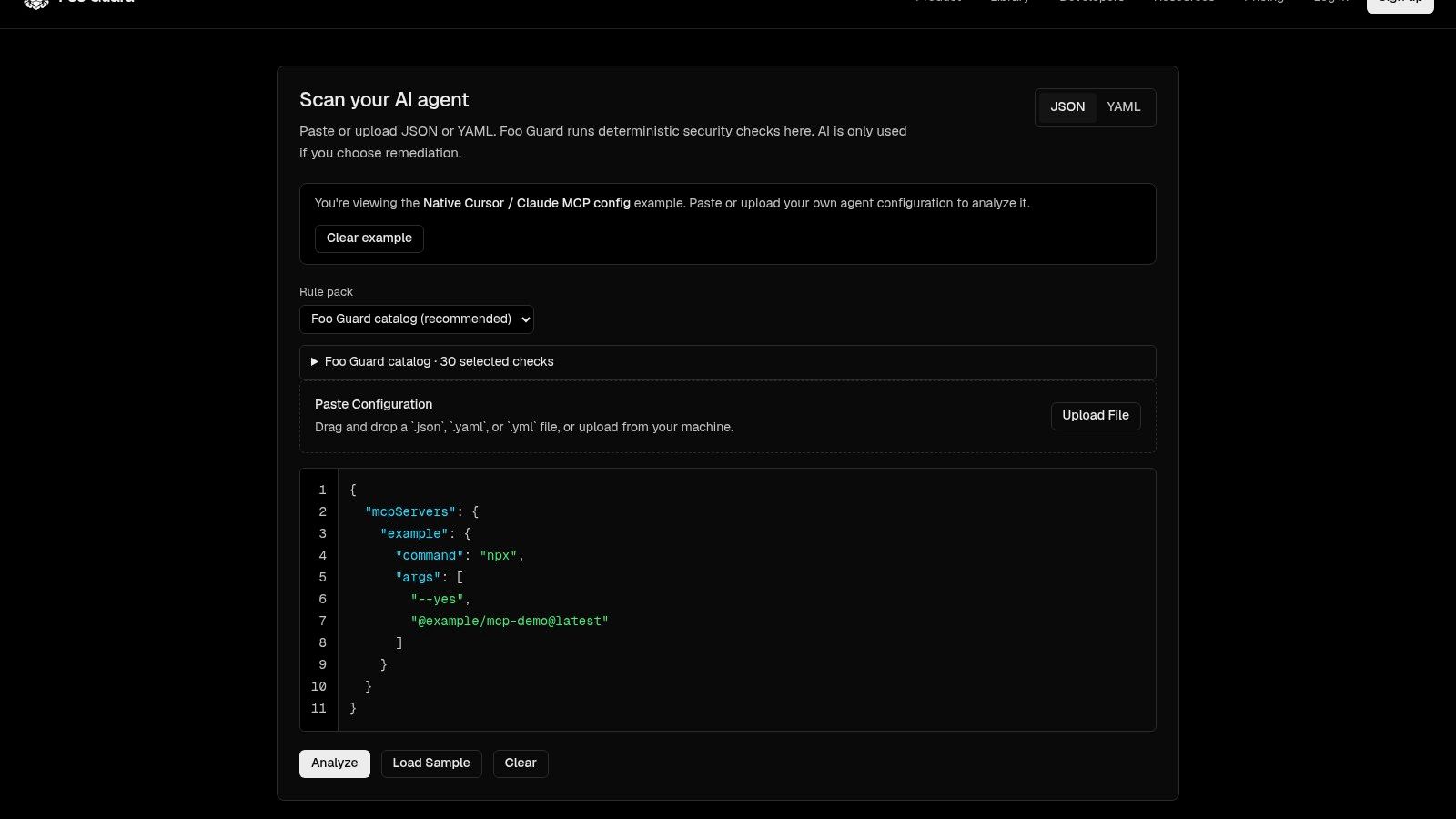
Foo Guard accepts pasted or uploaded JSON or YAML agent configurations and identifies permissions, credentials, and approval settings that need attention without running the agent. Its rule severities include critical, high, medium, and low; examples of critical findings include embedded credentials, wildcard permissions, shell execution, and destructive operations without approval. Check the native-format documentation for current supported formats. Review native Cursor, Claude Desktop, VS Code, and Continue files directly for least privilege. Don't convert them to a Foo Guard schema or assume a particular file structure without checking the product's current documentation.
A pull-request check can assess committed configuration against a policy threshold. It cannot run the agent or its tools. A practical flow is:
- Commit the configuration file in a pull request.
- Run a scan against the commit you plan to review.
- Fail the check if findings cross the threshold your team sets.
For GitHub, verify the current Actions and branch-protection instructions in GitHub's official documentation before deciding how to require a check. A static pull-request scan evaluates the file and policy, not live conversations or tool endpoints. Pinning a dependency version can reduce configuration drift, but it doesn't establish that the package is safe.
The policy-as-code examples can help teams think through thresholds and repeatable rules. For the same synthetic example, start with the agent configuration scan.
Permissions and Rate Limits That Cap Damage
Start with the smallest set of capabilities that lets the agent finish its task. The principle of least privilege is practical configuration work: remove unused access, narrow what remains, and keep read permissions separate from write permissions.
Use this checklist on one agent first:
- Remove wildcard scopes. Replace all-path or all-table access with the specific project folder or table the task requires.
- Drop unused shell access. If the agent only reads documentation, remove shell execution. If a task genuinely needs a command, restrict it to a fixed set rather than free-form input.
- Split read and write tools. Give a reporting agent read access to records, not a combined read-and-delete role.
- Scope paths and hosts. A tool that needs one internal documentation host shouldn't reach arbitrary destinations. For Cursor, Claude Desktop, VS Code, and Continue, inspect each file the agent loads for unnecessary filesystem, shell, network, database, and approval capabilities. Check the native-format guide and each product's official documentation before relying on specific keys or locations.
- Set a call ceiling per task. Measure a normal task, then set a cap at a small multiple of that baseline. A universal limit can be too tight for a legitimate workflow and too loose for a simple one.
Don't put an agent inside a developer's personal session or leave a long-lived token in its configuration. Give the agent a distinct identity and a short-lived credential scoped to its task, then revoke access when that task ends. The NIST-related credential guidance describes task-bound tokens and automatic revocation as ways to narrow the exposure window and limit the damage from excessive access.
Practical rule: If you can't explain why an agent needs a permission for its current task, remove it and add it back only when the workflow proves it's necessary.
A rate limit is a ceiling on damage, not a substitute for authorization. A retry loop can still make harmful calls if each individual call is allowed; the cap limits how many can run before the tool or gateway stops them. Apply the checklist to one agent and save the resulting configuration review as your baseline.
Argument Validation and Human Approval Gates
A tool may be permitted and still receive unsafe arguments. Suppose a send-email tool accepts a recipient field. Before the call leaves the agent, validate the address against an approved-domain list; reject anything outside it. That check belongs at the tool-call layer, where the actual argument can be inspected.
Typed schemas add specific boundaries. Keep numbers as numbers, normalize file paths and reject any that resolve outside the project folder, and make a read-only query tool reject write statements. A schema can catch a malformed or out-of-scope request, but it doesn't decide whether the action's purpose is appropriate. Pair it with authorization and approval rules.
Human approval is for high-impact actions. Put gates on deletes, production writes, payments, permission changes, and transfers of data outside the organization. In 2026, 70% of surveyed IT and security decision-makers said they allowed AI to make decisions or take actions that would have required human approval one year earlier, according to Help Net Security's cited survey. Treat that finding as a reason to inspect your own approval settings, not as evidence that every agent needs the same gate.
The reviewer should see the specific operation and its arguments, approve that one call, and avoid granting blanket permission for future actions. An approval prompt that hides the recipient, record ID, or requested permission turns review into a rubber stamp. For a broader perspective on where AI automation fits into workflows, Freeform Company's AI automation guide is useful context, but your approval policy still needs to reflect the actions your agent can take.
Write down the operations in your own agent that should pause for a person. If an approval step doesn't show the exact call and arguments, tighten it before deployment.
Authority Layers and Patterns That Keep Agents Narrow
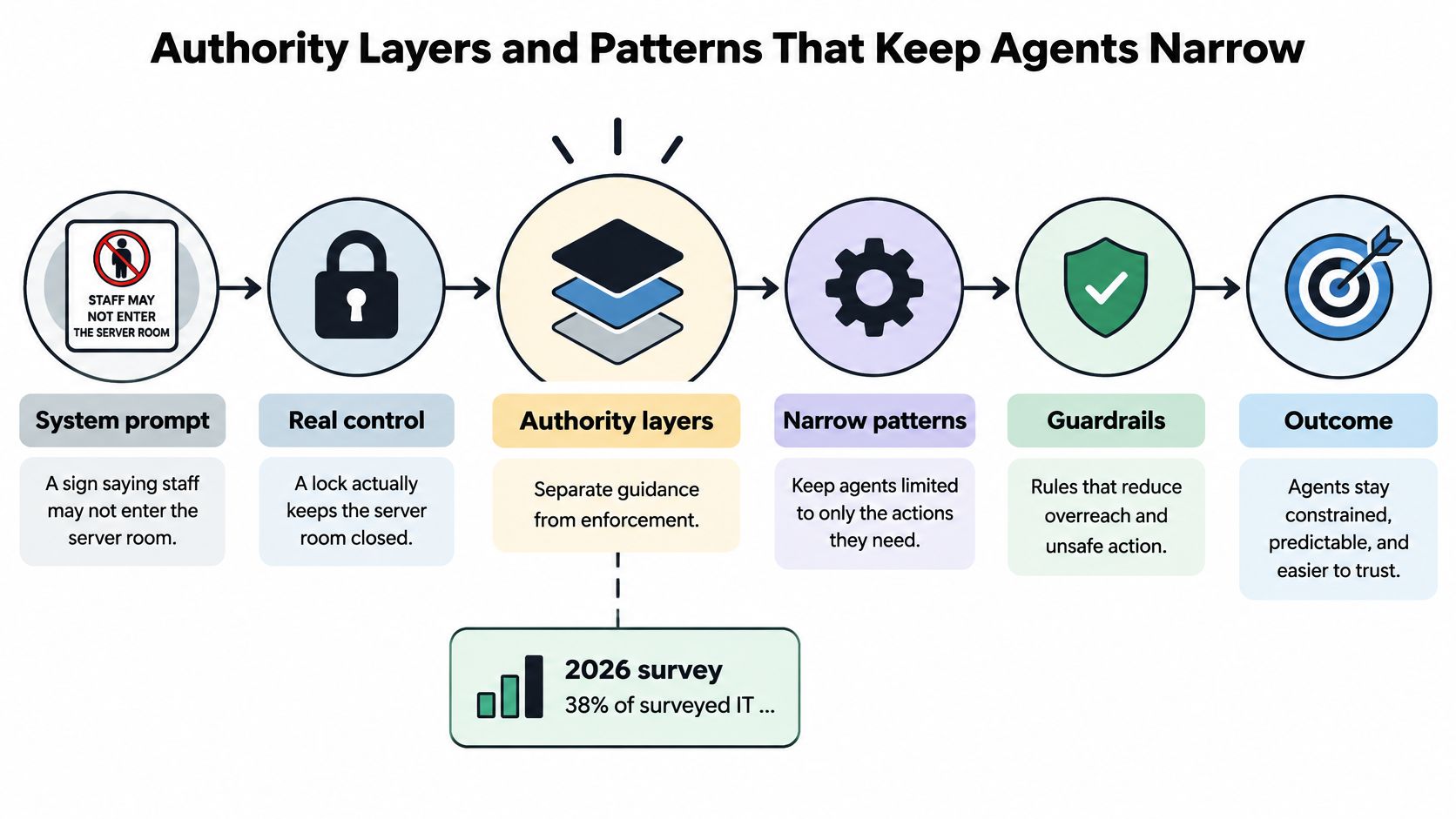
A sign saying staff may not enter a server room doesn't keep the door closed. A lock does. A system prompt is the sign; authorization at the tool call is the lock. In a 2026 survey, 38% of surveyed IT and AI decision-makers said AI agents had exfiltrated data or caused a sensitive-data leak, according to Foundry and Rubrik's survey.
An agent interprets a goal, selects tools, reads data, and runs actions. The authority it receives comes from its permissions, tool scope, credentials, approval settings, network reach, and autonomy. Untrusted retrieved text can steer its reasoning. A prompt-only rule can't stop that text from influencing a tool choice, and it can't revoke a credential the agent already has.
NIST-oriented guidance on agent identity management recommends least privilege, task-bounded access, continuous verification of tool calls, and a separation between the component that decides what an agent wants to do and the component that authorizes what it may do. Apply those principles through distinct enforcement patterns:
- Default deny. Reject a tool call unless policy explicitly allows it. Review the configuration before deployment, then enforce the decision at runtime.
- Use allowlists, not denylists. Name permitted tools, destinations, and operations. A denylist can miss a new or differently named route.
- Use task-scoped credentials. Bind access to the task and agent identity, and revoke it when the task ends. Validate the credential and authorization context when the call is made.
- Separate decisions from authorization. Let the agent propose an action, but let an independent policy layer decide whether the action is allowed. Retrieved text may influence the proposal; it mustn't expand the agent's credentials.
- Review composite risk. Consider what a chain of moderate capabilities can accomplish together, not only whether each tool looks safe on its own.
For example, read access to customer records, a transformation tool, outbound network access, and an email sender might each pass an isolated review. Together, they could move customer data outside the organization. Map the reachable action paths and check where data can travel, where autonomy accumulates, and whether any step bypasses approval.
The enforcement path should be explicit: agent intent → policy decision → authorization → tool execution → audit record. Configuration review before deployment can flag excessive permissions and missing controls. At runtime, a gateway can check supported, routed MCP requests and block or allow them according to policy. Foo Guard offers both pre-deployment configuration checks and a Gateway for controlling supported MCP requests at runtime. Neither a configuration review nor a gateway should be treated as a complete defense against every prompt attack or data-loss path.
The following video offers another view of agent guardrails and enforcement.
Choose one pattern to apply this week. Start with the boundary that would most reduce the authority your agent has today.
What a Static Check Cannot Prove
A static check reads configuration. Runtime observation sees calls only when they pass through an instrumented or routed control. Those are different kinds of evidence, and a pass on one shouldn't be treated as proof of the other.
| Question | Static configuration check | Observed runtime behavior |
|---|---|---|
| Does the file grant a wildcard or shell permission? | Yes, from the configuration | Not needed for this question |
| Does a secret-like value appear in the config? | Yes, if the value is in the file | Not needed for this question |
| Does a live conversation lead the agent to misuse a tool? | No | Yes, only when calls are routed and monitored |
| Does a call match the approved argument schema at runtime? | No | Yes, when calls pass through a runtime control |
| Is a pinned dependency safe? | No, pinning shows a version only | No, pinning is not a safety check |
| Does a clean result guarantee safety or compliance? | No | No |
A configuration scan can find a wildcard scope, shell access, an embedded credential, or missing approval settings in the file it examines. It can't see how an agent responds to a live conversation, determine whether a tool endpoint is trustworthy, or prove what the agent will do on a given day. Foo Guard's Gateway checks supported requests; it isn't a general prompt-injection or data-loss-prevention scanner. See the guide to what an MCP gateway does when deciding whether routed-call controls fit your architecture.
Pinning a package version makes the dependency reference more reproducible. It does not establish that the package is safe. Likewise, a clean static result means the file met the checks that ran; it isn't a guarantee of safety, certification, or framework compliance.
Write down the questions a static check can't answer for your agent. Decide which need runtime monitoring, and identify which tool calls must pass through that monitoring to be visible.
Confirm Your Guardrails Before the Next Merge
- Inventory one agent. List every tool, path, host, credential, and approval setting in its configuration.
- Scan the commit you plan to merge. Review the exact file at that commit, not a local version that may differ.
- Fix critical findings first. Start with wildcard scopes, shell access, and embedded credentials, then review the remaining findings.
- Rescan and save a baseline. Record the findings count and whether the file met your team's threshold.
- Add a CI check. Foo Guard can fail a pull request or CI job when an agent configuration violates policy. Confirm the current GitHub check and branch-protection steps in GitHub's official documentation before making a check required.
- Decide what needs runtime monitoring. A static check can assess committed configuration, but it won't observe live calls that don't pass through a runtime control.
A pass means the file at that commit met the rules and threshold applied to it. It doesn't mean the agent is safe or compliant, and it doesn't replace a direct review of native client files.
Scan one agent today, record the baseline, and change nothing else until that baseline is saved.
Foo Guard scans AI agent configurations and MCP or tool definitions for risky permissions, credentials, and autonomy settings before deployment, and its Gateway can control supported routed MCP requests at runtime. Visit Foo Guard to scan an agent configuration and decide which findings should block your next merge.