Safe, Fast Releases: Ci Cd Best Practices for 2026
Learn ci cd best practices for branching, tests, artifacts, deployment and config checks, plus benchmark tables and one gate to add this week.
Your release is green, but the pull request also changes an agent's MCP configuration. Before merging, review that file as a release artifact: identify its tools, narrow its permissions, remove literal credentials, and record the policy decision against the commit. A passing application build won't tell you whether an agent has just gained shell access.
Core CI/CD Practices at a Glance
A release passes every stage, yet nobody can say which commit reached production. The deployment job used a moving branch name, staging rebuilt its own dependencies, and the configuration scan sits in a separate dashboard. The pipeline ran, but the team can't reconstruct the release.
CI/CD best practices are connected process controls, not a shopping list of tools. Use this checklist to find where that connection breaks.
Core CI/CD practices and how to check each one
| Practice | What it requires | How to check it |
|---|---|---|
| Trunk-based development | Short-lived branches merged to main at least daily | Age of open branches in version control |
| Automated build on every commit | Same build steps run on a clean runner each time | Build passes on a clean runner |
| Layered tests | Fast tests gate each merge, slower tests gate promotion | A failing test stops the pipeline before deployment |
| Pipeline as code | Pipeline definition lives in the repository and changes through review | Pipeline edits appear in pull requests |
| Build once, promote the artifact | The same artifact digest moves from test to production | Digest in staging matches the digest in production |
| Security and config checks as gates | Scans run on pull requests and before deploy | A policy result is recorded for each commit |
| Progressive rollout with rollback | Traffic shifts in steps and reverts on alarm | A rollback has been rehearsed before the release |
Small changes merge to main. A clean runner builds each commit consistently, tests control promotion, and deployment uses the approved artifact. If any connection is missing, a green status can describe something other than what users received.
Include configuration in the release boundary
Agent instructions, MCP definitions, permission settings, and credential references belong beside application and infrastructure changes in this review process. A configuration-only pull request can change what an agent is allowed to do without changing the application binary.
For repository conventions and history management, Kogifi's guide to managing source code in CI/CD workflows provides a useful companion to the release controls here.
Score every checklist row yes, partly, or no. Treat the first no as the gap to close, rather than replacing the CI platform before you understand which control is missing.
Measure Speed and Stability Together
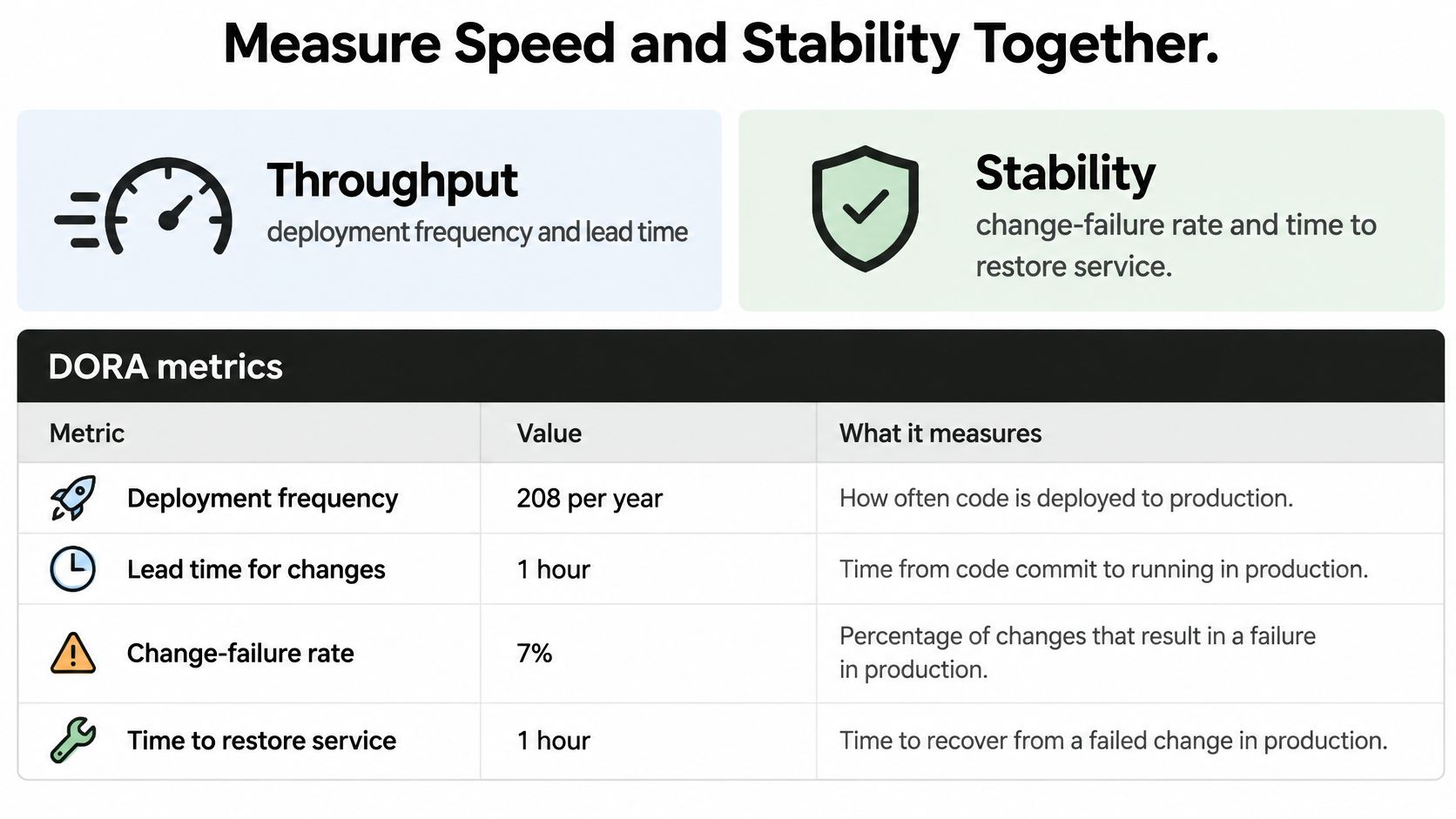
Measure throughput with deployment frequency and change lead time. Measure stability with change-failure rate and recovery time. Focusing on either group alone encourages the wrong optimization: a team can deploy more often by removing the checks that catch bad changes.
The following benchmark values come from DORA's 2018 Accelerate State of DevOps report, which described elite teams deploying on demand, with a normalized estimate of approximately 1,460 deployments per year, compared with approximately 32 for low performers.
DORA benchmarks for elite and low-performing teams
| Metric | Elite teams | Low performers | What it tells you |
|---|---|---|---|
| Deployment frequency | On demand, often several per day, approximately 1,460 per year normalized | Approximately 32 per year | How often value reaches production |
| Lead time for changes | Less than one hour | One to six months | How long a commit takes to reach production |
| Change-failure rate | 0% to 15%, midpoint 7.5% | 46% to 60%, midpoint 53% | Whether releases break production |
| Time to restore service | Not quantified in the benchmark evidence used here | Not quantified in the benchmark evidence used here | How quickly the team recovers from a failed release |
These are historical measurements, not current targets or promises of improvement. Check the latest DORA report before presenting them as current industry performance, and use this table only as context for staged goals.
Define events before building dashboards
DORA's metrics guide treats throughput and instability as complementary indicators. Define change lead time from a version-control commit to successful production deployment, and count production deployments requiring incident response, rollback, or hotfix remediation when calculating change-failure rate.
Attach a shared commit or release identifier to builds, scans, deployment records, and incidents. For agent releases, that identifier should also connect the configuration revision to its policy decision and any subsequent remediation.
Review the measures together each week. If deployments increase while failures rise, investigate the changes and failed gates rather than celebrating frequency alone.
Measurement rule: Count successful delivery to production, not merely successful completion of a CI job.
Start with a bounded exercise: select a service and calculate lead time and change-failure rate over a trailing month. Separate waiting for review, execution time, and waiting for deployment so the team knows which delay it can remove.
Branching and Merge Flow That Keeps Main Releasable
A short branch is useful because developers can understand and validate the change, not because the branch-age chart looks tidy. Keep configuration edits small enough that a reviewer can explain exactly which capabilities they add or remove.
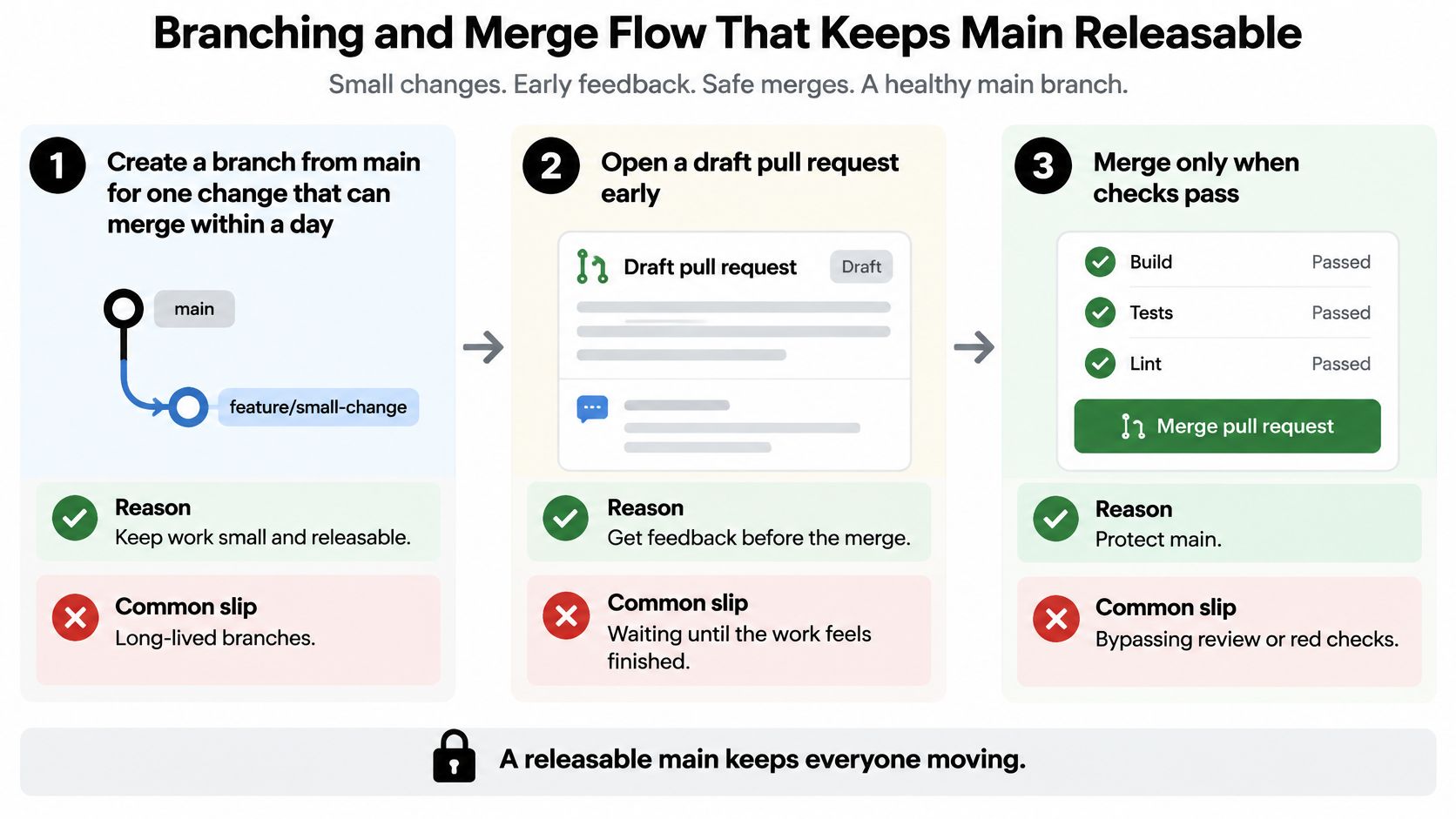
- Branch from main for a single change. Aim for work that can merge within a day. A branch that accumulates unrelated edits also accumulates conflicts and hides integration failures.
- Open a draft pull request early. Let the pipeline inspect each push while implementation is still easy to adjust. Waiting until the work feels finished postpones useful feedback.
- Finish review only after the gates pass. Require the build, unit tests, and relevant security checks before accepting the change. Running validation only after merge lets a known-bad configuration reach main first.
- Give the merged change a clear identity. A squash commit can make a focused pull request easy to trace, provided the description preserves its reasoning. Don't squash unrelated changes merely to make history look clean.
- Hide incomplete functionality behind a feature flag. This allows integration without exposing unfinished behavior. A flag isn't permission to merge broken startup paths or insecure default settings.
- Record the deployed commit SHA. Capture it for staging and production alongside the artifact identity. A branch name alone isn't a fixed release reference.
Make review ownership explicit
Application reviewers may understand the code while missing the significance of a newly declared shell tool. Route permission, credential, and workflow changes to reviewers who understand those boundaries, and avoid turning every small edit into an organization-wide approval meeting.
For review routing and workload, GENTY recruitment explains how to build scalable code review processes. Apply those ownership practices alongside the controls in our GitHub Actions security guide, rather than duplicating workflow-hardening instructions in each repository.
Small, frequently integrated changes fit the delivery pattern associated with both speed and stability in DORA's benchmarks. They don't guarantee either outcome, but they make failed changes easier to identify and reverse.
A healthy merge flow leaves main releasable: branches close promptly, reviewers can explain each change, and every merge has a passing pipeline attached to its commit.
Test Layers That Gate Each Stage
Say a developer changes a notes service and adds an MCP tool declaration. The unit suite passes because the application functions still return the expected values. Nobody tested whether the agent should have access to a shell.
That's a coverage gap, not a reason to abandon unit tests. Each layer needs a defined trigger, a blocking condition, and an honest account of what it misses.
| Layer and trigger | What it catches | What it misses |
|---|---|---|
| Unit tests on every commit | Local logic errors and boundary conditions | Deployed integration behavior and agent permissions |
| Integration tests on pull requests | Broken database, service, and external-tool contracts | Complete user journeys and untested permission combinations |
| End-to-end tests before staging promotion | Failures in critical workflows against a representative environment | Every possible input, dependency failure, or production condition |
| Security and configuration scans on pull requests and default-branch pushes | Prohibited declarations and known policy violations | Actual runtime tool use |
| Smoke tests after deployment | Startup failures and broken health checks | Deep correctness or comprehensive security |
Run pre-promotion end-to-end tests in a disposable environment if staging itself is the promotion target. Otherwise, the pipeline has to deploy to staging before it can determine whether staging deployment was allowed.
Fail early without hiding uncertainty
Put inexpensive checks first. Validate syntax and run fast tests before allocating expensive environments, then parallelize independent checks when the runner capacity and isolation model support it.
Keep the configuration gate beside the merge tests, not in an optional report someone must remember to read. Use explicit policy definitions, such as the patterns in our policy-as-code examples, so reviewers can distinguish an informational finding from a blocking violation.
- Quarantine deliberately. Give a flaky test an owner and a repair deadline, and document which protection is temporarily missing.
- Retain failed attempts. Rerunning until green doesn't repair a test or explain why it failed.
- Check the exact revision. A passing result from an earlier pull-request commit mustn't approve a later permission change.
A flaky test that eventually passes still produced evidence of an unresolved problem.
More layers consume runner time and developer attention. Keep broad suites where they add distinct coverage, rather than repeating the same assertions everywhere. No change reaches staging unless the fast gates passed for that exact commit.
Build Artifacts Once and Promote Them
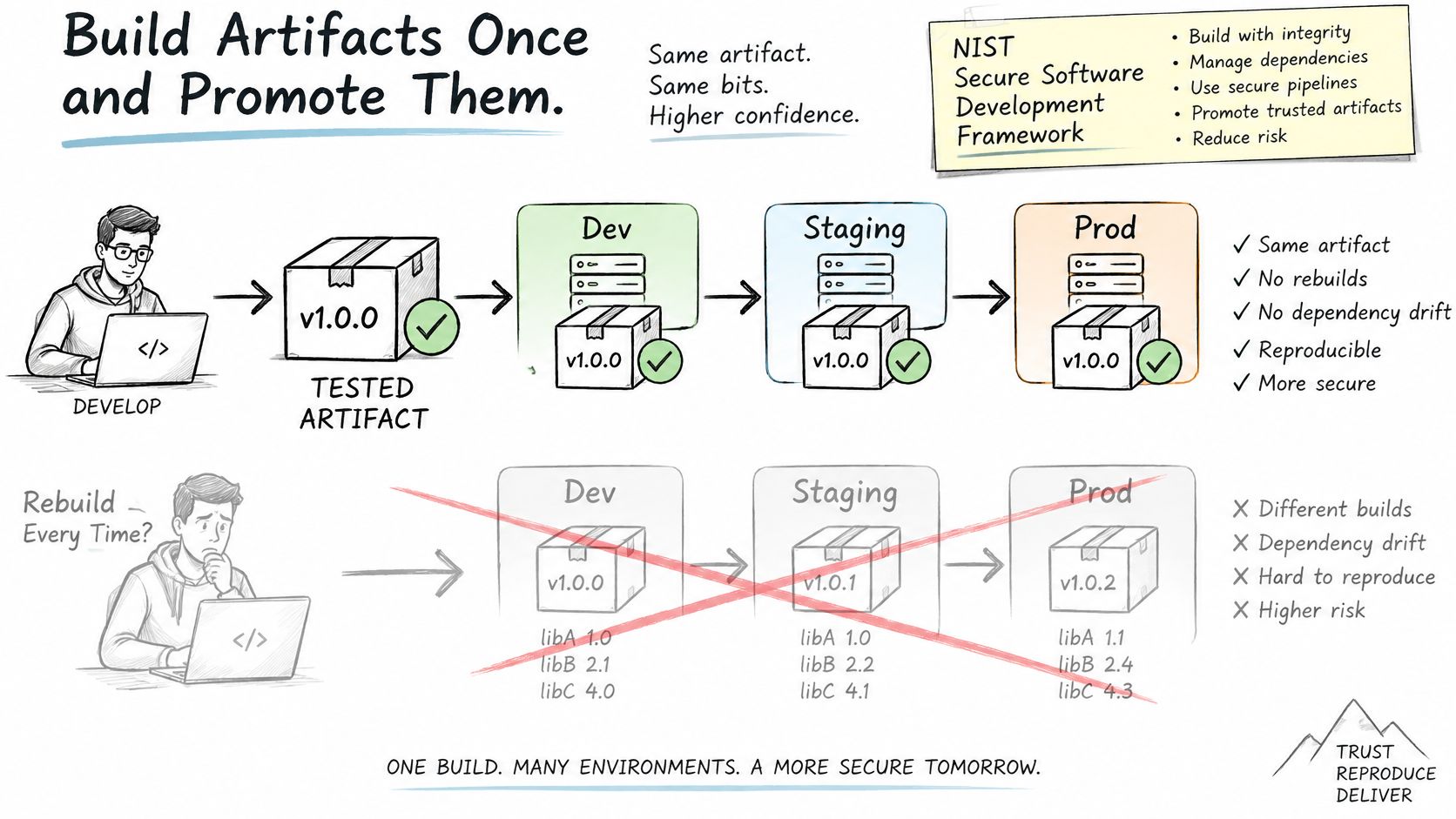
Rebuilding for each environment creates another opportunity for inputs to change. Staging may test a binary built with one dependency resolution while production receives another, even though both jobs started from the same source commit.
Use a single tested artifact as the promotion unit.
Make the evidence part of the release
Treat automation and component provenance, including the software bill of materials, as release outputs rather than optional attachments. A useful evidence record contains:
- Source identity. Commit SHA, repository, and reviewed change.
- Build inputs. Dependency resolutions, tool versions, base image, and build environment.
- Validation results. Tests, security findings, policy version, and scanner ruleset.
- Artifact identity. Content digest and any signed attestation used to authorize promotion.
- Agent configuration. Exact configuration content, MCP definitions, permissions, credential references, and autonomy settings.
Keep secret values out of this record. Recording a credential reference is different from exporting the credential into build logs or an attestation.
Promotion then becomes a verification sequence: retrieve the artifact by digest, match it to its approved evidence, verify the destination's required checks, and deploy that same digest. If an environment needs different nonsecret settings, record those settings as separate versioned inputs rather than rebuilding the executable.
Pin inputs without confusing reproducibility with trust
Pin package versions and base images to exact versions or digests where the tooling supports them. Review dependency updates through pull requests so a changed package resolution is visible instead of arriving as an incidental side effect.
Pinning limits unreviewed version drift. It doesn't establish package safety. Review provenance, integrity, dependencies, permissions, and behavior independently; a precisely identified malicious package is still malicious.
For agent deployments, also identify the server implementation behind the configuration. A pinned declaration doesn't help if a wrapper downloads mutable code during startup.
This video provides additional context for the delivery workflow.
Retain evidence per commit without overwriting earlier records. When policy changes, create a new evaluation that identifies the new policy rather than editing the historical result.
That distinction matters during incident review: the team needs to know what was approved at release time and what would fail under today's policy. Both records are useful, but they answer different questions.
Choose a Deployment Strategy and Rollback Path
Choose the rollout method according to the failure you need to contain. A traffic-routing strategy won't reverse a destructive database migration, and a feature flag won't remove a compromised process from production.
Deployment strategies compared by traffic and rollback
| Strategy | How traffic moves | Rollback | Best fit |
|---|---|---|---|
| Rolling update | Instances are replaced in batches | Redeploy the previous artifact, usually slower | Stateless services with spare capacity |
| Blue-green | All traffic switches between two environments | Switch back to the old environment, usually fast | Services that need one clean cutover |
| Canary | A small share of traffic reaches the new version first | Route traffic away from the canary | Changes where production metrics reveal risk |
| Feature flag | Code ships dark and is enabled per user or group | Turn the flag off without redeploying | Changes that need gradual exposure |
Evaluate blast radius, spare capacity, database compatibility, and whether production signals can reveal the expected failure. A canary adds little protection if the risky tool path never receives traffic during observation.
A blue-green cutover fits a service that needs a coordinated switch and can afford to keep the previous environment ready. Rolling replacement uses capacity differently, but the team must tolerate mixed versions and understand how long reversal takes.
Write the recovery decision before release
For each release, record:
- Rollback target. The previous artifact digest and compatible configuration revision.
- Reversal action. The tested deployment command, traffic change, or flag operation.
- Decision owner. The person authorized to stop promotion and initiate recovery.
- Trigger. The error, latency, health, or policy signal that requires reversal.
Use expand-and-contract database migrations so the previous application version remains compatible during the rollback window. If recovery requires restoring deleted data or reversing a destructive schema operation, it's a recovery project, not an immediate rollback.
DORA's 2021 State of DevOps findings retained recovery alongside deployment frequency, lead time, and change-failure rate in its performance model. That's the practical reason to rehearse restoration, not just successful deployment.
Release condition: No release goes out without a named rollback target and a written trigger.
For an agent configuration, rollback must also account for effects already produced. Reverting a permission declaration can stop future access, but it won't undo a file write, external request, or disclosed credential.
Gate a Synthetic MCP Configuration in a Pull Request
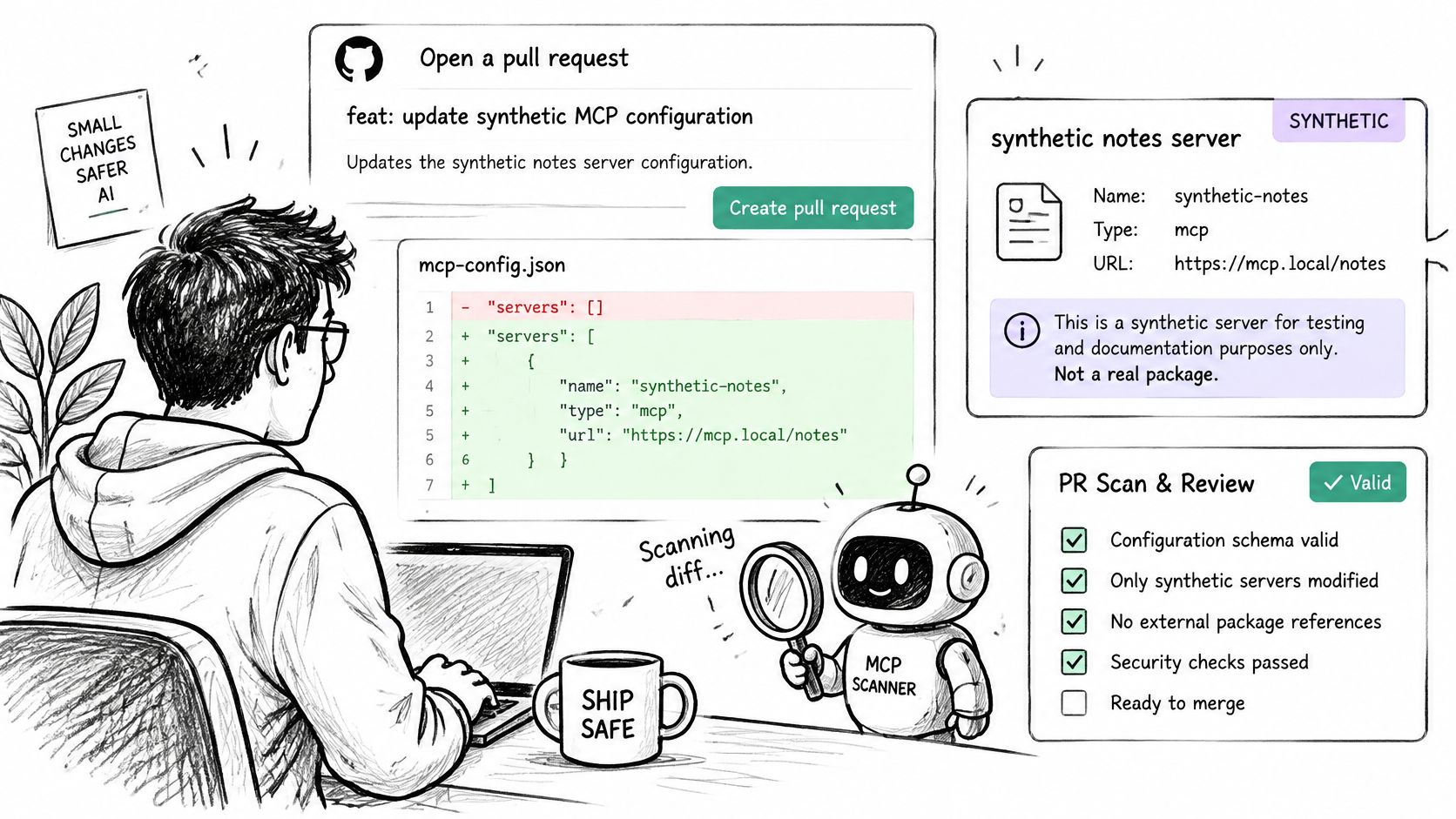
Open a pull request that narrows a synthetic notes server's permissions. The complete comparison below is an illustrative review fixture, not a native client schema, installable package, or claimed scan result.
| Configuration field | Before | After |
|---|---|---|
| Server | Synthetic notes server, not a real package | Same synthetic server |
| Version | Floating release | Exact reviewed release |
| Filesystem tool scope | Entire home directory | Project notes folder only |
| Shell tool | Enabled | Removed |
| API credential | Literal REDACTED_SYNTHETIC_KEY in file | Reference named NOTES_API_KEY |
| Other permissions | None declared | None declared |
Don't install a package from this example. Replace live tokens with placeholders before sharing any configuration.
Cursor, Claude Desktop, VS Code, and Continue have native configuration files. Check our supported-format documentation for the exact accepted formats before relying on a client integration; compatibility isn't established here, and rewriting native files into a new schema isn't a prerequisite asserted by this example. Consult each client's documentation for credential-reference mechanics.
Compare redacted revisions using the native MCP scan example. Retain actual outputs, not an assumed list of findings.
Attach the policy decision to the change
The NIST Secure Software Development Framework recommends automation and safeguarding provenance for release components. Apply that principle to the configuration and its commit-linked scan evidence.
Our Team repository policy file, .fooguard.yml, declares scan paths, fail conditions, and a minimum grade. CLI exit code 0 means policy passed, 1 means policy failed, and 2 means an operational or configuration error; both failure codes must fail the CI step.
What a Static Scan Proves and What It Cannot
A static scan evaluates declarations. It doesn't observe an agent executing tools. The following are finding categories to check in the synthetic fixture, not reported results from an executed scan.
Static configuration findings and their limits
| Static finding | What the scan shows | What it cannot prove |
|---|---|---|
| Literal API key in config | The credential value is declared in the file | That the key was used or exposed at runtime |
| Filesystem access to home directory | Tool scope exceeds the project folder | That the tool read or wrote any file |
| Shell execution tool | The tool can run commands by declaration | That a command ran or ran safely |
| Unpinned server version | The version is not fixed in the configuration | That the server package is safe |
| Wildcard permission | The declaration allows any matching action or argument | That the agent will use it in a risky way |
A placeholder also isn't evidence that a live credential exists. Reviewers must distinguish a synthetic value from real credential material without publishing the latter to prove the finding.
Keep runtime enforcement separate
Use the same scanner ruleset and policy when comparing revisions, and preserve each result with its commit. Otherwise, an apparent improvement might reflect changed rules rather than changed permissions.
Work on AI-enabled pipeline controls discusses combining configuration-level controls with runtime protections. A runtime gateway is a separate layer: it can monitor or deny supported routed calls after release, but traffic that bypasses it isn't covered by that enforcement.
A clean static scan isn't a safety guarantee or framework certification. It also doesn't establish that an agent behaved safely during execution.
Add One Pipeline Gate This Week
Choose the lowest-scoring checklist row and implement a bounded improvement. For configuration review, make the gate easy to reproduce before making it mandatory.
- Version the inputs. Keep agent and tool configuration files in the repository, with ownership assigned for permission changes.
- Declare the policy. Configure scan paths and failing thresholds in
.fooguard.yml, using the documented policy syntax and accepted file formats. Organization policy remains a mandatory floor. - Run against the checkout. Execute the CLI from the repository root on pull requests. Give each report a fresh output path because existing SARIF files aren't overwritten.
- Require the correct check. Use GitHub's current documentation to configure required-check behavior for your repository. Our GitHub security settings guide provides related hardening guidance; verify the check applies to the latest commit and test enforcement with a deliberately failing change.
- Compare the repair. Scan the revised files and compare findings to confirm whether the relevant issue is resolved.
Review the result before publishing
Before setting a threshold, read the assessment reading guide. Don't grant an agent deployment authority merely because it can suggest remediation.
An eligible configuration version can be published after passing team policy, and teammates can retrieve its sanitized copy from Library. Skills can be stored and scanned, but not published.
After a fortnight, check whether the gate caught an actionable finding and whether the measured service's lead time changed. Use those observations to adjust workflow friction without removing the protection.
Foo Guard provides deterministic pre-deployment review and policy gates for AI agent configurations and MCP/tool definitions, with versioned configurations in Library. Visit Foo Guard to review a redacted configuration and make its policy decision part of your release evidence, while keeping runtime monitoring as a separate control.