Claude Desktop MCP Configuration Security Review Guide
A practical Claude Desktop MCP configuration security review: check tool permissions, credentials, pinned packages and PR checks before enabling servers.
You've just added a community MCP server to claude_desktop_config.json so Claude Desktop can look up files faster. The entry looks harmless in the editor. It also launches a command, passes arguments, and carries a token in its env block. Nothing in the chat window tells you any of that. A Claude Desktop MCP Configuration Security Review starts from that gap. It treats the native client file, whether for Claude Desktop, Cursor, VS Code, or Continue, as the place where effective permissions get defined, and it checks that file before a server runs.
Why a Claude Desktop MCP Config Needs a Security Review
A developer pastes a server entry copied from a README. It promises a quick file lookup. The same entry gives the process a shell style command and a token, and the assistant can now call tools the developer never inspected. That's the pattern to catch.
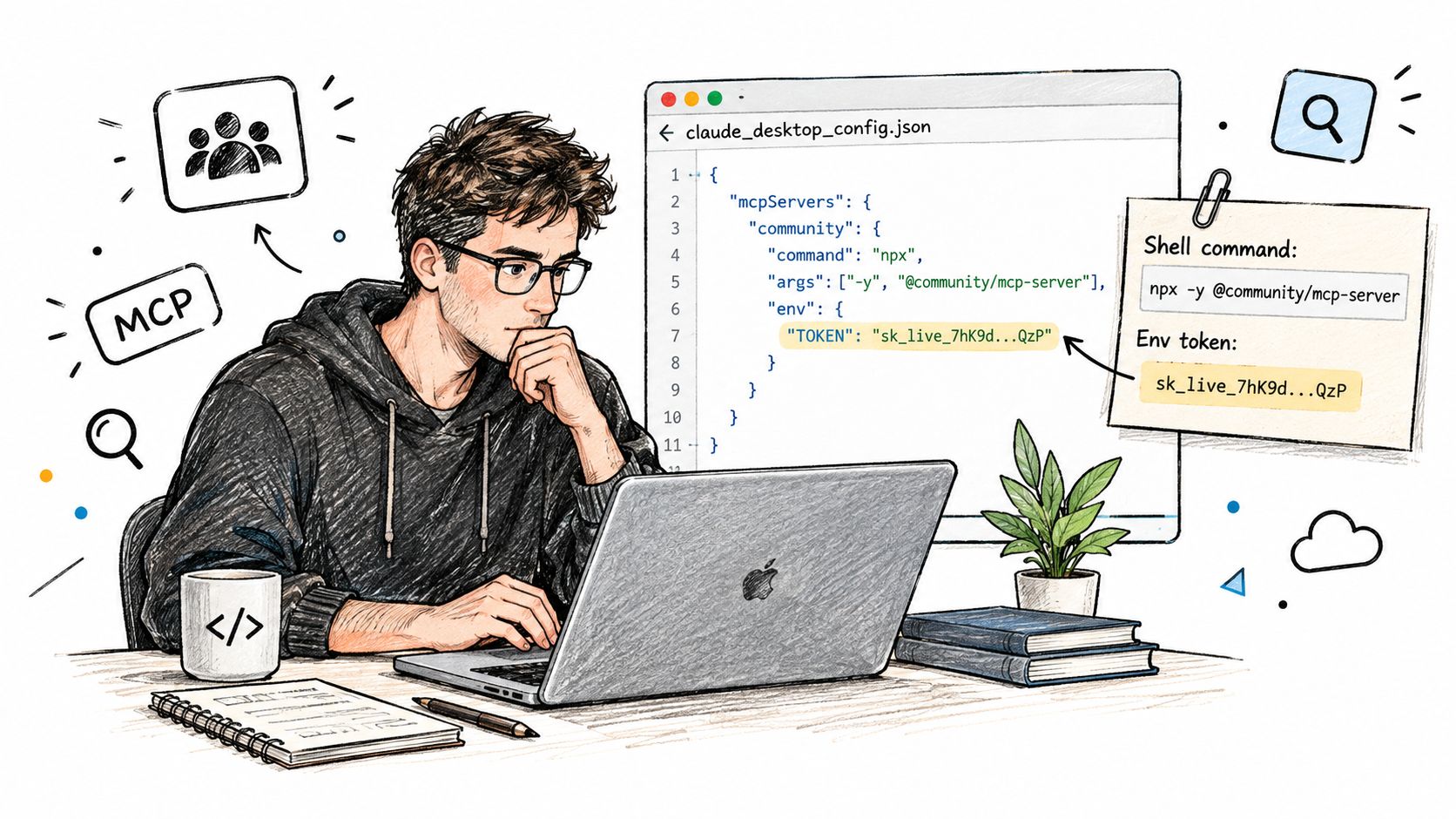
Treat the config as a control plane. It defines which executables launch, which arguments and environment variables they receive, which paths they can reach, and which tools become callable. Change a server definition and you've changed the assistant's effective permissions, even if the prompt never changes.
That isn't theoretical. A 2025 academic MCP safety audit demonstrated malicious code execution, remote access control, and credential theft against language models connected to standard MCP servers, with successful demonstrations involving Claude 3.7 and Llama-3.3-70B-Instruct, and it found that model refusal wasn't a dependable boundary because simple prompt changes could coerce execution, as detailed in the 2025 academic MCP safety audit.
So the review checks capability exposure in the file itself, before runtime. It covers static review of native client files for Claude Desktop, Cursor, VS Code, and Continue. It can prove what a file configures. It can't prove what a running server does. File locations and syntax for each client sit in the supported native formats documentation.
Review Checklist for Claude Desktop MCP Configurations
Read the wiring, not the tool name. A tool labeled read-only can still launch a shell, inherit your whole environment, or accept attacker influenced arguments. The MCP specification states that tool annotations and behavioral descriptions are untrusted unless they come from a trusted server, and hosts should obtain explicit consent before invoking tools, a point set out in the Model Context Protocol specification on tool trust and consent. Validate command, arguments, environment, working directory, transport, filesystem scope, network destinations, and approval mode independently of the description.
Nine Checks With a Fail Condition Each
| Review area | Field to inspect | Fails when | Fix direction |
|---|---|---|---|
| Executable | command | Shell, interpreter or launcher package without pinned version | Narrow binary at absolute path |
| Arguments | args | Attacker-influenced values or shell strings reach the command | Fixed argument arrays |
| Environment | env | Whole parent environment inherited or tokens in plain values | Pass only named variables |
| Filesystem scope | args or allowed directories | Home directory, root or whole drive in scope | One project folder |
| Network | url, headers | Unpinned remote endpoint or header passthrough | Pin host, remove passthrough |
| Credentials | env, headers | Secret-like values in JSON, .env or hardcoded strings | OS-backed storage or helper |
| Approval state | per-tool or managed policy setting | Allow on write, network, database or shell tools | Ask or blocked with owner |
| Source and version | command or package reference | Unpinned package or unknown publisher | Exact version and recorded source |
| Tool consequence | tool list per server | Read tool shares a server with publish or egress tools | Split servers by consequence |
Mark each row pass, fail, or needs-owner. Pass means the field shows a bounded value you can point to. Fail means the fail condition is present in the file. Needs-owner means the file alone doesn't settle it, for example a shared account whose scope lives elsewhere, and a named person must supply that evidence.
Practical rule: If you can't name the binary, the directory, the destination, and the owner from the file itself, the row isn't a pass.
The highest value fix across rows is capability minimization. Replace unrestricted shell access with narrowly scoped binaries, pin absolute executable paths, remove unnecessary environment inheritance, restrict writable directories, and require per call approval for sensitive operations. High impact tools should default to ask or blocked. Any allow needs documented justification, an owner, and a bounded resource scope.
Foo Guard reviews shell, filesystem, network, database, and approval settings in agent configuration, which maps directly to the rows above. Native client files don't need rewriting into a different schema for that review, and the broader practice behind these rows is covered in our MCP security best practices guide.
Reviewing a Synthetic Config and What the Result Cannot Prove
Here's a complete synthetic example. It's fictional, written for review practice, and not for installation. Don't install @example/mcp-demo or any package named here.
The synthetic claude_desktop_config.json defines four servers under mcpServers:
- synthetic-shell-tool:
commandlaunches a shell, andargsbuilds a command string from a tool argument. - synthetic-files-tool:
argspoints the server at the user's home directory. - synthetic-repo-tool:
envcontains SYNTHETIC_TOKEN with a secret like value. - synthetic-web-tool:
urlis unpinned, and a header copies an incoming value through.
Walk the File in Review Order
Start with command. A shell plus a string built from input is an arbitrary execution boundary, whatever the tool is called. Next, args. Fixed arrays are reviewable, string interpolation isn't. Then env, where a plaintext token and broad inheritance both fail. Filesystem scope comes next, and a home directory is far wider than one project folder. Then network, where an unpinned endpoint and header passthrough leave the destination and the credential flow unproven. Finish with approval state, because a pre approved shell or egress tool removes the last human checkpoint.
| Server | Config field | Risk category | Change to make |
|---|---|---|---|
| synthetic-shell-tool | command and args | Arbitrary shell execution | Replace with a narrow binary at an absolute path |
| synthetic-files-tool | args (directory) | Filesystem scope too broad | Limit to one project folder |
| synthetic-repo-tool | env SYNTHETIC_TOKEN | Plaintext secret-like value | Move to OS-backed storage and use a placeholder in shared copies |
| synthetic-web-tool | url and headers | Unpinned endpoint and header passthrough | Pin the host and remove passthrough |
These rows list illustrative categories, not scan output. A real scan returns more. Each security finding shows the rule, severity, configuration field, evidence, and a suggested change, so a reviewer can trace a category back to the exact field that triggered it.
What this example cannot prove matters as much. It reads the file only. It doesn't start the servers, observe a tool call, verify what the token can access, or show whether a model would misuse a tool. Those are runtime questions, and a static pass doesn't answer them.
Apply changes in this order. Narrow the shell tool first, then scope the directory, then move the token, then pin the URL. Re-review afterward and confirm each row against the revised file rather than against your memory of the fix.
Where Credentials Belong in Claude Desktop MCP Configs
| Storage pattern | Verdict | Reason |
|---|---|---|
| Plaintext value in claude_desktop_config.json env | Fail | Readable by anyone with file access and copied into repositories |
| Sensitive field in OS secure store (Keychain, Credential Manager, Linux keychain manager) | Pass with scope check | Protects at rest but does not limit what the credential can do |
| Secret passed as a command-line argument | Fail | Exposed through process listings and logs |
| Whole parent environment inherited by the server | Fail | Exposes credentials the server never needed |
| Shared service account across developers | Needs owner | Blast radius equals the account scope for every user |
| Helper script fetching from a vault at launch | Needs owner | Review the script permissions, logging and what it returns |
Anthropic's documentation says sensitive extension fields can be encrypted using the operating system's secure storage, Keychain on macOS, Credential Manager on Windows, and the Linux distribution's keychain manager, when marked sensitive, as described in Anthropic's guidance on local MCP servers and secure storage. That protection doesn't make plaintext secrets in JSON acceptable. Static analysis should flag API keys, bearer tokens, private keys, suspicious header values, and secret like environment variables before distribution or repository storage.
Encryption at Rest Is Not Scope
Configuration security is not the same as credential security. An encrypted token can still read and write far beyond the task. Ask the blast radius question directly. If this server is compromised, exactly which systems can its credential reach, and which actions can it perform? A shared service account makes every developer's agent effectively equivalent, and revoking one person means rotating a credential everyone uses.
Check the exposure paths too. Credentials shouldn't pass through shell command strings, command line arguments, or logs, and they shouldn't arrive through whole environment inheritance that hands a server secrets it never needed.
For centrally managed deployments, managed MCP policies take precedence over user grants, and organizations can explicitly allow only listed plugin servers or block them. That precedence is what stops a local user from weakening an organization rule about which servers may hold secrets at all.
Remediate in a fixed way. Move secrets to approved OS backed storage or a helper mechanism, require explicit server allowlisting, and remove plaintext copies from repositories. For any copy you share for review, use a redacted copy with live credentials and tokens replaced by placeholders before pasting or uploading it. The verdicts in the table follow the credential row of the checklist table earlier, so a plaintext value fails the same way in both places.
Why Approval Prompts Do Not Close Indirect Injection Risk
A GitHub MCP server configured with ask on every write still fails in a specific way: the tool call that matters never looks suspicious. The destructive instruction arrives inside a ticket body or file the agent was asked to read, and by the time the approval dialog appears, the request shown to the user describes a legitimate-looking action. The person clicks allow. The config file declared the policy correctly, and the file itself cannot tell you what the tool output will contain.
That gap is the control plane limit. Static review proves what the configuration permits. It says nothing about the content those permitted tools will carry.
| Tool consequence | Minimum approval state | Evidence to keep |
|---|---|---|
| Read, scoped to one project | Ask, or allow with justification | Owner and scope note |
| Modify local files | Ask | Directory scope and owner |
| Publish or send externally | Ask or blocked | Destination allowlist |
| Delete or destructive action | Blocked by default | Named exception and owner |
| Credential or secret access | Blocked unless documented | Owner and rotation date |
| Shell or command execution | Blocked unless narrowed | Pinned binary and justification |
The table sets a floor, and the failure mode sits above it. Even a row marked Blocked only constrains that tool category. It can't stop an allowed read tool from feeding injected instructions to an allowed publish tool inside the same session.
Review Paths, Not Single Tools
Classify tools by consequence, then trace data flow. Which untrusted read source shares a session with a publish, network, or delete tool? Does an ask prompt sit between them, and would the request shown to the user reveal the destination and payload? If you can't answer that from the config, the approval state is a guess. Write-ups on mitigating prompt injection attacks treat the instruction source as the thing to distrust ahead of the tool itself, which is the right frame for this check. The wider risk categories behind these paths are mapped in our overview of AI agent security risks.
Policy enforcement on configured tools still leaves downstream behavior open. An allowed tool can be invoked with arguments, redirects, or destinations the policy never enumerated, and the prompt shown at approval time may carry none of that detail.
An approval prompt asks a person to judge a request. It doesn't prove the person was shown enough to judge it.
Record whether each finding came from static config review or runtime observation, because they're different evidence and a review record should say which produced it. Foo Guard's Hosted Gateway can route supported MCP requests and display allowed, flagged, and blocked activity, and Team Enforcement can block requests that violate team policy. Traffic that bypasses Gateway is outside its coverage, so a clean runtime log only counts if the traffic in fact flowed through it.
How to Pin Versions and Gate Pull Requests on the Review
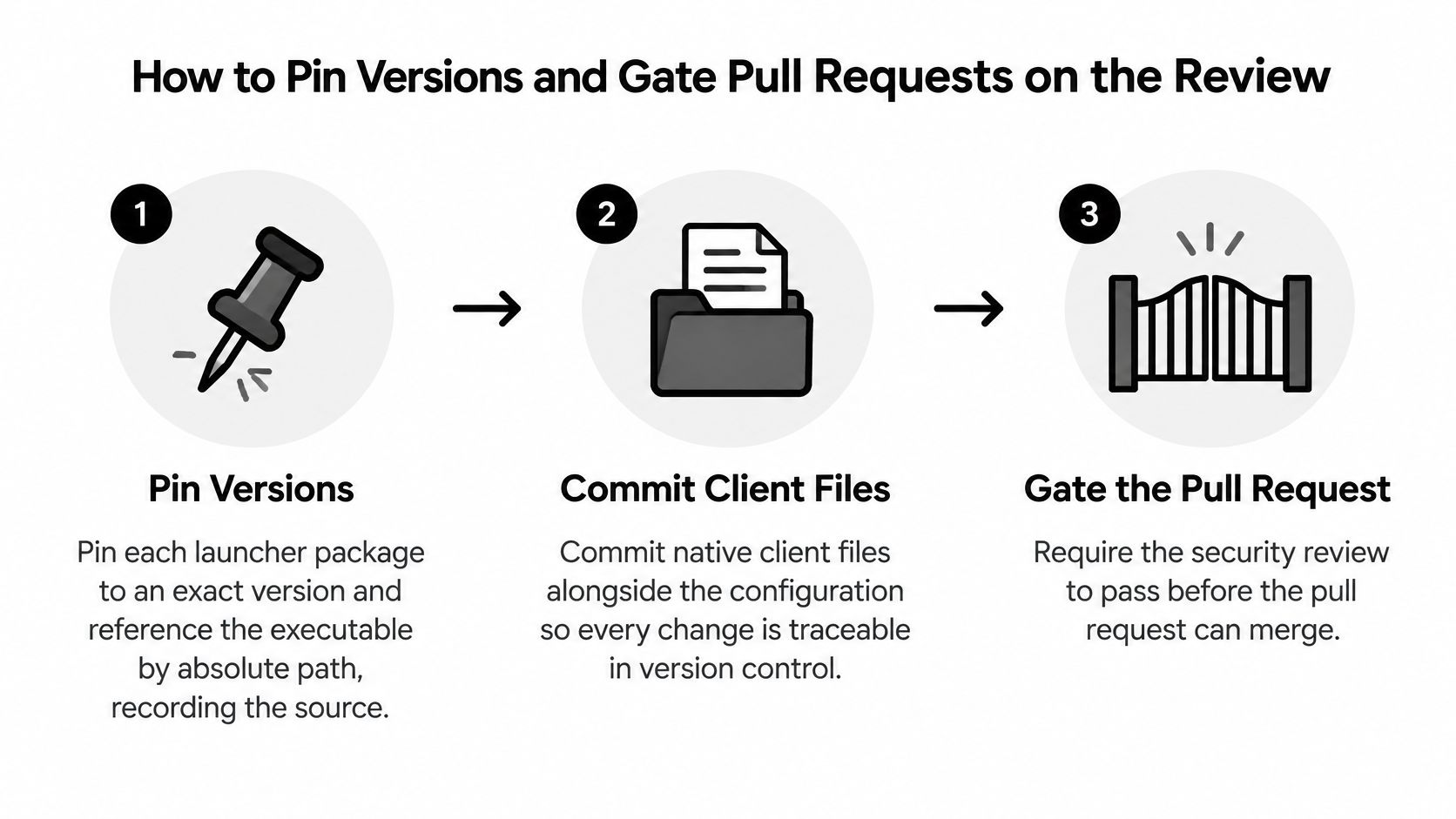
Treat the config file as the control plane: the pull request should prove that the reviewed version is the version that will run.
- Pin the package and path: Pin each launcher package to an exact version, reference the executable by absolute path, and record the source. Put the caveat beside it in your runbook: pinning fixes which code runs, while safety still has to be assessed separately. A pinned malicious package remains malicious, just reproducibly so.
- Commit native files: Commit claude_desktop_config.json for Claude Desktop, .cursor/mcp.json for Cursor, .vscode/mcp.json for VS Code, and a YAML file in .continue/mcpServers for Continue. Keep a redacted copy for review, and confirm exact locations and syntax in the native format documentation before writing a path into a workflow.
- Run on pull_request: Add a workflow that runs the scan on pull_request events, so the check applies to the proposed change rather than to code already merged.
- Set the threshold: Set the failure threshold in .fooguard.yml. Effective scan policy combines Team organization policy, a repository
.fooguard.ymlfile, and CLI flags, with the strictest threshold taking precedence, so a repository file cannot weaken an organization rule. - Require the check: Mark the check as required in branch protection so a failing result blocks merge. A comment alone doesn't block anything.
- Rescan after fixes: After making a change, scan the revised configuration and compare findings to confirm whether the relevant issue is resolved. Compare against the earlier result instead of assuming the edit worked.
- Re-run on version bumps: Re-run after every version bump, since each new commit gets its own check and the pinned code has changed.
A green run still has a boundary. It says the file passed static checks; it does not prove a secret stayed confined to encrypted storage, or that every later request carried enough context for a sound approval.
The GitHub detail decides whether the gate is real. GitHub describes status checks as signals showing whether commits meet repository conditions, and checks can expose detailed output, annotations, logs, and links, with supported triggering events including push, pull_request, pull_request_review, pull_request_target, deployment, and deployment_status, per GitHub's documentation on status checks and required workflows. A required check must run on an applicable event and publish against the commit SHA. Otherwise a policy result exists without becoming a merge condition. The mechanics are covered in our guide to MCP security checks in GitHub pull requests.
Continue is a useful reminder that native formats differ. Continue documents YAML files in a workspace's .continue/mcpServers directory, with name, version, and schema metadata for standalone files, and it states that JSON MCP files from Claude Desktop, Cursor, and Cline can be copied directly into that directory, as set out in Continue's MCP configuration documentation. Review the file in its native form rather than rewriting it first.
SOC 2 Type II Evidence From Configuration Reviews
The calendar below is a reminder that observation periods, not single snapshots, are what auditors sample.
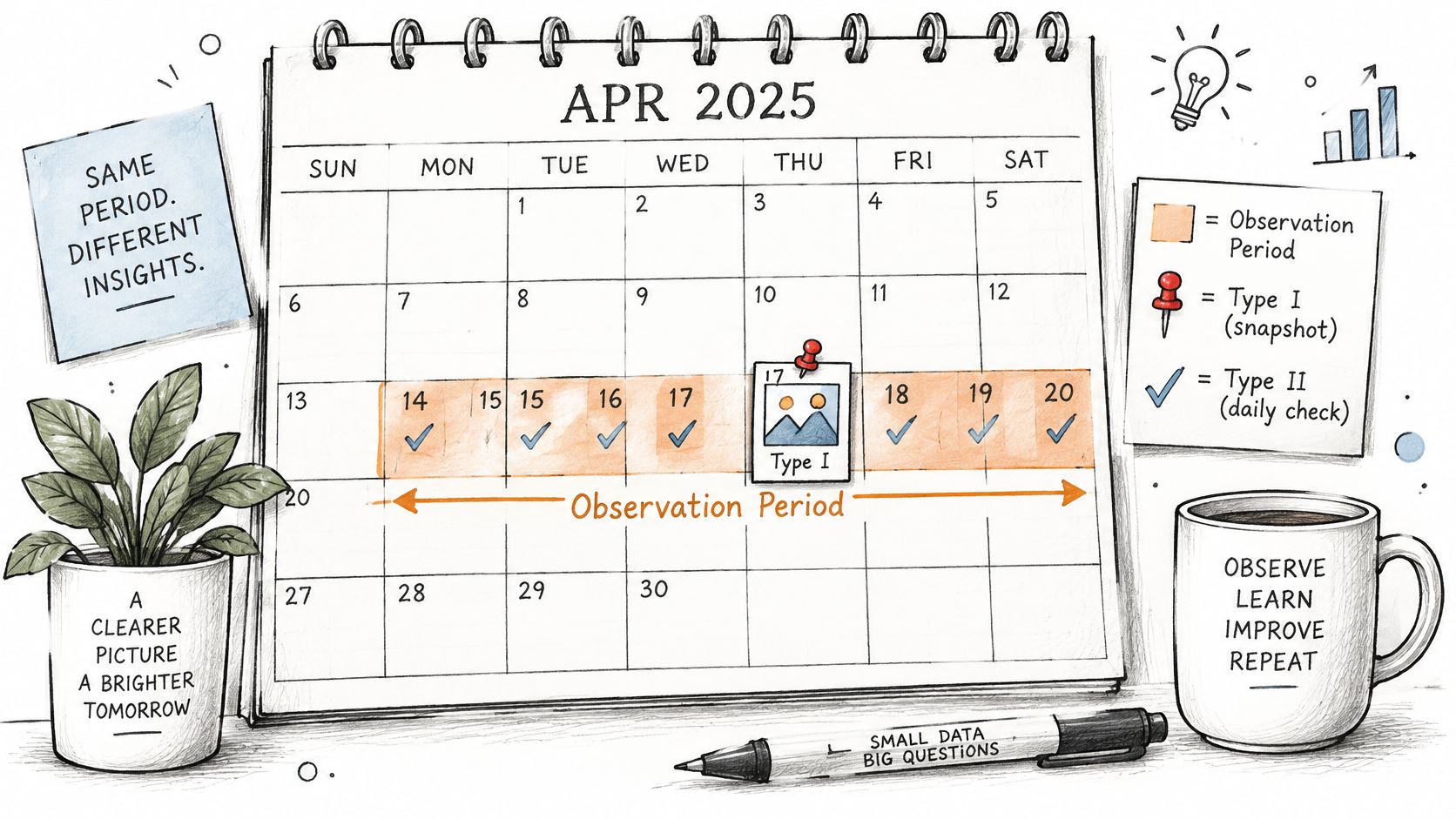
A SOC 2 Type II report is an independent auditor's opinion on whether controls operated effectively across an observation period. A Type I report checks whether controls are suitably designed at one point in time. The Trust Services Criteria use Security as the common criteria. Availability, processing integrity, confidentiality, and privacy are additional categories an organization may include.
Auditors commonly sample evidence across a window of several months to a year. A review pipeline switched on in the final month says little about the rest of that period. Run it continuously and keep the records.
A configuration review can produce these evidence items:
- Dated scan records: Results tied to commit SHAs showing which file version was assessed.
- Review decisions: Named owners for pass, fail, and exception outcomes.
- Pull request check history: Evidence that required checks ran and gated merges.
- Approval records: Documented approval states for high impact tools.
- Credential rotation records: Dates and owners for secrets the configs reference.
The short video below walks through how evidence collection fits an observation period in practice.
For SaaS and AI platforms, customers ask how agent configurations change and who approves them. A repeatable pipeline produces that trail without reconstructing it later. State the boundary plainly. A scan is not an audit or attestation. Any mapping of controls to SOC 2 criteria does not establish certification or a clean audit outcome. Use the existing SOC 2 guide for scope and timeline rather than restating them in a review record.
Confirm a Configuration Is Ready Before It Ships
Treat the config file as the control plane for what the agent can touch, and gate it accordingly. No open critical findings, no plaintext secrets. Every high impact tool carries an approval state and a named owner. Packages are pinned with recorded sources, and the required pull request check runs on the version of the file actually being merged. Any failed item holds the config back.
The scanner view below shows the kind of result that gate depends on.
Run the First Scan
Paste a configuration or upload a JSON or YAML file, choose rules or keep the default selection, and run the analysis to get findings, a security score, and remediation guidance. Work from a redacted copy with placeholders in place of live tokens. Don't paste a working secret into any review tool to find out whether it gets flagged.
Read the findings before the score. The score and grade summarize the assessed configuration, so a passing grade can still sit next to a finding that blocks your gate. Each finding shows the rule, severity, configuration field, evidence, and a suggested change, which is what drives the ship or hold decision.
A clean result means the checked rules passed on the submitted file. It doesn't mean the server is safe.
Static review confirms what the file declares. It says nothing about what the server does once it runs, whether a pinned package deserves the trust you give it, or whether encrypted credential storage and approval prompts actually contain a malicious request at runtime. Those are observation questions, not inspection questions. After a fix, rescan the revised file and compare findings to confirm the issue is resolved, then record the decision and owner with the result.
Start with a worked example. Open the native format scan example, read one finding end to end from rule to suggested change, then apply the same gate to your own redacted file. That is the whole loop: review the file, fix the field, rescan, and keep the evidence with the commit.
Foo Guard scans Claude Desktop, Cursor, VS Code, and Continue MCP configurations before deployment, returning rule based findings with severity, evidence, and a suggested change for each risky field. Run your redacted config through Foo Guard, clear the critical findings, and gate the pull request on the result before the server ever runs.