Continue MCP Configuration Security Review: A Checklist
Continue MCP configuration security review: check commands, env secrets, pinned versions and pull requests, with OWASP mappings and a synthetic example.
A pull request adds an MCP server so the agent can search internal notes. The JSON looks small, but approving it may launch a local process, expose a credential, or send repository content to a remote service. Your first task is to find the file the client will load in practice, then review its launch settings and access field by field.
A Continue MCP configuration security review should preserve the native configuration, not turn every client's settings into an imagined universal schema. Start with the file inventory below, then use the complete synthetic Cursor example to practice the review without handling live credentials.
Find Every MCP File Your Clients Load
The merged file is only the visible part. A repository diff can add one server while the developer's user-level configuration adds three more without any trace in Git, and those extra entries never touch Git. Build the inventory before judging any single command or env block.
The VS Code MCP configuration reference separates native and portable formats, including different top-level objects and supported transports. Record the client and scope beside the path instead of guessing the format from the filename.
Native MCP file locations by client
| Client or scope | File to collect | Record with the file |
|---|---|---|
| VS Code native | .vscode/mcp.json in the workspace, or the user profile | servers; stdio, HTTP, SSE |
| VS Code portable | .mcp.json at workspace root | mcpServers; stdio, HTTP |
| Copilot home | $COPILOT_HOME/mcp-config.json, fallback ~/.copilot/mcp-config.json | mcpServers; stdio, HTTP |
| Cursor project | .cursor/mcp.json, scoped to one repository | Project scope; keep the native server object unchanged |
| Cursor global | ~/.cursor/mcp.json, available across projects | Global scope; collect separately from the project file |
| Continue | The path shown by the installed client or its configuration export | Local stdio, sse, and streamable-http entries; record which transport each server uses |
| Claude Desktop | The path shown by the desktop client on that machine | Desktop scope; do not substitute Claude Code paths |
For clients that expose the active file through an interface, open that interface and copy the path the application reports. A guessed path from another vendor can send the review to a file the agent never loads.
Keep scope attached to the evidence
Cursor's MCP documentation distinguishes project and global locations. A clean project scan says nothing about ~/.cursor/mcp.json, so request a separately redacted copy when that scope belongs in the review.
Keep the file in its native structure when you submit it. Foo Guard reviews agent configurations for permissions, tools, credentials, and autonomy, and inspects MCP-style tool definitions before those servers run; use the native-format documentation to confirm the review path accepts the file as written.
For VS Code-specific details, use the existing VS Code MCP configuration security checks guide. If the inventory extends beyond declared MCP files, Agntz's guide to uncover undocumented AI integrations provides useful discovery context.
Scope rule: Record which files you inspected. Don't describe a repository-only review as an assessment of the developer's entire agent environment.
Check These Fields in Each Server Entry
A server entry combines a launch instruction with access to resources. Treat executable selection, arguments, credentials, and remote destinations as separate trust boundaries.
Continue's MCP documentation describes local stdio, sse, and streamable-http execution paths, along with fields such as command, args, cwd, env, request options, and connection timeouts. Local execution inherits operating-system access unless another control restricts it; remote execution moves requests and potentially credentials across a network boundary.
Server entry fields to verify
| Field | What the reviewer checks | Risk if unsafe | Review rule |
|---|---|---|---|
command | Approved absolute executable; no bare npx or uvx resolving mutable versions | Arbitrary local execution | AG-013 Shell or Command Execution |
args | No unnecessary home-directory paths, shell interpreters, database targets, or verification-disabling flags | Broader file or data access than the task needs | AG-008 Wildcard Permission, where a wildcard is declared |
cwd | Repository or dedicated runtime directory | Relative paths reach unintended files | Review manually |
env | Variable references only, narrow server scope, no broad or long-lived tokens | Server reads or forwards a credential | AG-004 Embedded Credential, for literal values |
url for remote transports | HTTPS, allowlisted host, bounded connection and request timeouts | Traffic and credentials reach an unapproved endpoint | AG-022 Potential Data Exfiltration Path |
| Package version | Exact version pinned and recorded | Automatic updates silently change code | Review manually; pinning isn't a safety verdict |
| Agent mode and approval | Explicit decisions on writes, network access, and command execution | Autonomous destructive action | AG-017 Destructive Operations Without Approval |
| Agent self-modification | Configuration and rules changes require approval | Agent widens its own tool access | AG-019 Agent Self-Modification |
| Production or admin scope | Read-only or staging credentials where the task allows | Writes to live systems or administrative access | AG-010 Production Write Access; AG-009 Administrative Permission |
| Config location | Project or global scope, including inheriting projects | Server becomes available beyond its intended repository | Review manually |
These rule references identify review categories, not guaranteed matches for every native representation. Record a manual finding when the risk is visible but scanner coverage hasn't been established.
Check what the setting actually restricts
An absolute executable path avoids ambiguous executable lookup, but it doesn't restrict what the executable can do. Likewise, cwd controls relative-path resolution; it isn't a filesystem sandbox.
A variable reference keeps a credential out of the file, but the receiving server still gets its value. Continue's secret-handling examples use references such as ${{ secrets.SECRET_NAME }} and show credentials passed through env; scope those credentials to the receiving server's actual task.
For consequential business tools, agentcentral's discussion of per-request authorization for seller MCP workflows is useful context. Configuration approval and authorization of a particular action are different decisions.
A field passing this checklist doesn't establish that the server is safe. It establishes a narrower, documented configuration decision.
A Synthetic Config Reviewed Line by Line
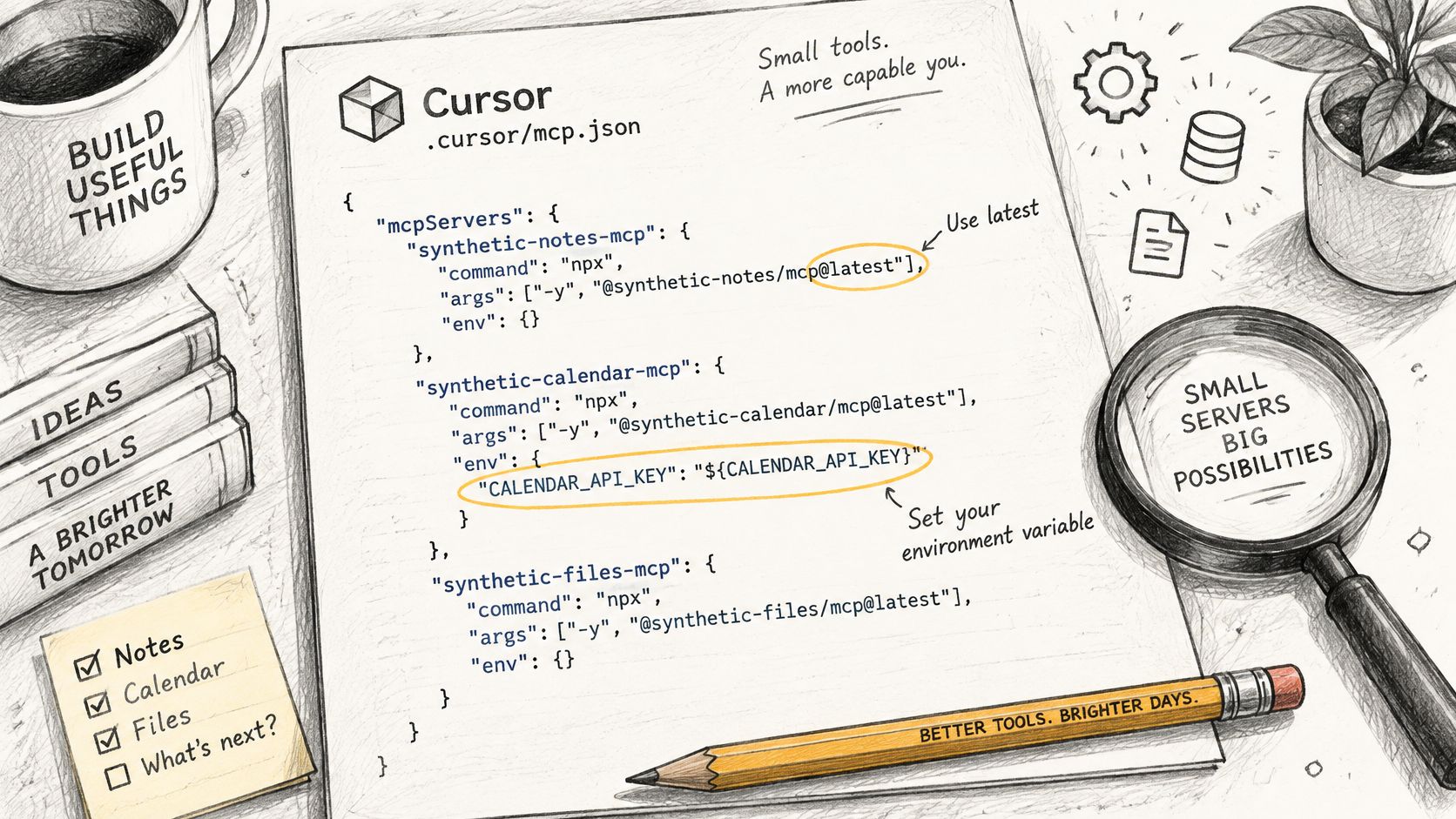
Save this example only as review material representing .cursor/mcp.json. Every server name, package name, executable path, flag, credential value, and endpoint below is synthetic. The flag semantics are hypothetical, and none of these packages should be installed.
{
  "mcpServers": {
    "synthetic-notes-mcp": {
      "command": "npx",
      "args": [
        "@example/mcp-demo@latest"
      ],
      "env": {
        "NOTES_TOKEN": "synthetic_token_NOT_A_REAL_CREDENTIAL"
      }
    },
    "synthetic-repo-tools": {
      "command": "/synthetic/bin/repo-tools",
      "args": [
        "/Users/synthetic-reviewer",
        "--disable-path-check"
      ],
      "cwd": "/synthetic/workspace"
    },
    "synthetic-docs-remote": {
      "url": "http://synthetic-docs.invalid/mcp"
    }
  }
}
The sketch illustrates the kind of file a reviewer annotates.
Read local launch fields first
For synthetic-notes-mcp, command selects a package runner rather than an approved installed executable. Review executable resolution and startup behavior before deciding whether a runner is acceptable for this environment.
The first args value names a synthetic package with @latest. Replace mutable resolution with a reviewed exact version of a real, approved package, or use a controlled installed artifact. There is deliberately no replacement install command here.
The env.NOTES_TOKEN value illustrates an embedded credential pattern. Replace a real credential with the client's documented secret-reference mechanism, and rotate it if it appeared in Git history. Editing the current file alone doesn't revoke an exposed value.
For synthetic-repo-tools, the absolute command resolves one ambiguity but says nothing about executable trust. The home-directory argument is broader than repository work requires, so narrow it to the approved repository directory.
The hypothetical --disable-path-check flag removes a boundary the task needs. Remove it and verify the actual server's argument semantics rather than inferring behavior from a flag name. Keep cwd explicit so relative references resolve predictably.
Review the remote destination separately
synthetic-docs-remote.url uses unencrypted HTTP and declares no timeout. Move a real service to an approved HTTPS endpoint, add its host to the allowlist, and configure bounded timeouts using the actual client's supported fields.
Record these observations as manual findings, with the field, evidence, owner, and proposed change. They aren't claimed scanner results.
Use the native-format scan example to exercise the review flow. The assessment-reading guide explains how to interpret rule, severity, and evidence without treating a score as a substitute for review.
How to Run the Review in Order
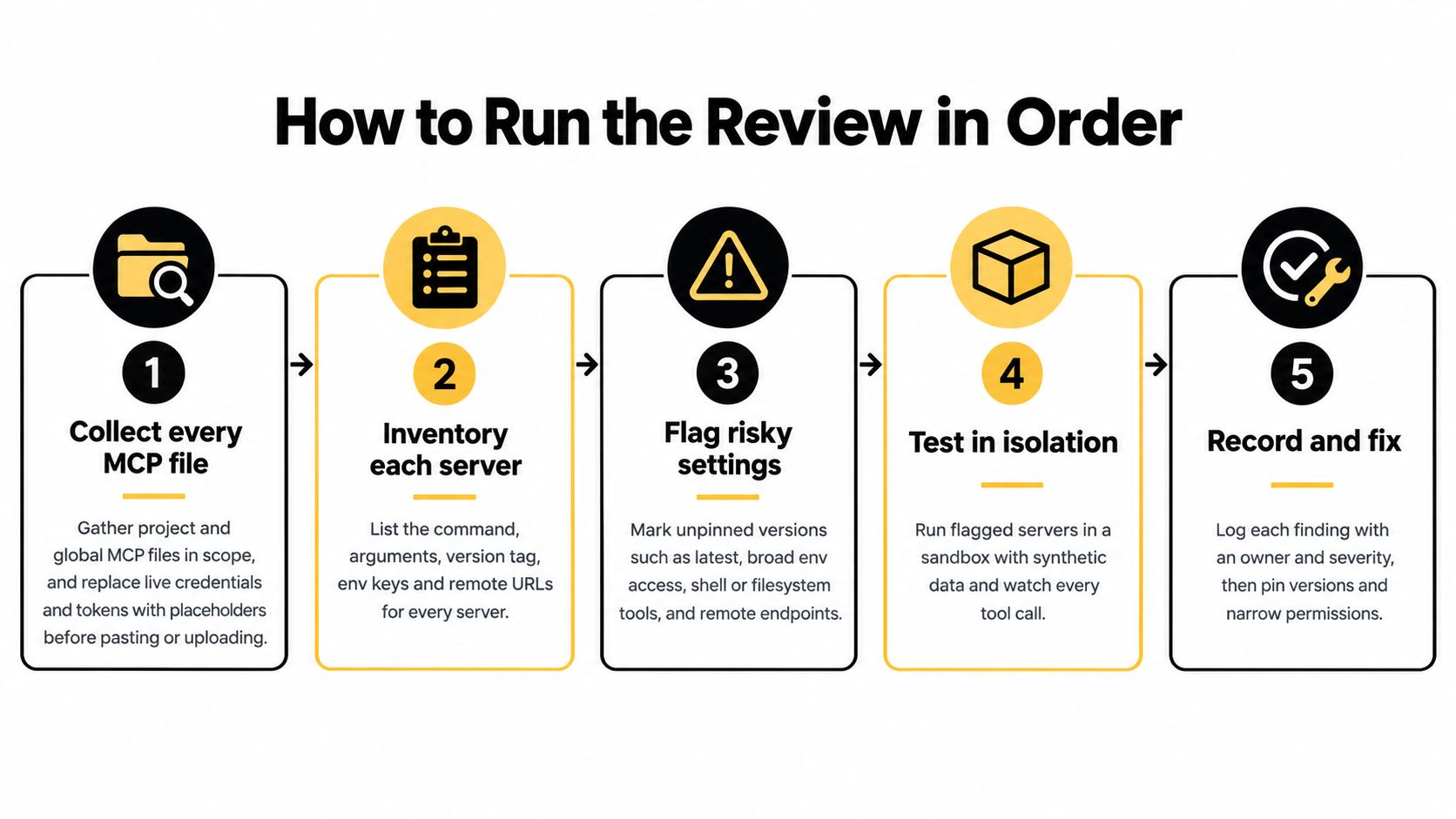
Keep the review reproducible: preserve the original file, work from a redacted copy, and attach decisions to a commit. Use this process overview to organize the work; any execution testing belongs in a separate isolated environment.
Follow the file before following the score
Collect the files in scope. Gather project and global MCP configurations for the clients under review. Replace live credentials and tokens with placeholders before pasting or uploading anything, while retaining field names and enough structure to assess credential exposure.
Record each file's client, location, native format, top-level object, and supported transports. If a parser rejects the file, resolve the format mismatch rather than rewriting settings until the parser accepts them.
Walk each server in field order. Inspect
command,args,cwd, andenv, then inspecturland request options for remote transports. Read argument arrays as actual process inputs, including positional paths and flags that change validation.Record the exact package identity, version, and approved source. The official MCP local-server security guidance recommends specific versions instead of
latest; separately inspect filesystem, shell, network, database, and credential access because a fixed version can still be malicious, vulnerable, or overprivileged.Check agent mode and approvals. Decide whether the agent may write files, contact external services, execute commands, or modify its own rules. Require a meaningful approval boundary for irreversible actions rather than relying on a server's reassuring name.
Compare the proposed file with its last reviewed version. Focus on added servers, changed transports, wider path arguments, new environment keys, and altered approval settings; an unchanged server name doesn't mean an unchanged capability.
Scan, inspect, fix, and compare. Our deterministic findings show the rule, severity, configuration field, evidence, and suggested change, while the score and grade summarize the assessed configuration. Read the evidence, apply an appropriate fix, and rescan the revised file to check whether the relevant finding is resolved.
The same file and policy reproduce the same findings, score, and grade. An AI-assisted suggestion doesn't change the score by itself; the revised configuration must be assessed.
Keep execution testing distinct
If a server needs behavioral validation, run it with synthetic data in an isolated environment and inspect startup activity and tool calls. That test produces runtime evidence, which should be labeled separately from static findings.
The walkthrough provides another way to follow the review process.
Keep this minimum decision record for every server:
- Owner: The person or team responsible for access, updates, and exceptions.
- Pinned version: The exact approved package or artifact identity.
- Capability decision: Whether writes, network access, and command execution are permitted, and where approval is required.
Map Findings to OWASP Agentic Controls
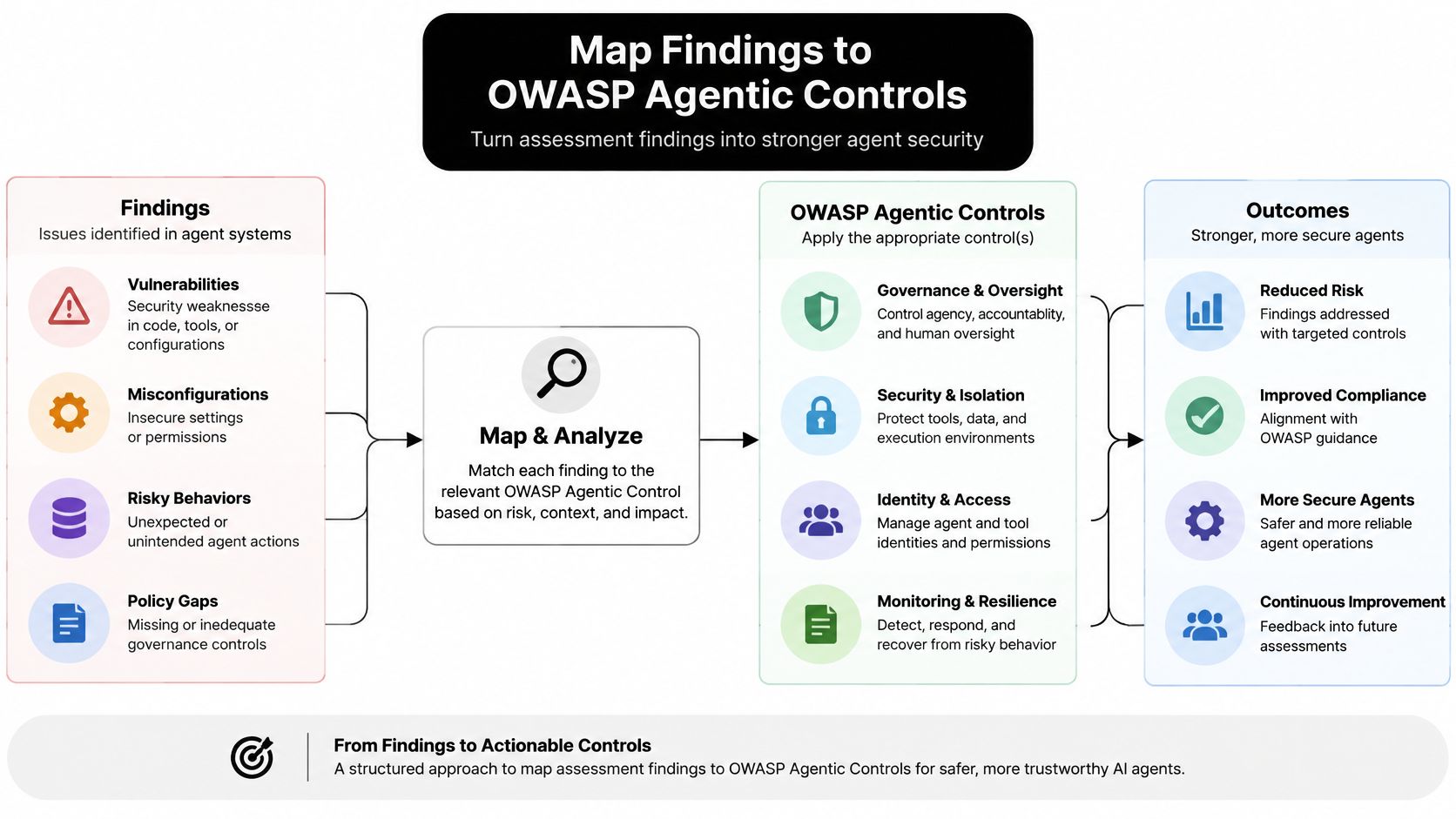
A rule ID tells you what is wrong. A control mapping tells you why it matters and who owns the fix. Agents plan actions, invoke tools, and use returned content to choose their next step, so one overprivileged field in the loaded file can expose attack capability before a single malicious call is made.
Use the following as a working control mapping. The signal column is deliberately honest about visibility: some categories leave a clear trace in fields like env, command, or the package specifier, while others live in returned content or resolved artifacts that the file cannot contain. Where the signal is a field you can read, static review catches it. Where it is not, the mapping tells you which runtime control to put in place.
OWASP Agentic risks mapped to config signals and controls
| OWASP Agentic item | Config signal | Control | Rule reference |
|---|---|---|---|
| ASI01 Agent Goal Hijack | Remote server descriptions or responses that steer the agent; usually not visible in the configuration alone | Per-tool approval and isolation of returned content | Review manually |
| ASI02 Tool Misuse and Exploitation | Capability to call a permitted tool with dangerous arguments | Argument schemas, bounds, least-privilege arguments | AG-008 Wildcard Permission |
| ASI03 Identity and Privilege Abuse | Broad or long-lived token in env | Scoped, rotated credentials | AG-004 Embedded Credential; AG-009 Administrative Permission |
| ASI04 Agentic Supply Chain Vulnerabilities | @latest or an unpinned runner | Exact pin and reviewed source | Review manually |
| ASI05 Unexpected Code Execution | Server launches a shell interpreter | Restricted commands and approval | AG-013 Shell or Command Execution |
Rows marked "Review manually" are triage items, not dead ends. An unpinned runner and a steering server description both fail the same way in a file review: the field looks clean because the risk arrives later. I'd assign each of those rows an owner and a runtime check rather than closing them because the scan found nothing.
This diagram provides a visual summary of the relationship between findings and controls.
Test the boundary, not just the label
Consider a synthetic remote documentation tool that returns instructions telling the agent to read a credential file through another server. The remote URL is approved and encrypted, yet the requested cross-tool action still violates the documentation task's boundary. Isolate returned content from trusted instructions and require authorization for sensitive file access.
A second scenario: an unpinned synthetic package resolves to changed code at startup while its configuration entry stays identical. Review the resolved artifact and its source, then test the approved behavior with restricted resources.
For a concrete business-action context, NotFair's guidance on safe AI access to advertising platforms is relevant when defining approval boundaries around consequential platform operations.
A category mapping explains why a control matters. It doesn't demonstrate that the control is implemented or effective.
Our rules map to OWASP Agentic and OWASP LLM categories and SOC 2 criteria. Free, Pro, and Team include these control mappings for security reviews, but the mappings aren't a compliance certification.
Rule severities run critical, high, medium, and low. The named critical rules are AG-004, AG-008, AG-009, AG-010, AG-013, AG-017, AG-019, and AG-022; use the finding's evidence to determine the actual remediation. AG-019 Agent Self-Modification and AG-022 Potential Data Exfiltration Path describe boundaries worth checking in the field list, not evidence that a runtime attack occurred.
What a Static Review Cannot Prove
A clean static result isn't evidence that an agent behaved safely. The scanner reads the submitted configuration; it doesn't execute the agent or the tools named in the file. Its result describes the declarations it assessed at a particular revision.
Keep these limits explicit
- Loaded configuration: Static analysis can't prove which file Cursor or VS Code loaded, or whether user-level settings supplemented the project file. Verify the active configuration through the client and record the relevant scopes.
- Post-launch behavior: It can't establish what a server did after startup, including outbound connections made before a tool invocation. Collect process and network telemetry during isolated testing.
- Package trust: It can't establish that a pinned package is safe. Review the selected artifact, dependencies, provenance, and permitted resources.
- Tool-call sequences: It can't observe a search followed by file access and shell execution. Evaluate both individual calls and the sequence that connects them.
Authorization of a single request and authorization of a multi-step workflow are runtime questions. The NSW agent authorization-boundary example illustrates why even a legitimate task still needs a permission boundary.
Route enforcement deliberately
Our Hosted Gateway can route supported MCP requests and display allowed, flagged, and blocked activity. Team Enforcement can block requests that violate team policy, but traffic that bypasses the Gateway is outside its coverage.
That distinction matters when developers retain direct server connections alongside routed ones. Inventory those paths and test which requests pass through enforcement rather than assuming a connected client routes everything.
Use the existing MCP security best-practices guide for the broader deployment controls. Pair configuration review with runtime monitoring wherever agents can reach production systems, and treat no scan result as a guarantee of safety.
Gate the Pull Request Before You Merge
A configuration check must not create a more privileged execution path than the change being reviewed. A fork pull request becomes dangerous when pull_request_target or workflow_run checks out untrusted code inside a workflow with secrets or repository write access.
GitHub's secure-use guidance recommends read access to repository contents as the default GITHUB_TOKEN permission, job-specific increases only when needed, and commit-SHA pins for third-party Actions. Keep fork-provided code out of privileged contexts, and inspect configuration as data rather than launching its declared servers.
Bind the policy to the commit
Team scans read .fooguard.yml at the commit SHA, so the policy under review is the policy that produces the Foo Guard Security check. Effective policy combines organization policy, the repository file, and CLI flags, with the strictest threshold taking precedence.
CLI flags can tighten a run but can't weaken organization policy. Use the existing policy-as-code examples to implement thresholds without inventing workflow syntax or copying a mutable Action reference.
Review changes to the policy file with the same care as changes to MCP settings. A pull request that adds a high-impact server and alters its acceptance threshold requires an explicit reviewer decision, not automatic acceptance because both files parse.
Make the merge decision explicit
- Secrets are absent: No MCP file contains literal live credentials, including files outside the primary client's directory.
- Servers have accountable approval: Every new server has an owner, an exact pin, and a documented data path.
- Critical findings are resolved or excepted: No critical rule finding remains open without an approved exception that records its scope and rationale.
- Destinations match policy: Transports and remote URLs match the approved allowlist.
- Autonomy is documented: Agent mode and decisions about writes, network access, command execution, and approvals are recorded.
- The revised file was assessed: Rescan after changes and compare findings with the previous version to confirm whether the relevant issue was resolved.
Attach the commit, configuration path, failing field, rule, and evidence to any rejection. That gives the author a concrete change to make instead of an unexplained failed grade.
Merge when every item holds. Otherwise, return the pull request with the failing field and the rule that flagged it, or a clearly labeled manual finding when no rule applies.
Foo Guard offers deterministic pre-deployment configuration checks and a Hosted Gateway for monitoring and enforcing policy on supported routed MCP requests. Visit Foo Guard to review a redacted native configuration, inspect evidence-backed findings, and build a repeatable pull-request gate for your agent settings.